Get an ID Token
The ID token is generated in JWT format and has lifetime of 60 minutes. It is used to validate user claims namely the Autodesk ID, if the signature of the ID token is verified & trusted.
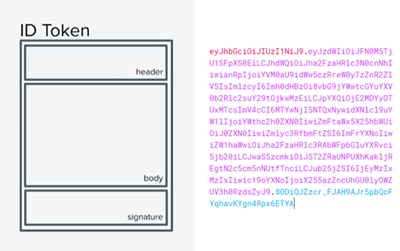
You can get an ID token for an user after they successfully authenticate and it is optimized for confidential clients.
Claims are name/value pairs that contain information about the user along with some additional details such as iss (issuer), exp (expiration time), aud (audience).
Specifically, ID Token contains only registered claims so far that are recommended, to provide a set of useful & interoperable claims.
| Claim Names | Description |
|---|---|
| first_name | First name of the user |
| last_name | Last name of the user |
| user_name | A unique identifier name associated with the user entity |
| user_email | Email address of the user |
| userid | Unique Id of the user |
| analytics_id | A unique Id of the user in third-party tracking/analytics system |
Note that this walkthrough does not show you how to write server-side code. Instead, it uses cURL commands to illustrate the calls you need to instrument in your code.
This walkthrough presupposes that the app is a web app and that it needs to read the user’s data.
Before You Begin
Before you begin, please follow the Create an App walkthrough to create your app on APS. Specify your app’s callback URL and note your client ID and secret.
Familiarize yourself with the overall flow:
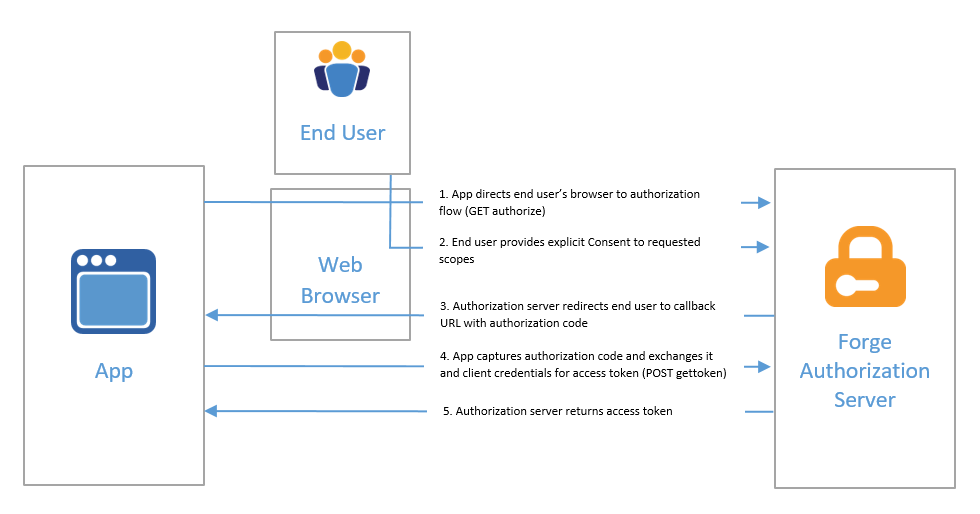
Refer Authorization code grant type to authorize and obtain an access token.
Re-verification Flow
At some point in the UI of your web app, you will find that you need to get the end user’s consent to access APS resources on the user’s behalf. Depending on your app, you may do this when the user first starts using the app, or you may wait until your app actually needs to access the resource. Whatever the case, you will redirect the user to the GET authorize endpoint in their browser.
Refer Re-verification flow (scroll down to example 3) to get an ID token for an user after they successfully authenticate and it is optimized for confidential clients.
To Validate ID Token
In order to utilize the ID token to validate user information, the signature must be verified first.
The verification can be done by using the library with the public key. Refer to Validate the token section under GET JWKS endpoint to see the list of libraries provided.
Now that you have verified that the id token is legitimate, it can be assured that the call is from a valid authorization server.
You can extract the claims from this id_token to check whether the user entering the verification flow is same as the signed-in user.