
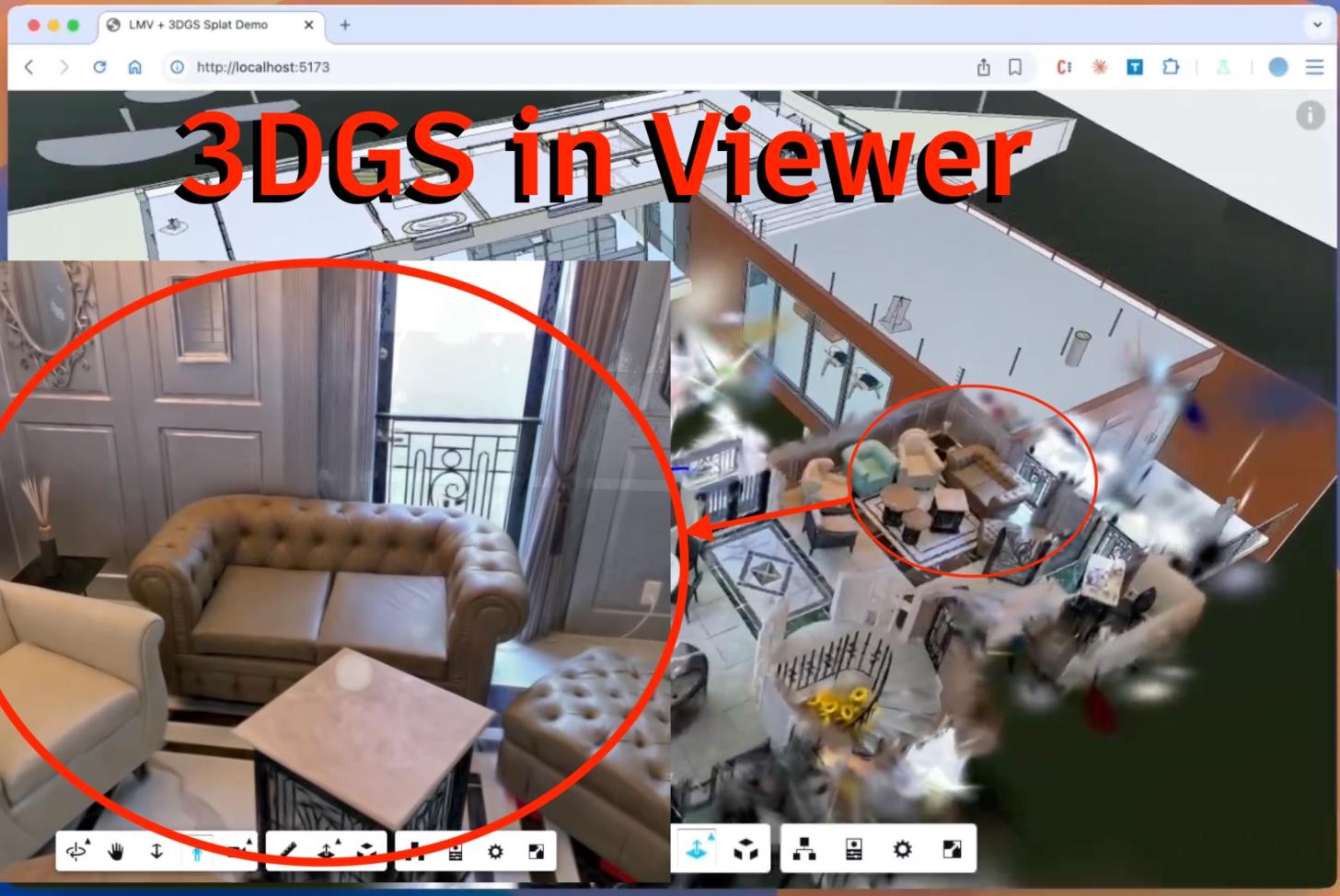
What if you could overlay a photorealistic reality capture directly onto your BIM model — right in the browser, with no plugins, no server-side rendering, and no separate viewport?
Now, with 3DGS and APS Viewer, you can. With the recent announcement of WorldLabs and XGRIDS new PortalCam, it was time to update the DevCon2025 code
Try it Live: wallabyway / Gaussian-splats-lmv
This demo decodes LCC, then renders 3D Gaussian Splats on top of a Revit model - all inside the web based APS Viewer.
The entire thing is roughly 600 lines of JavaScript.
Quick Start
Download the source code (wallabyway/gaussian-splats-lmv) and serve the files with any static HTTP server:
# Python
python3 -m http.server 8000

# Node (npx)
npx serve .
Then open http://localhost:8000 in a modern browser or load a custom LCC model like this:
http://localhost:8000/?lcc=https://d2pqszqfxcodwz.cloudfront.net/lcc-model/showroom+level+2/showroom2.lcc
Try loading other Sample LCC scenes (see references)
Five Technical Highlights
Click the link for full technical details:
1. From Point Clouds to Gaussian Splats: The Shader
If you’ve ever rendered a point cloud (previously), you’re halfway there. The leap from fixed-size dots to oriented Gaussian ellipses is smaller than it looks — each splat is just an instanced quad whose “texture” is a mathematically computed Gaussian falloff, shaped by projecting a 3D covariance matrix through the camera.
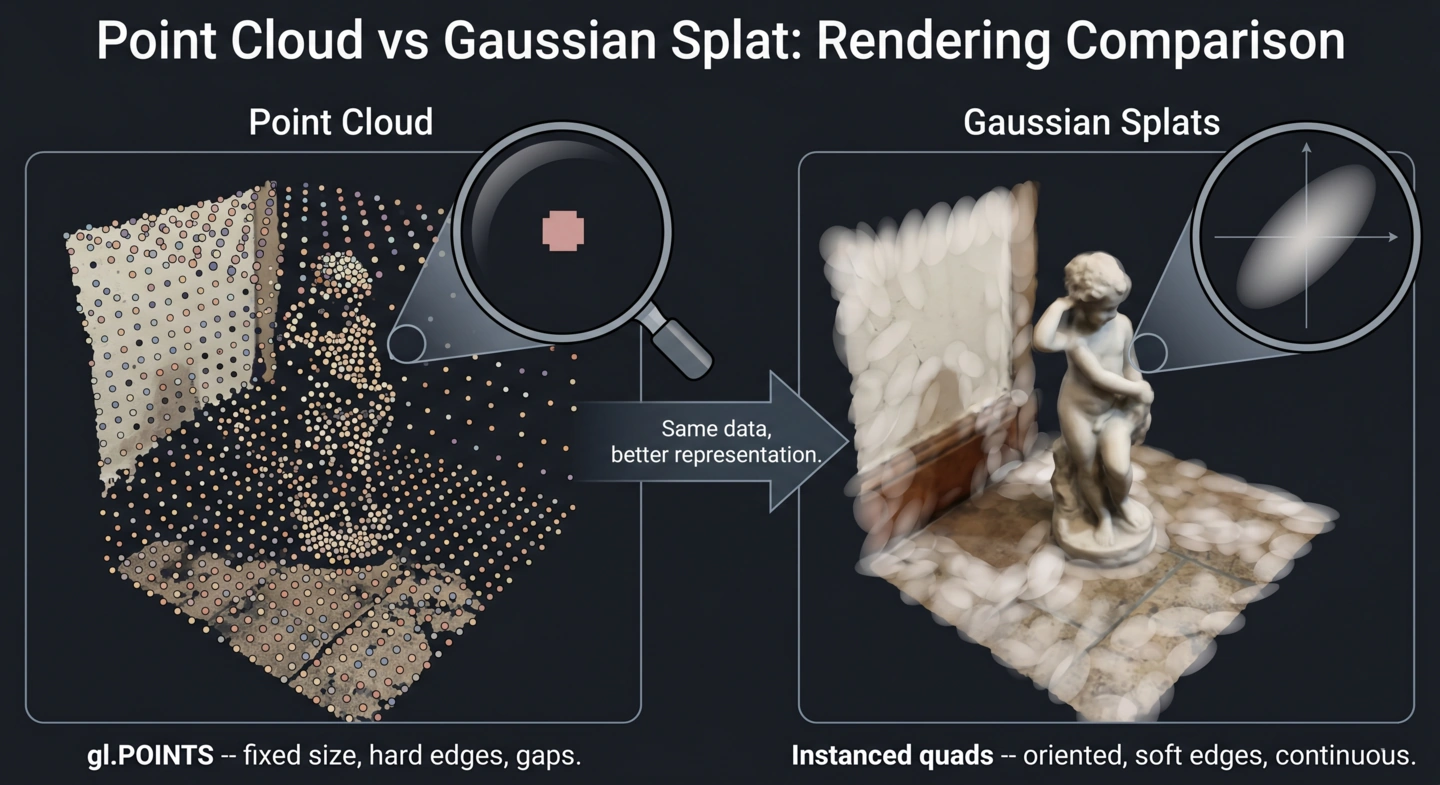
Point cloud vs Gaussian splat
2. The LCC Format and the XGRIDS LiDAR Pipeline
How a single Gaussian splat gets packed into 32 bytes of binary data — and why a LiDAR scanner on your phone can skip the most expensive step in the traditional 3DGS pipeline. XGRIDS uses hardware depth sensing instead of COLMAP’s hours-long photogrammetry reconstruction, making splat capture viable on a handheld device.
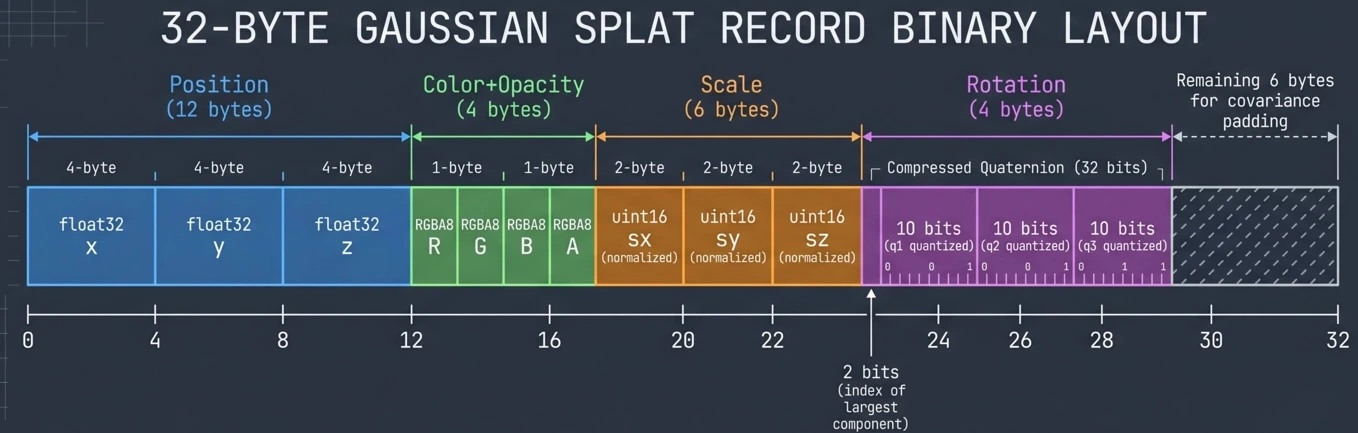
data.bin)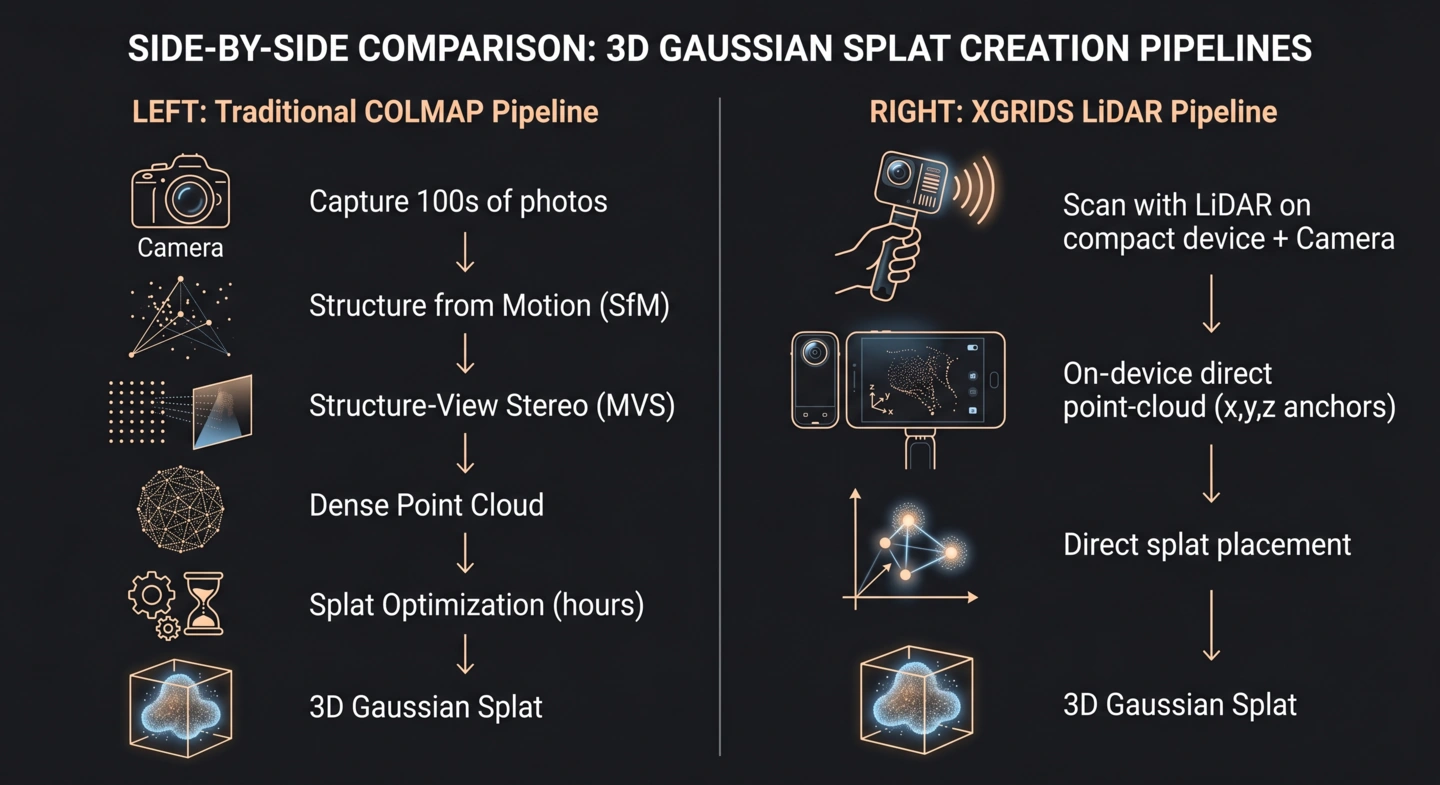
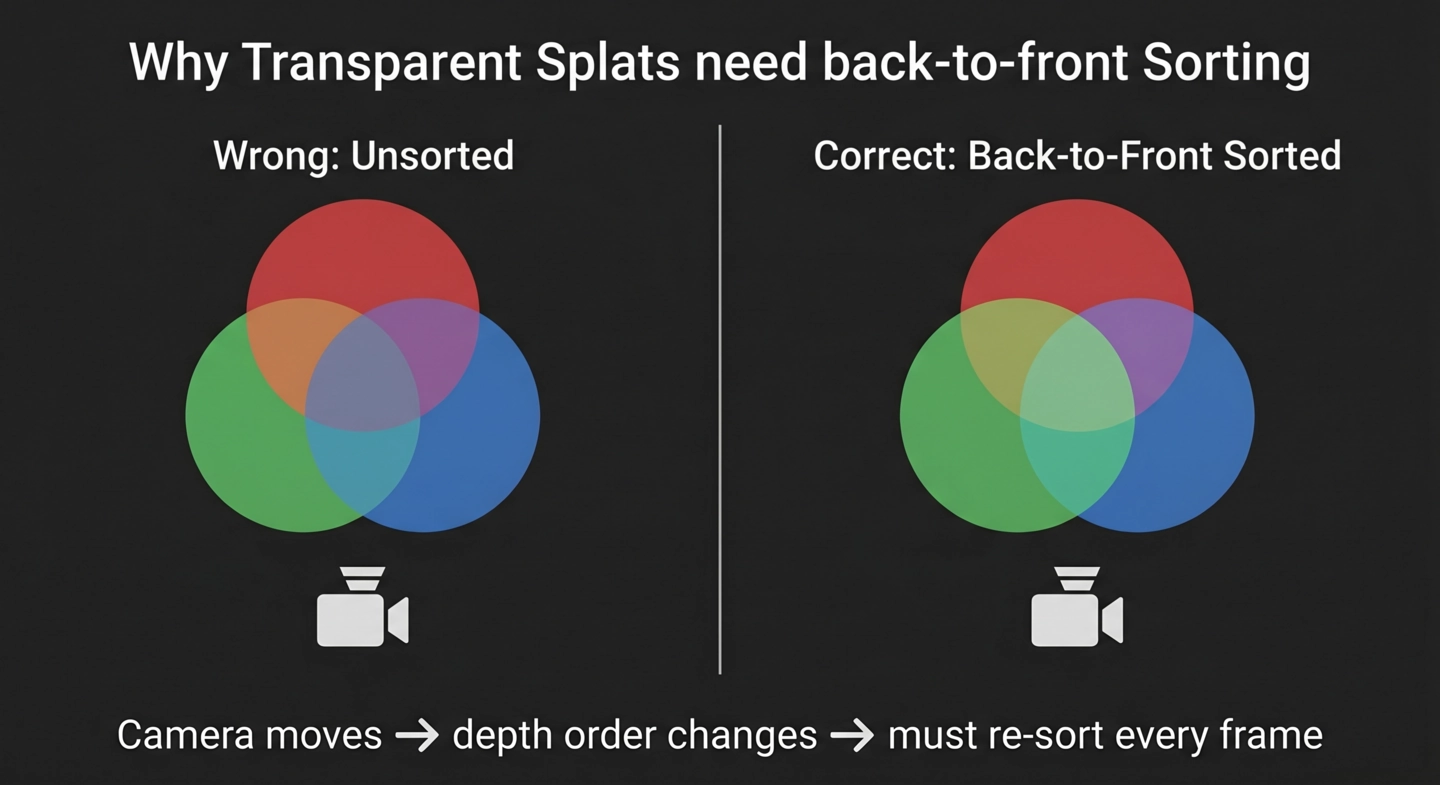
3. Why Splats Need Sorting
Transparent primitives can’t hide behind a Z-buffer. Every camera movement means re-sorting millions of splats back-to-front (without using OIT techniques or ray-tracing).
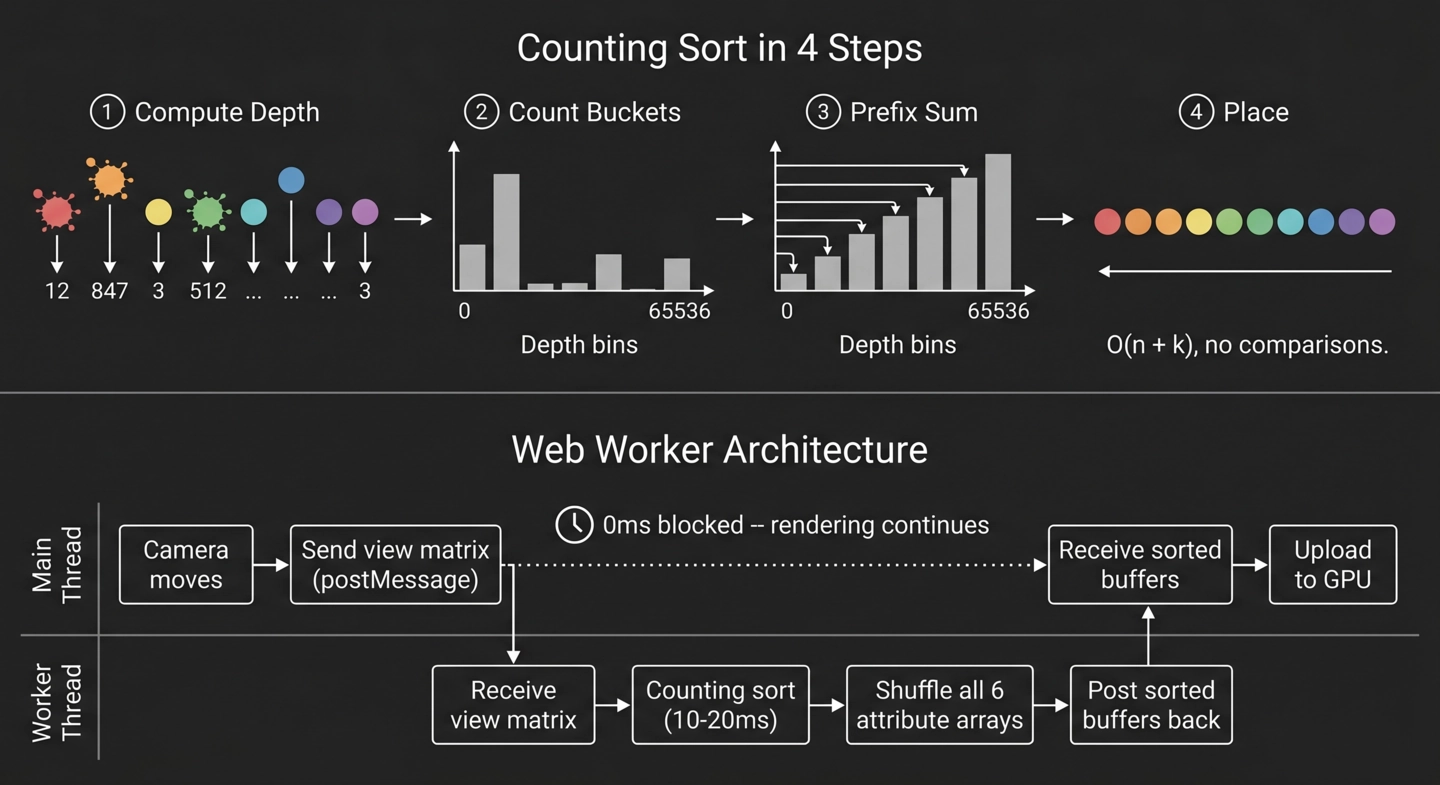
A 65536-bucket counting sort runs in O(n) time inside a dedicated Web Worker, keeping the main thread free for rendering.
4. Section Planes: Making Splats Play Nice with BIM Tools
The BIM viewer’s section tool cuts through both the Revit model and the splat overlay at exactly the same plane. The vertex shader evaluates the same half-space equation that LMV uses internally, so the cut aligns perfectly with no coordinate transforms or sign flips.
Add 3DGS to Your Own APS Viewer
Already have an APS Viewer app? You can drop Gaussian splats into it with four steps.
1. Import the loader and renderer
import { LCCLoader } from './lcc-loader.mjs';
import { GaussianSplatRenderer } from './splat-renderer.mjs';
2. Load the LCC file and initialize the renderer
const loader = new LCCLoader({ targetLOD: 4 });
const data = await loader.load('https://your-cdn.com/path/to/model.lcc');

const splatRenderer = new GaussianSplatRenderer();
await splatRenderer.init(data);

// Scale and rotate to align with your model
const METERS_TO_FEET = 3.28084;
splatRenderer.mesh.scale.set(METERS_TO_FEET, METERS_TO_FEET, METERS_TO_FEET);
3. Add the splat mesh as an overlay
viewer.impl.createOverlayScene('splats');
viewer.impl.addOverlay('splats', splatRenderer.mesh);
4. Drive the render loop on camera changes
viewer.addEventListener(Autodesk.Viewing.CAMERA_CHANGE_EVENT, () => {
    splatRenderer.update(viewer.impl.camera);
    viewer.impl.invalidate(false, false, true);
});
That’s it. The splats will sort, render, and composite automatically. If you also want section plane support, add one more listener:
viewer.addEventListener(Autodesk.Viewing.CUTPLANES_CHANGE_EVENT, () => {
    splatRenderer.setCutPlanes(viewer.getCutPlanes() || []);
    viewer.impl.invalidate(false, false, true);
});
The Result
Realistic looking 3D Gaussian Splats (XGRIDS LCC) composited on top of a Revit model inside the APS Viewer, in the browser. Pan, orbit, and section the BIM model; the splat overlay respects the same camera, the same section planes, and the same compositing stack as the native geometry. The entire implementation is roughly 600 lines of JavaScript across three modules.
Try it live: wallabyway.github.io/gaussian-splats-lmv.
Source
The complete source code for this demo is in the repository wallabyway/gaussian-splats-lmv. The implementation lives in three files:
| File | Lines | Role |
|---|---|---|
lcc-loader.mjs |
~210 | Decodes the XGRIDS LCC binary format (see part 1 below for the spec details) |
splat-renderer.mjs |
~375 | vertex/fragment shaders, Web Worker depth sort, cut-plane support |
app.mjs |
~115 | Viewer init, Revit model loading, splat overlay |
References
- XGRIDS Sample Scans — see here: developer portal — Sample data.
- lcc-decoder — github.com/wallabyway/lcc-decoder — reference decoder / Three.js viewer this demo was ported from.
- antimatter15/splat — github.com/antimatter15/splat — early WebGL 3DGS viewer; influenced common shader conventions in the ecosystem.
- LCC whitepaper — github.com/xgrids/LCCWhitepaper