
BIM models contain information that could be useful in all kinds of applications. You might need element properties for a report, a few values for a validation check, or a list of changes since the previous design version. Getting that information into your code can take more work than the task itself.
If you develop scripts or plugins for a design tool, you may be used to opening the model locally before you can read its data. Moving to a cloud workflow brings different questions: how do you access the right information, filter it, and keep your application connected to design changes?
Join our upcoming webinar to see how the Autodesk Data Exchange GraphQL API can help.
Wednesday, December 2, 2026
7:00 AM Pacific (PST) / 4:00 PM CET / 8:30 PM IST
How Data Exchange helps developers
Autodesk Data Exchange connects supported design and business applications, including Revit, Civil 3D, Inventor, Tekla, Rhino, Navisworks, Power BI and more. Teams can share selected design information and use it across different tools, while developers can build applications around that shared data.
An exchange contains selected model elements and their properties. It can be published through a supported application’s connector or created from a supported cloud source. Once the exchange is available, your application can query its published data without opening the original model in its authoring tool.
This gives developers a common API for accessing exchanges from different supported sources. Your application works with the information the team shares, whether you’re building an internal reporting tool, checking model properties or connecting design data to another business system.
Where GraphQL fits
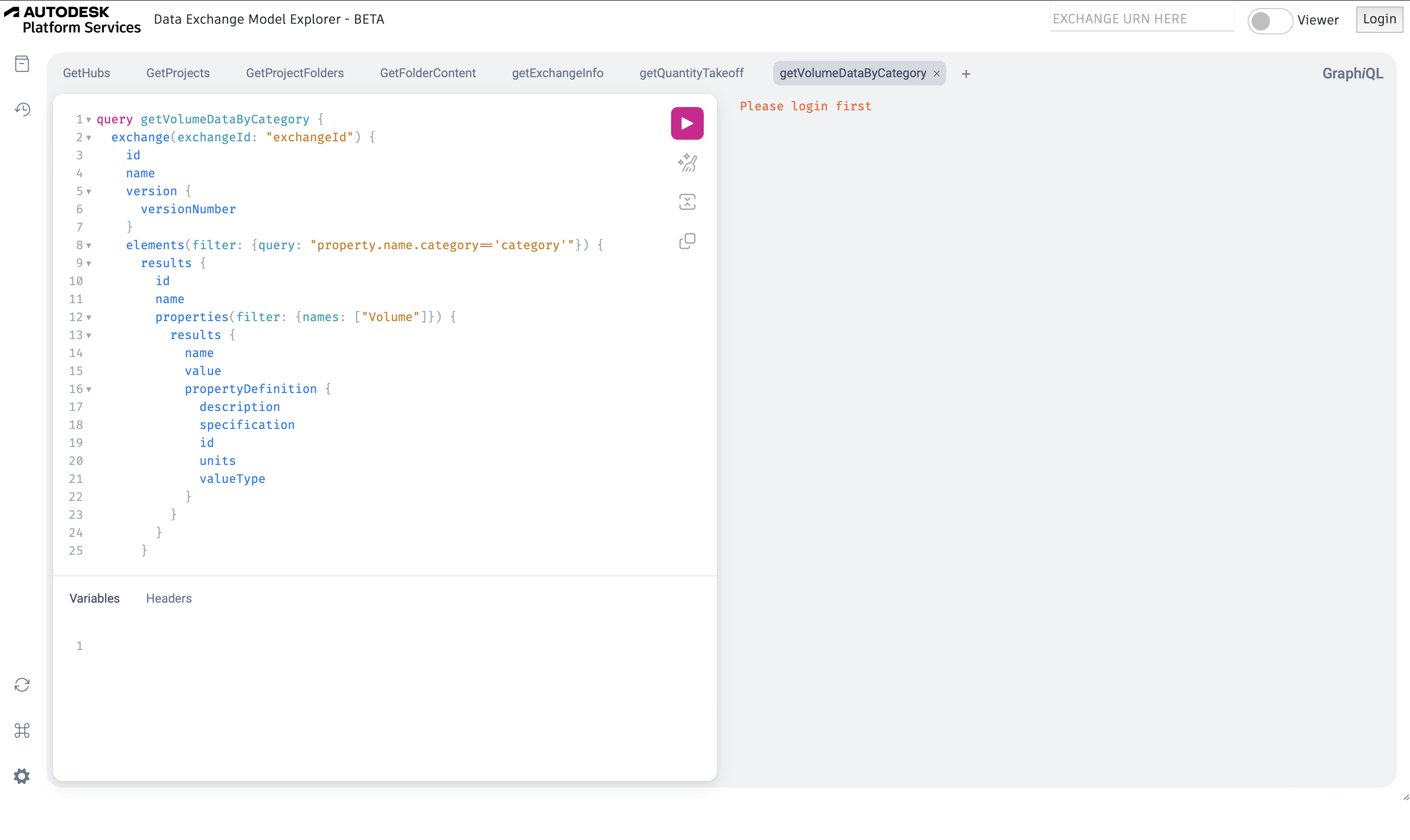
GraphQL is a query language for APIs. You specify which fields you want to receive and use the Data Exchange API’s filters to select the relevant elements and properties. The response returns data in JSON, ready for your application to process.
Workflow examples
We’ll explore examples you can adapt and combine in your own workflows, including:
-
Creating Data Exchanges in batches from supported cloud sources.
-
Calculating quantities from published model properties.
-
Checking published model data against your project requirements.
-
Tracking design changes and triggering follow-up tasks.
-
Exporting data to Excel or CSV, or using it in dashboards.
We’ll use Data Exchange Explorer to introduce queries and filtering, then explore Workflow Bench (Python / .NET), Exchange Maker and Exchange Monitor. These samples provide code you can study and adapt to your own workflows.
Getting started
We’ll also cover access setup, walk through your first query, and explain when to use the GraphQL API or the .NET SDK.
You’ll get links to the interactive tutorial and sample applications in Python and .NET. We’ll finish with a live Q&A, so bring a task you’d like to automate.
Who should join?
This session is for developers building AEC applications, engineers writing automation scripts, and BIM specialists working with development teams. If you already build desktop plugins and want to explore accessing published model data through a cloud API, it’s a useful place to start.
No previous GraphQL experience is required.