

By Rami Kuret, Product Manager, Autodesk Platform Services
Today, every Revit job on Automation API runs on a 32GB CPU machine, and every job waits in the same queue. That works well for most workloads. Some need more. Very large or heavily linked Revit models can run out of memory, and instead of failing with a clear error, the job slows down and times out. Heavy 3D view and sheet exports are slow on CPU-only machines. On busy days, a time-sensitive job can wait behind unrelated batch work, with no way to mark it as urgent.
To give you more control over these workloads, Automation API is adding three optional job settings, available in public beta from November 16, 2026: High Memory and GPU machines for Revit jobs, and Priority Pass, starting with Revit and followed shortly by the other engines.
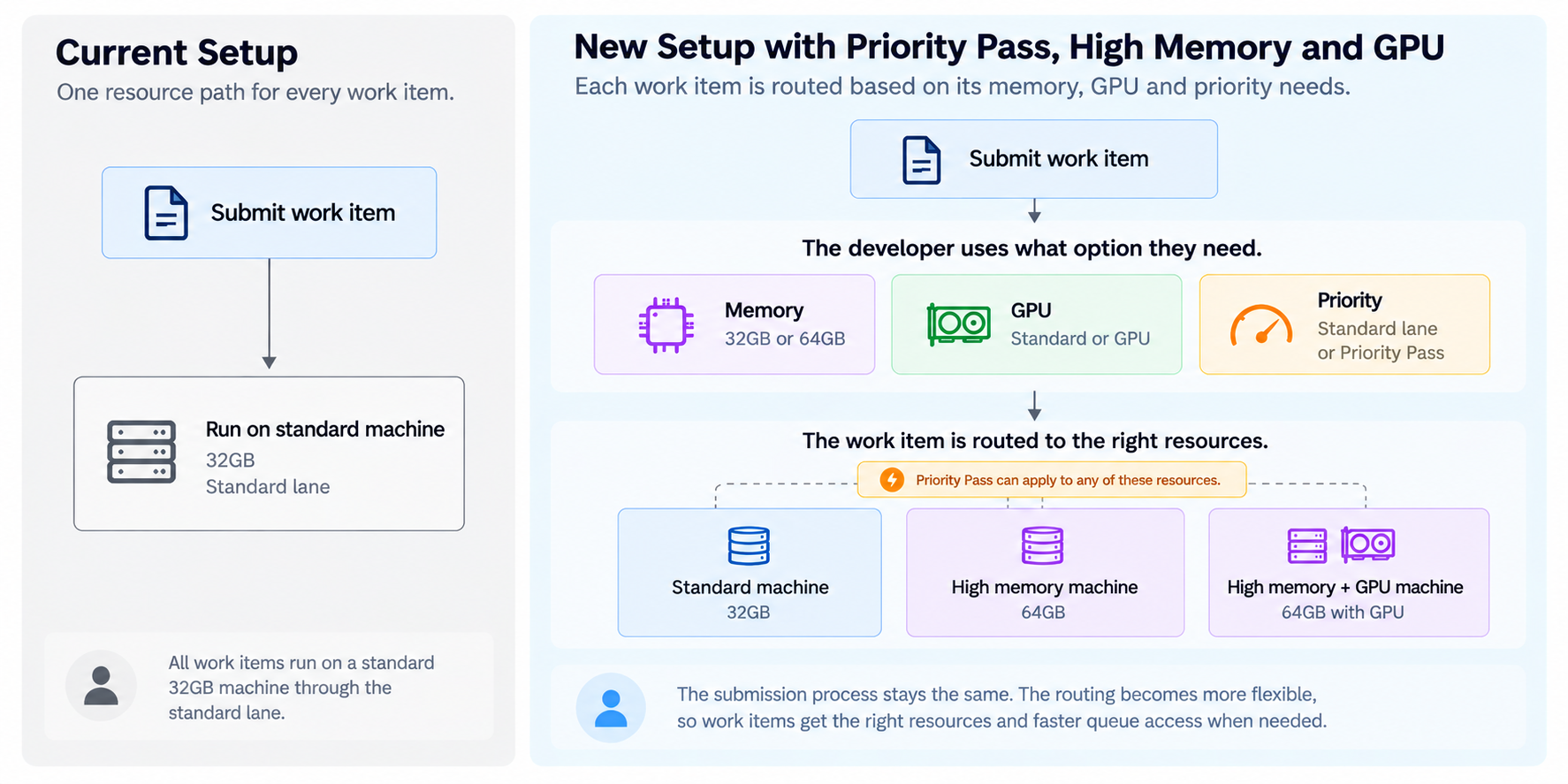
Each setting is a single parameter on your existing workitem request, and you choose it job by job. Jobs that don't use them run exactly as they do today, at today's price.
Try High Memory, GPU, and Priority Pass today: Get Started
(Automation API lets developers run Revit®, AutoCAD®, Inventor, 3ds Max, and Fusion plugins and workflows programmatically in the cloud on a pay-per-result basis.)
What you get
- Run large Revit models in the cloud. Send a job to a 64GB machine instead of the standard 32GB.
- Speed up heavy Revit exports. Send 3D view and sheet exports to an NVIDIA GPU machine.
- Get urgent jobs picked up first. Use Priority Pass to have a job picked up ahead of standard jobs in the queue. In the public beta it starts with Revit, with the other engines following shortly.
- No commitment. There is no reserved capacity to buy and nothing to migrate. You opt in per job, and the beta is billed at the standard rate (see Beta terms below).
How it works
1. High Memory (Revit)
Add memoryGb to your workitem request:
{ "memoryGb": 64 }- Leaving
memoryGbout, or setting it to32, keeps today's behavior. 64and32are the only accepted values. Any other value is rejected with an error that lists the supported values.memoryGbandgpuare supported on Revit only. A workitem for any other engine that includes either parameter is rejected with a validation error.- During the beta, each client ID (APS app) can have up to 5 standard (P3) High Memory jobs in progress at a time. A request over the limit is rejected with an error. Resubmit it once one of your High Memory jobs finishes.
Can help run larger, heavily linked models without splitting files or removing links, and you only use the larger machine on the jobs that need it.
2. GPU (Revit)
Add gpu and memoryGb to your workitem request:
{ "gpu": true, "memoryGb": 64 }- The job runs on an NVIDIA GPU machine with 64GB of memory.
gpudefaults tofalse. - GPU is available with 64GB only. A request with
gpu: trueand nomemoryGb, or withmemoryGb: 32, is rejected with a validation error. - During the beta, each client ID (APS app) can have up to 5 standard (P3) GPU jobs in progress at a time. A request over the limit is rejected with an error. Resubmit it once one of your GPU jobs finishes.
In private beta testing, large-model sheet, 3D view, and floor plan exports ran about 1.7 to 2.1x faster on GPU compared to standard machines.
Best fit: 3D views and sheet exports on large models. Light or 2D-only exports see little or no improvement, so they are better left on standard machines.
3. Priority Pass
Add priority to your workitem request:
{ "priority": "P1" }- The default is
P3(standard).P2is not yet available. In the public beta, Priority Pass starts with Revit, with support for the other engines following shortly. - P1 jobs are picked up ahead of standard jobs waiting for the same type of machine (standard, High Memory, or GPU).
- During the beta, each client ID (APS app) can have one P1 job at a time. If a client ID already has a P1 job pending or in progress, a new P1 workitem request is rejected with an error. Resubmit it once the current P1 job finishes, or submit it without
priorityto run as a standard job. If your organization runs several APS apps, each app has its own limit. - Priority Pass gives a job precedence in the queue. It does not guarantee a completion time.
Priority queue wait times will be published on the Automation API health endpoint, so you can see what Priority Pass is doing before you use it. For how to read queue-time data, see Introducing queue visibility for Automation API.
Combining options
Priority Pass can be added to any job, including High Memory and GPU jobs. For example, a GPU job with Priority Pass:
{ "memoryGb": 64, "gpu": true, "priority": "P1" }Engine availability
High Memory and GPU are available for Revit. Priority Pass is available for Revit now and is coming soon for the other engines during the public beta.
| Engine | High Memory | GPU | Priority Pass |
|---|---|---|---|
| Revit | Available | Available | Available |
| AutoCAD | No | No | Coming soon |
| Inventor | No | No | Coming soon |
| 3ds Max | No | No | Coming soon |
| Fusion | No | No | Coming soon |
To check whether Priority Pass is available for an engine, call GET engines/:id. If the response includes "priorityPass": true, you can send "priority": "P1" for that engine.
What's not changing?
- The same
POST /workitemssubmission flow and endpoints - Jobs that don't set these parameters run on the same machines, in the same standard queue, at the same price, before and after full release.
memoryGbandgpuapply to Revit only;prioritystarts with Revit and extends to the other engines shortly after. - No code changes unless you choose to use the new settings
Beta terms
- High Memory and GPU jobs are billed at the current work item rate during the public beta, with no extra charge for the larger or GPU machine. At full release, planned for early 2027, jobs will be priced above the standard rate.
- Beta performance: High Memory and GPU capacity is limited during the public beta, so jobs on those machines may wait longer in the queue than standard jobs. Wait times during the beta may not reflect performance at full release.
- Concurrency limits: during the public beta, each client ID can have up to 5 standard (P3) jobs in progress at the same time on each of the High Memory and GPU machine types. P1 jobs are limited to one at a time per client ID.
- GPU benchmarking: during the public beta, Autodesk may run a second copy of GPU work items on a standard machine to measure the performance difference. The copy uses the same inputs, writes no outputs, sends no callbacks, and is not billed to you. Your inputs are downloaded a second time from the locations you provided and you may incur costs with your data storage provider.
- Priority Pass is free during the public beta and is expected to become a paid add-on at full release. During the beta, each client ID can only have one P1 job at a time.
- Pricing for full release is not final and will be shared before full release. Active beta users will be notified before any price increases go into effect.
Getting started
- Documentation: https://aps.autodesk.com/en/docs/design-automation/v3/reference/http/workitems-POST/
- Troubleshooting large jobs: debug packages from
adskDebugcan now be up to 2 GB (up from 1 GB). See Using argument "adskDebug" to troubleshoot failed jobs. - Feedback and questions: https://feedback.autodesk.com/flexiblecompute
What's next?
We'll use feedback from the public beta to shape these settings ahead of full release. For questions, visit the APS Get Help page.