
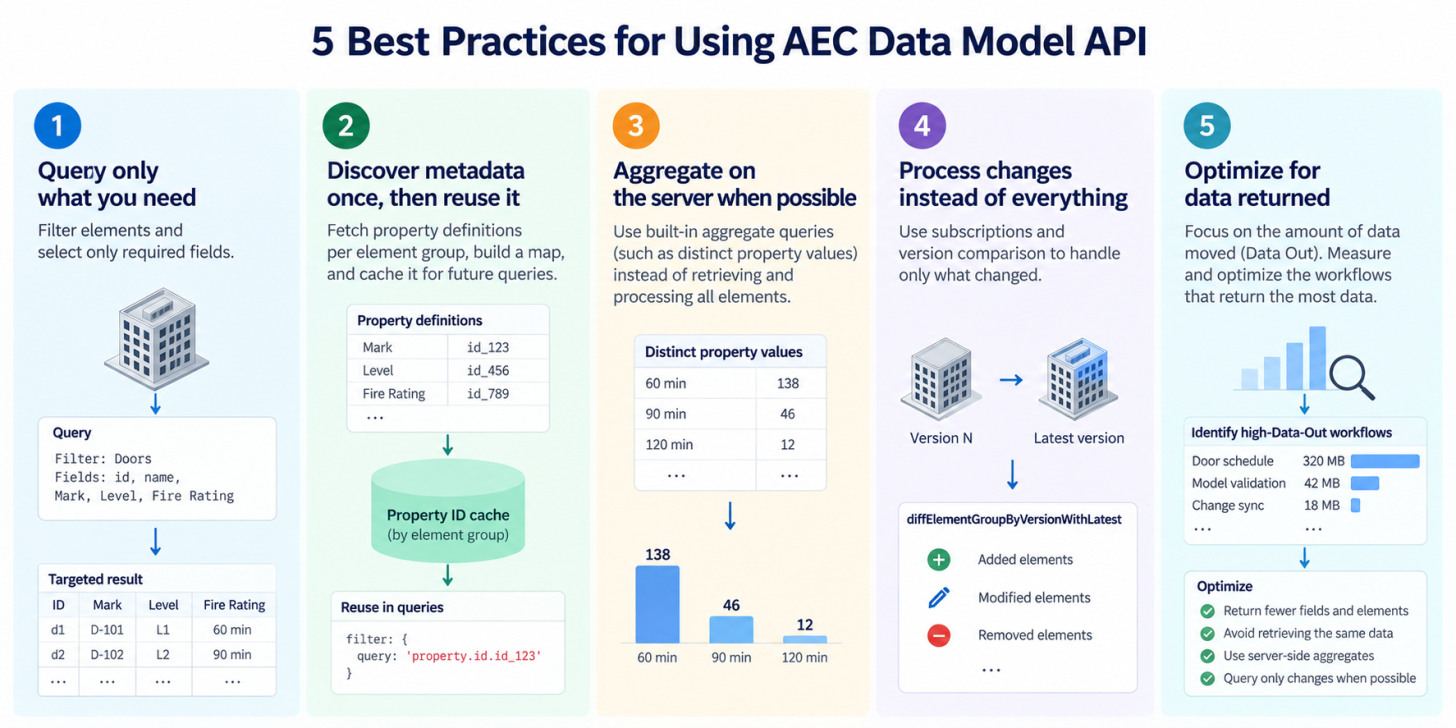
Granular data access works best when the application stays granular.
If a workflow needs door marks, levels, and fire ratings, it usually doesn't need every element and every property in the model. And if an application already discovered how those properties are represented in a project, it shouldn't rediscover them every time it runs.
For details about the updated AEC Data Model API pricing model, included usage, and scaling options, see our earlier post, Data Model APIs included with subscriptions, plus flexible ways to scale.
Here, we'll focus on five technical practices that can help production applications retrieve and process AEC Data Model data more efficiently.
1. Query only what you need
GraphQL gives you two controls at the same time: filter which elements you need, and select which fields you want returned.
For example, if you're building a door schedule, start by filtering to doors:
query Doors($elementGroupId: ID!) {
  elementsByElementGroup(
    elementGroupId: $elementGroupId
    filter: {
      query: "property.name.category==Doors"
    }
    pagination: {
      limit: 100
    }
  ) {
    pagination {
      cursor
    }
    results {
      id
      name
    }
  }
}
If the workflow also needs only a few properties, filter those properties instead of returning the complete property set:
query DoorSchedule($elementGroupId: ID!) {
  elementsByElementGroup(
    elementGroupId: $elementGroupId
    filter: {
      query: "property.name.category==Doors"
    }
    pagination: {
      limit: 100
    }
  ) {
    pagination {
      cursor
    }
    results {
      id
      name
      properties(
        filter: {
          names: ["Mark", "Level", "Fire Rating"]
        }
      ) {
        results {
          name
          value
        }
      }
    }
  }
}
A broad query can be useful while you're exploring a model:
properties {
  results {
    name
    value
    displayValue
    definition {
      id
      units {
        name
      }
    }
  }
}
Once you know what the application needs, narrow the selection.
The useful question isn't "How do I retrieve this model?" It's "What data does this operation require?"
2. Discover metadata once, then reuse it
Production applications often need to work with property definition IDs. Those IDs should be resolved in the context of the element groups you're querying. But that doesn't mean resolving every required property with a separate request.
Use propertyDefinitionsByElementGroup to retrieve the available definitions for an element group in bulk:
query PropertyDefinitions($elementGroupId: ID!) {
  propertyDefinitionsByElementGroup(
    elementGroupId: $elementGroupId
  ) {
    pagination {
      pageSize
      cursor
    }
    results {
      id
      name
      specification
      units {
        id
        name
      }
    }
  }
}
Page through the result once, then build the lookup your application actually needs.
For example:
const wantedProperties = new Set([
  "Mark",
  "Level",
  "Fire Rating",
  "Manufacturer"
]);

const propertyMap = new Map();

for (const definition of allDefinitions) {
  if (wantedProperties.has(definition.name)) {
    propertyMap.set(
      `${definition.name}|${definition.specification}`,
      definition.id
    );
  }
}
Store that mapping with the element group:
propertyDefinitionCache.set(elementGroupId, propertyMap);Now your normal data-retrieval path doesn't need to repeat metadata discovery before every query.
For applications working across many projects, the pattern becomes:
Element group A
    ↓
discover definitions
    ↓
build local definition map
    ↓
reuse map for queries

Element group B
    ↓
discover definitions
    ↓
build local definition map
    ↓
reuse map for queries
Not:
property 1 → lookup
property 2 → lookup
property 3 → lookup
...
repeat for every run
This distinction becomes significant when an application works with dozens or hundreds of parameters across many models.
Don't rely on the property name alone
A name is useful for discovery, but it may not uniquely describe the property your application intends to use.
For example, when building your lookup, consider the property name together with metadata such as its specification or units:
function propertyKey(definition) {
  return [
    definition.name,
    definition.specification,
    definition.units?.name ?? ""
  ].join("|");
}
That gives the application a semantic key:
Width|LENGTH|millimeterswhich it can map to the definition ID used by that element group.
Once you've resolved the ID, use it in production filters rather than asking the API to translate the property name repeatedly:
'property.id.<PROPERTY_DEFINITION_ID>' > 1.5This is particularly useful for queries that span larger scopes, where the same property name can resolve to many property definitions.
Cache metadata, but give the cache an invalidation strategy
Metadata discovery doesn't belong in the hot path of every request, but neither should an application assume that cached metadata will remain valid indefinitely.
A practical approach is to refresh the definition cache when:
-
The application encounters a new element group.
-
A required definition can't be found in the cached map.
-
Your workflow detects a model or schema change that requires rediscovery.
-
An administrator explicitly refreshes the application's configuration.
The exact policy depends on the application. The important part is separating metadata discovery from normal data retrieval.
3. Aggregate on the server when possible
Sometimes your application doesn't need individual elements at all.
Suppose a dashboard needs to answer:
What values exist for this property, and how many elements use each value?
Retrieving thousands of elements and counting them locally adds work that the API can already perform.
Use the distinct-property queries instead:
query PropertySummary(
  $elementGroupId: ID!
  $propertyDefinitionId: ID!
) {
  distinctPropertyValuesInElementGroupById(
    elementGroupId: $elementGroupId
    propertyDefinitionId: $propertyDefinitionId
  ) {
    values(limit: 200) {
      value
      count
    }
  }
}
A response might look like:
{
  "values": [
    {
      "value": "60 min",
      "count": 138
    },
    {
      "value": "90 min",
      "count": 46
    }
  ]
}
Now the application receives the answer it needs instead of the entire dataset used to calculate that answer.
This pattern is useful for:
-
Dashboard filters.
-
Model-health summaries.
-
Validation rules.
-
Classification reports.
-
Parameter-value distributions.
-
User-interface pick lists.
Before retrieving a large element collection, ask whether the workflow actually needs the elements or only an aggregate derived from them.
4. Process changes instead of reprocessing everything
Many integrations begin with a timer:
setInterval(refreshEverything, 5 * 60 * 1000);It's simple, but it treats an unchanged model exactly like a changed one.
AEC Data Model subscriptions provide another pattern. An application can listen for successful extraction events and start its downstream workflow when updated model data becomes available.
The application logic can look like this:
onExtractionEvent(async (event) => {
  if (event.status !== "SUCCESS") return;

  if (!trackedFiles.has(event.fileUrn)) {
    return;
  }

  await processModelUpdate(event);
});
The flow becomes:
model changes
    ↓
AEC Data Model extraction completes
    ↓
application receives event
    ↓
application processes the update
That's already better than querying every five minutes.
But an application can go one step further.
Query the difference when the workflow permits it
If your downstream system already holds data from a previous element-group version, you may not need to retrieve and process the entire latest model again.
AEC Data Model provides the diffElementGroupByVersionWithLatest query for this pattern. It compares a specified starting version with the latest version of the element group and returns the differences.
The query takes the element group ID and startVersion:
query DiffFromVersion($elementGroupId: ID!, $startVersion: Int!) {
  diffElementGroupByVersionWithLatest(
    elementGroupId: $elementGroupId
    startVersion: $startVersion
  ) {
    result {
      differences {
        results {
          type
          item {
            name
            value
          }
          oldItem {
            name
            value
          }
        }
      }
    }
  }
}
A synchronization workflow can therefore look like:
Version N
    ↓
store the data your application needs
    ↓
Version N+1 is published
    ↓
AEC Data Model extraction completes
    ↓
receive subscription event
    ↓
diffElementGroupByVersionWithLatest(
    startVersion: N
)
    ↓
process returned differences
    ↓
update downstream state
The important distinction is that this isn't a replacement for every full query.
A reporting workflow may still be simpler and more reliable when it rebuilds its complete dataset after a model update. But a synchronization service, validation pipeline, or downstream system that already stores model state can often use the diff to limit its work to what changed.
5. Measure Data Out by workflow
The most useful optimization starts with a baseline.
AEC Data Model usage is reported as Data In and Data Out in megabytes. For read-heavy integrations, track which application workflows are responsible for the most Data Out, then optimize those workflows first.
For example, your application might have a few recurring operations:
const Operations = {
  DOOR_SCHEDULE: "door-schedule",
  MODEL_VALIDATION: "model-validation",
  PROPERTY_SYNC: "property-sync",
  CHANGE_SYNC: "change-sync"
};
Record the operation name and the size of each response:
log({
  operation: "door-schedule",
  projectId,
  elementGroupId,
  responseBytes
});
Then aggregate that data over time:
door-schedule
  calls: 1,200
  data returned: 320 MB

model-validation
  calls: 80
  data returned: 42 MB

change-sync
  calls: 600
  data returned: 18 MB
Now the optimization target is clear.
If one workflow accounts for most of the data returned, look at two things first:
Reduce the data returned by each query
Inspect the element filter and GraphQL selection set.
For example, this broad query:
results {
  id
  name
  properties {
    results {
      name
      value
      displayValue
      definition {
        id
        specification
        units {
          name
        }
      }
    }
  }
}
may return much more information than a production workflow needs.
A targeted version might be:
results {
  id
  properties(
    filter: {
      names: [
        "Mark",
        "Fire Rating"
      ]
    }
  ) {
    results {
      name
      value
    }
  }
}
The goal is simple: don't retrieve fields that the downstream application doesn't use.
Reduce how often the same data is retrieved
The second question is frequency.
If an operation runs every five minutes but the underlying model changes only a few times a day, optimizing the GraphQL selection set addresses only part of the problem.
Instead of:
every 5 minutes
    ↓
query current model data
    ↓
query current model data
    ↓
query current model data
consider an event-driven flow:
model changes
    ↓
extraction completes
    ↓
subscription event
    ↓
query updated data
And if your application already has the previous model state, consider using:
diffElementGroupByVersionWithLatest(
  elementGroupId: $elementGroupId
  startVersion: $previousVersion
)
to process the changes rather than retrieving the complete dataset again.
Compare before and after
After changing the query or refresh strategy, measure the same workflow again:
Before
door-schedule
  1,200 calls
  320 MB returned

After
door-schedule
  240 calls
  54 MB returned
The specific numbers will depend on the model and workflow. What matters is measuring the same operation before and after the change.
That gives you a repeatable optimization loop:
Measure
   ↓
Find the highest-Data-Out workflow
   ↓
Reduce query scope or refresh frequency
   ↓
Measure again
Start with the workflows that move the most data. A small improvement there usually matters more than optimizing many low-volume queries.
Put discovery outside the hot path
These practices share one architectural idea.
Separate the operations that help your application understand the model from the operations it performs every time it uses the model.
For example:
ONBOARD MODEL
──────────────
discover element group
discover property definitions
build property map
save configuration


NORMAL OPERATION
────────────────
wait for change
query targeted elements
request targeted properties
process result


MODEL CHANGES
─────────────
receive extraction event
check whether metadata changed
refresh metadata if needed
process changed data
That division matters more as an integration grows.
A prototype can discover everything on every execution and retrieve broad datasets because it's convenient. A production application should know what it needs before it starts moving model data.
The AEC Data Model API gives you granular access to AEC information. Build your queries, caches, and refresh strategy around that same idea: retrieve the smallest useful answer, and reuse what you've already learned.
Explore the AEC Data Model API developer resources for tutorials, documentation, and code samples.