

If you've ever added custom 3D content to APS Viewer, you've probably run into this. You start with overlays because it's the simplest option, then watch your frame rate drop as you add more content. So you switch to the Scene Builder extension, which renders progressively, but now you're dealing with a different set of types and no object tree. And neither API was ever a documented contract, so filling the gaps meant reverse-engineering our internals.
We're excited to announce the new Scene API, which replaces both. It's one documented, typed API for creating and manipulating 3D content, built on the same code paths the Viewer already uses for models loaded from our platform.
The Mental Model
Let's start with the most important Concepts of the API:
-
A Model is a container. It can hold content loaded from a design file or content you construct at runtime (aka dynamic model), and the renderer treats both identically.
-
An instance is the unit that actually gets drawn: geometry + material + transform + visibility state. There's no
Instanceclass to construct; instances are owned and addressed by numeric IDs through InstanceCollection3D, which you get frommodel.getInstances(). -
An object is a logical component (a door, an engine) in an object tree, identified by
dbId, and it's whatisolate,hide, and other common Viewer methods operate on. One object can own several instances, for example, a door object might contain two instances: one for a wooden door frame, and one for a brass door knob.
On top of that sit two optional extras: a scene graph of Node3D transform groups you build yourself when instances need to move together, and render layers for content that has to draw before, after, or on top of the main scene.
Adding Custom Content
Here's an example that touches most of the authoring side of the API: creating the model, building geometry, assigning materials, and grouping instances under a shared transform. The full runnable versions of each step live in the CodePens embedded in Hello Triangle, Geometry Factory, and Building a Hierarchy.
const av = Autodesk.Viewing;
const avs = Autodesk.Viewing.Scene;
const avm = Autodesk.Viewing.Math;

function addCustomContent(viewer) {
    // A dynamic model is just a Model you construct yourself.
    // Register it with the renderer *before* you touch its instances.
    const model = new av.Model();
    viewer.showModel(model);
    const instances = model.getInstances();

    // Geometry 1: raw vertex data, for anything the factory can't give you.
    const positions = new Float32Array([
        -50.0, -50.0, 0.0,   // bottom-left
         50.0, -50.0, 0.0,   // bottom-right
         0.0,   50.0, 0.0    // top-center
    ]);
    const normals = new Float32Array([
        0.0, 0.0, 1.0,
        0.0, 0.0, 1.0,
        0.0, 0.0, 1.0
    ]);
    const triangleGeometry = new avs.BufferGeometry();
    triangleGeometry.setAttribute(
        'position', new avs.BufferAttribute(positions, 3)
    );
    triangleGeometry.setAttribute(
        'normal', new avs.BufferAttribute(normals, 3)
    );
    triangleGeometry.setIndices(new Uint16Array([0, 1, 2]));

    // Geometry 2: the same result for a common primitive, minus the typing.
    const sphereGeometry = avs.GeometryFactory.createSphere(50.0, 32, 16);

    const shadedMaterial = new avs.StandardMaterial({ color: 0x4488ff, specularColor: 0xeeeeee, specularPower: 128, side: avs.Side.Double });
    const unlitMaterial = new avs.UnlitMaterial({ color: 0xffaa00 });

    // geometry + material + transform = one instance, addressed by id.
    const triangleId = instances.add(triangleGeometry, shadedMaterial, new avm.Matrix4().makeTranslation(-1.5, 0, 100.0));
    const sphereId = instances.add(sphereGeometry, unlitMaterial, new avm.Matrix4().makeTranslation(1.5, 0, 100.0));

    // Every instance stays mutable afterwards.
    instances.setMaterial(triangleId, new avs.StandardMaterial({ color: 0xff5522 }));
    instances.setVisibilityState(sphereId, avs.VisibilityState.Ghosted);

    // Group both instances under one transform node and lift them together.
    const root = instances.getSceneGraph(true);
    const group = new avs.Node3D();
    root.add(group);
    avs.InstanceNode3D.fromInstance(triangleId, group);
    avs.InstanceNode3D.fromInstance(sphereId, group);

    group.position.y = 2;
    group.markDirty();
    root.updateTransformWorld();

    viewer.refresh(true);
    return model;
}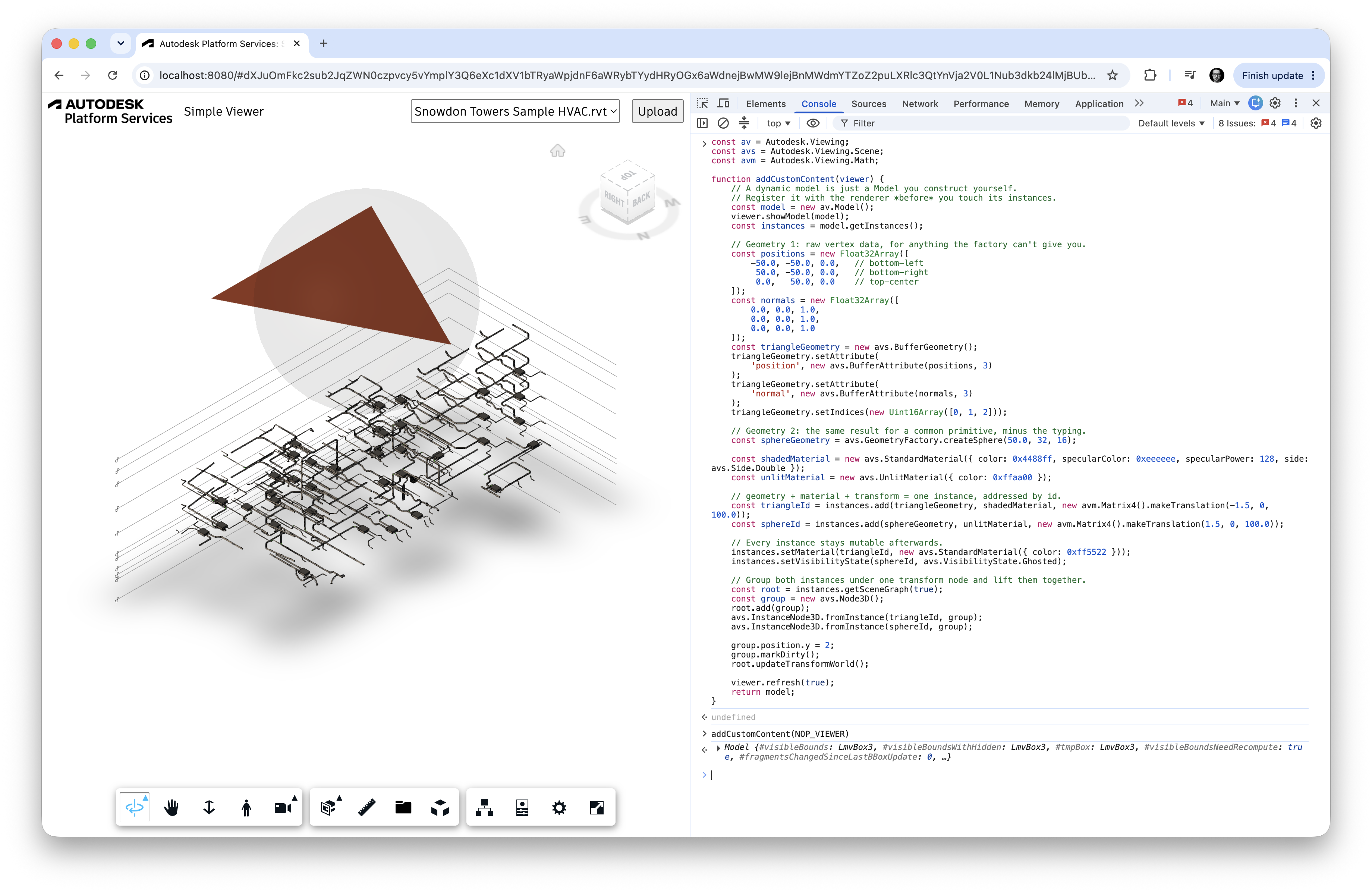
Here's what the code does:
new av.Model()allocates an empty, programmatically-owned model. No upload, no translation job, no URN.avs.BufferGeometryholds your shape as typed-array attribute buffers.positionandnormalare the minimum a lit material needs, both with an item size of 3.setIndices()accepts aUint16Arrayor aUint32Array; preferUint16Arraywhere the vertex count allows it, to save memory.avs.GeometryFactoryis a convenience layer over the same BufferGeometry, not a separate path. It covers spheres, boxes, cylinders, cones, and planes, and takes an optional trailing boolean for edge indices, which you need if you want wireframe rendering viaviewer.setDisplayEdges(true).instances.add(geometry, material, transform)returns a numeric instance ID, or-1if the instance couldn't be added. That ID is your handle for every later update.avs.VisibilityStateis the same three-state model (Visible,Ghosted,Hidden) the Viewer uses for its own isolate and ghost operations, so your content behaves consistently with loaded content. See Visibility States.getSceneGraph(true)creates the scene graph on demand, since a model doesn't have one by default.markDirty()flags a subtree, androot.updateTransformWorld()recomputes only the dirty subtrees, which is what makes per-frame animation of deep hierarchies cheap.viewer.refresh(true)schedules a frame. Nothing you changed appears until you call it.
Manipulating a Loaded Model
The same InstanceCollection3D also holds the instances of a model loaded from a design file, which is the part that used to require internals. The bridge between the two worlds is the object tree: dbId gets you to instance IDs, and from there everything above applies. The runnable version is in the CodePen on Wrapping Loaded Instances.
// Opt in before the Initializer runs. Required for loaded models.
Autodesk.Viewing.FeatureFlags.set(
    Autodesk.Viewing.PublicFeatureFlags.SceneAPI, true
);

// ... initialize the viewer and load a document ...

const avs = Autodesk.Viewing.Scene;

async function highlightAndLift(viewer, model, dbIds) {
    const instances = model.getInstances();
    const objectTree = await model.getObjectTreeAsync();

    // dbIds identify *objects*; resolve them down to instance ids.
    const instanceIds = [];
    for (const dbId of dbIds) {
        objectTree.enumNodeInstances(dbId, (instanceId) => {
            if (instances.getGeometry(instanceId)) {
                instanceIds.push(instanceId);
            }
        }, true);
    }

    // Recolour the loaded instances in place.
    const highlight = new avs.StandardMaterial({ color: 0xff5522 });
    for (const instanceId of instanceIds) {
        instances.setMaterial(instanceId, highlight);
    }

    // Or wrap them in scene graph nodes and move them as one group.
    const root = instances.getSceneGraph(true);
    const group = new avs.Node3D();
    root.add(group);
    for (const instanceId of instanceIds) {
        avs.InstanceNode3D.fromInstance(instanceId, group);
    }

    group.position.y += 100.0;
    group.markDirty();
    root.updateTransformWorld();

    viewer.refresh(true);
}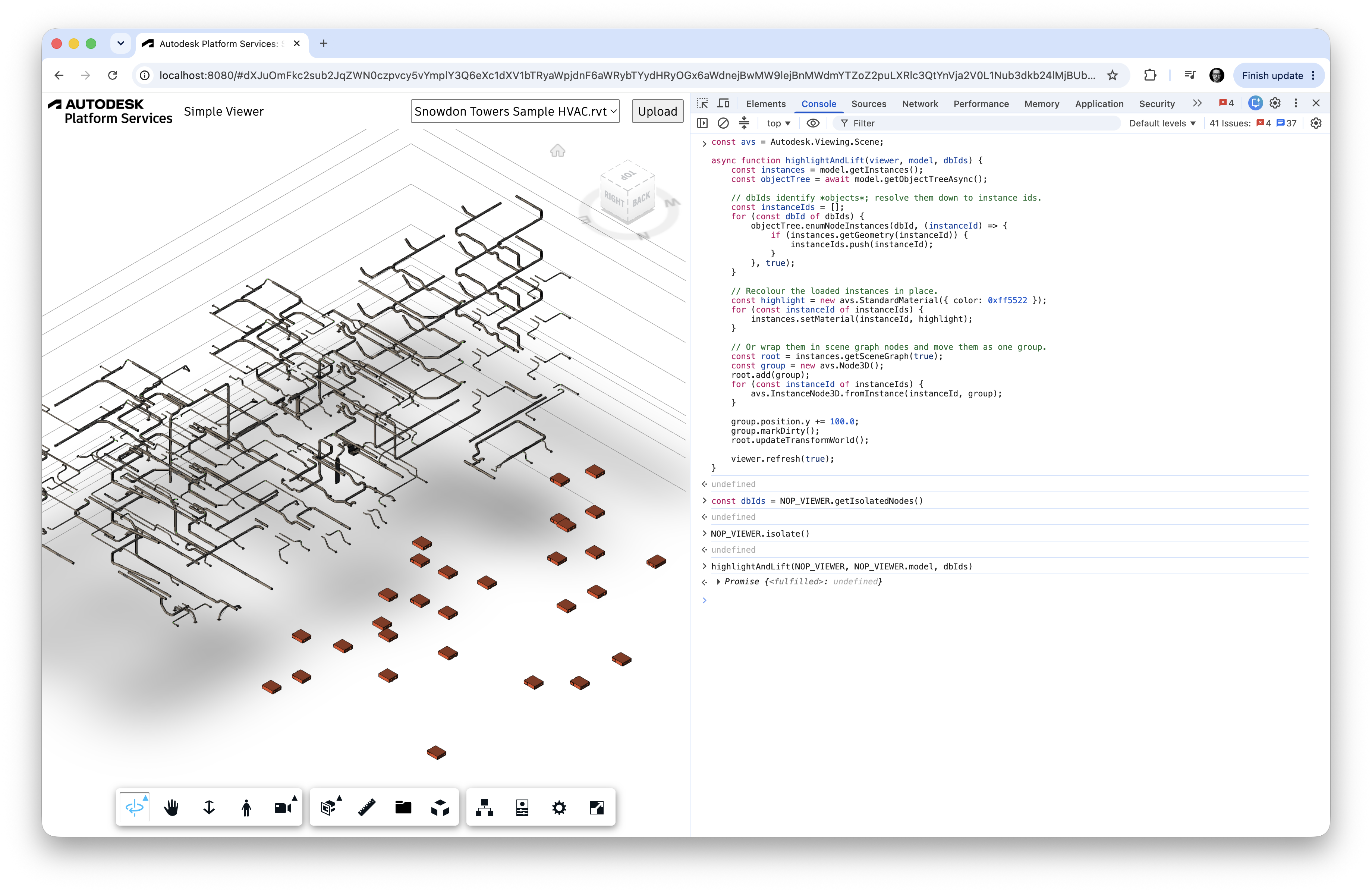
Autodesk.Viewing.PublicFeatureFlags.SceneAPImust be set beforeAutodesk.Viewing.Initializer. Dynamic models you build yourself work without it; using the Scene API on loaded models does not.objectTree.enumNodeInstances(dbId, callback, recursive)walks from an object to its instances. ThegetGeometrycheck filters out instances that carry no geometry.InstanceNode3D.fromInstance(instanceId, parent)wraps an existing instance, loaded or authored, in a scene graph node, giving you the full transform hierarchy over geometry you didn't create.
If you need a copy that outlives the original load state instead of an in-place change, read the geometry and material off the source collection and add them to a fresh dynamic model. Copy Instances shows the pattern. Note that geometries and materials are owned by their model and can't be shared across models, so you always clone first.
How It Compares
| Overlays | Scene Builder | Scene API | |
|---|---|---|---|
| Types | THREE.* (bundled three.js r71) |
THREE.*, restricted subset |
Documented Autodesk.Viewing.Scene types |
| Rendering | Every frame, all at once | Progressive, like a loaded model | Progressive in the main scene; every frame on a render layer |
| Object tree | None | None | Present on loaded models; optional on dynamic models |
| Materials | Any three.js material that happens to work | MeshPhong, MeshBasic, LineBasic, Prism | StandardMaterial, UnlitMaterial, LineMaterial, PointsMaterial |
| Runtime edits | Add/remove meshes | Add fragments, limited changes | Full CRUD on geometry, material, transform, and visibility per instance |
| Loaded models | Not addressable | Not applicable | Same API as your own content |
The one thing overlays did that's worth calling out separately is draw ordering, and Render Layers is the unified replacement. viewer.layers.create(id, { renderTarget, renderOrder }) gives you explicit, named control: renderTarget: 'overlay' is where you land if you're coming from viewer.overlays, and renderTarget: 'main' with a negative or positive renderOrder covers drawing before or after the loaded model.
Overlays and Scene Builder aren't going anywhere in Viewer v7, and nothing you've shipped breaks. We do plan to deprecate both in Viewer v8, and we'll help you get across; more on that below.
Gotchas
Here's a few things to keep an eye on when using the new API:
- Call
viewer.showModel(model)before you do anything else with a dynamic model. FeatureFlags.set(PublicFeatureFlags.SceneAPI, true)has to run beforeAutodesk.Viewing.Initializerif you want to use the Scene API with models loaded from designs.- Nothing renders until
viewer.refresh(true). Every mutation (add, remove,setMaterial,setTransformWorld, a visibility change) needs a frame render scheduled after it. - Don't read typed arrays back out of a geometry after
add(). The Viewer takes ownership and may re-optimize the buffer layout. Usegeometry.getVertexCount()andgeometry.getPosition(i, target)instead; Working with Buffers covers this in detail. - Geometries and materials belong to exactly one model.
addGeometry()andaddMaterial()returnnullif the object is already owned elsewhere. Clone before reusing across models. setThemingColor(dbId, color)takes adbId, not an instance ID, unlike every method sitting next to it in InstanceCollection3D. Theming is an object-level operation.- Setting
node.positionin a scene graph on its own does nothing visible. You need eithermarkDirty()followed byroot.updateTransformWorld(), ornode.updateTransformWorld(true)to skip the dirty check entirely. And the scene graph doesn't exist until you ask for it withgetSceneGraph(true).
See It at AU
The Scene API gets a full walkthrough and a live demo at Autodesk University 2026 in Las Vegas, September 15–17. If you can make it in person, come and bring the awkward questions. If you can't, the recording will be available afterwards.

Wrapping Up
You can now build 3D content in code, place it in the same model and the same pipeline as your loaded designs, manipulate individual instances of a design file without touching Viewer internals, and group any of it under a transform hierarchy you control. Start with Concepts for the vocabulary, then work through the CodePens from Hello Triangle onward. Every page in the guide ships with a live, editable one.
A separate post is coming that walks through migrating existing overlay and Scene Builder code to the Scene API, endpoint by endpoint. In the meantime, if you hit something the docs don't cover, do let us know. That's exactly the kind of gap this API exists to close. Happy building! 🛠️
Resources
- Scene API developer guide: concepts, examples, and live CodePens
Autodesk.Viewing.Scenereference:InstanceCollection3D,BufferGeometry, materials,Node3D- Render Layers: the replacement for
viewer.overlaysandviewer.impl.scene/sceneAfter - Adding Custom Geometry and Scene Builder: the current APIs, for reference while you migrate
- AU 2026 session: Scene API explained and demoed live