


If you were at Autodesk DevCon in April, you heard this was coming. Today, we’re introducing Autodesk Assistant on APS in tech preview. Whether you’re exploring APS for the first time, researching what’s possible without writing a line of code, or deep in a technical build, Autodesk Assistant is here to help you get to better outcomes faster.
What is Autodesk Assistant?
Autodesk Assistant is the AI interface for the Design and Make platform. It is already transforming workflows across Autodesk products like Revit, Fusion, Forma, Civil 3D and more, helping designers and makers work with greater creativity and less friction. Its arrival on APS brings that same deep industry context and trusted experience to the developer platform.
Try it now: Autodesk Assistant on APS in tech preview
- This is an early release, and capabilities will continue to evolve.
- In Tech Preview, Autodesk Assistant can help you explore APS capabilities, understand how they apply to your industry, scope out specific solutions you want to build, and get cost estimates — all grounded in public Autodesk documentation.
- Autodesk Assistant cannot yet give insights based on your specific APS projects.
- As you work with Autodesk Assistant, give your feedback on its responses with a thumbs-up or thumbs-down to help us fine tune it.
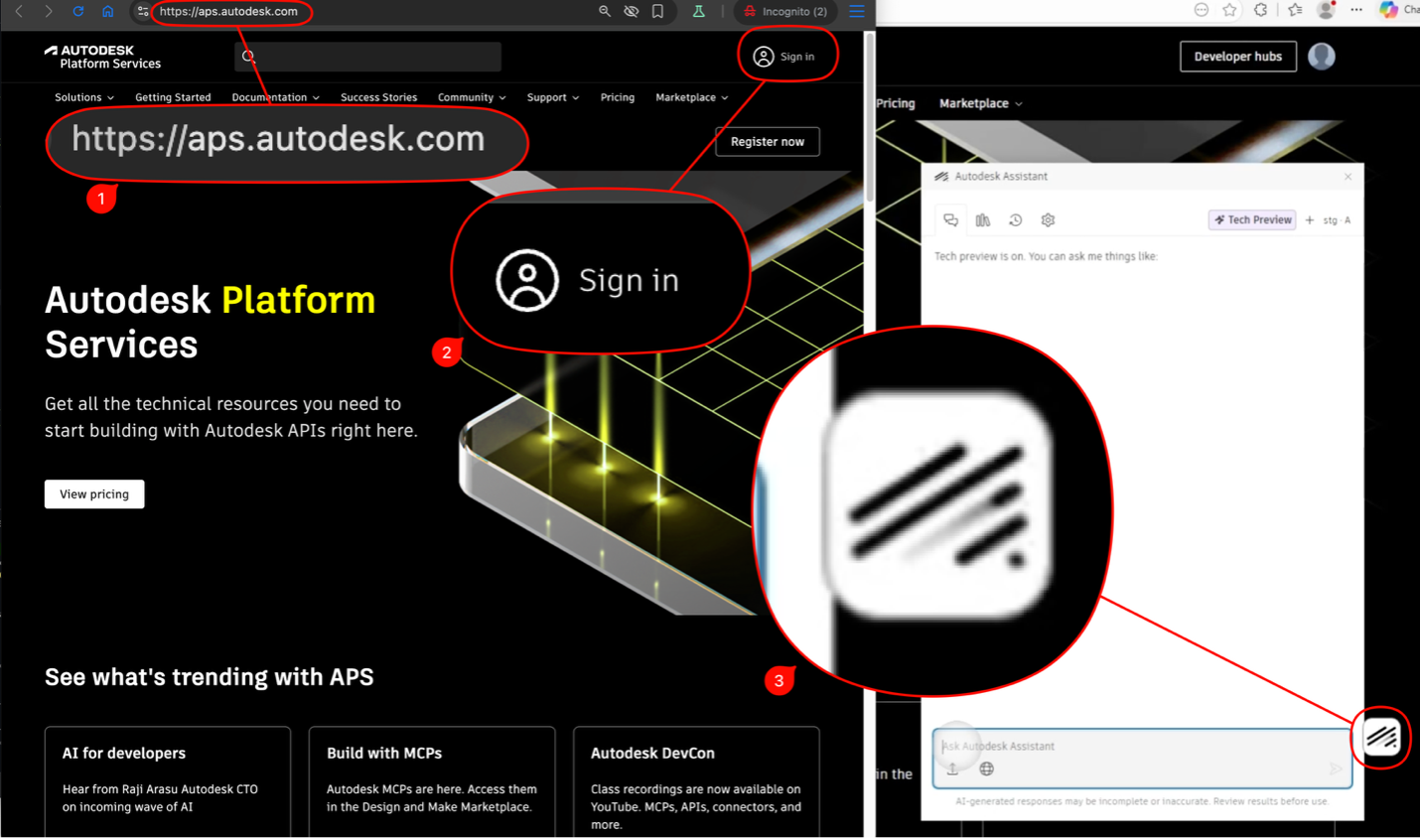
To access, go to Autodesk Platform Services, sign-in and click on the “Autodesk Assistant” icon at the bottom right.
A different way to work with APS
Until now, working with APS meant searching, browsing, and piecing together what you needed. You might search the documentation, open several tabs, cross-reference API references.
With Autodesk Assistant, you describe what you’re trying to do and get a direct, relevant answer. The experience of working with APS changes from the moment you log in.
How key personas work with Autodesk Assistant
APS serves a wide range of people — from business leaders evaluating what outcomes are possible, to industry professionals who need automations and insights across their workflows, to developers building targeted solutions for their industry. Here’s how Autodesk Assistant helps each of them:
Business leaders
You're new to APS or scoping out what's buildable. You need to understand what's possible, what it costs, and whether APS is the right fit — no technical knowledge required.
Try asking:
- I'm new to APS. Where should I start?
- What APS capabilities are relevant for construction workflows?
- Give me some examples of digital twins built using APS.
- What does it cost to build my application on APS? Describe your application.
- How do I estimate the ROI of building with APS?
- Every Friday, we bulk print custom Revit 2D sheets with a plugin. What will this cost me on APS?
Industry professionals and builders
You work with design data every day and want to automate tasks, extract insights, or connect workflows. You may not be writing code from scratch, but you need to know what APS can do for your specific use cases.
Try asking:
- Is there a tutorial on viewing my Revit model in a browser? How do I get started?
- Is there a way to export the properties to an Excel spreadsheet?
- Help me build a Bill of Materials dashboard using Manufacturing Data Management API given a Fusion folder URL and Access Token?
- How do I extract the layers out of an AutoCAD DWG file and change its title block. How can I apply that to my folder of DWG files on ACC, every Friday?
Developer
You're deep in a build and need fast and trustworthy technical guidance. The last thing you want is to lose flow hunting through tabs and cross-referencing API specifications. Autodesk Assistant gives you specific responses from Autodesk documentation.
Try asking:
- Explain the difference between 2LO and PKCE authentication?
- Help me use APS to find the properties that changed between two versions of Revit on ACC/Forma?
- How can I extract the BOM from the MFG Data Model using GraphQL?
- What's the best way to run my Revit plugin on APS? What does ‘headless’ mean?
What’s next
The capabilities we’re launching today — technical guidance, cost estimation, and more — are the beginning. Autodesk Assistant will evolve to help you discover, build, and do more with APS. Autodesk Assistant understands your industry and workflows, the problems you are trying to solve, and is here to help you move from idea to impact faster.
Log in to APS, enable Tech Preview, and see what’s possible when you have Autodesk Assistant working with you.