
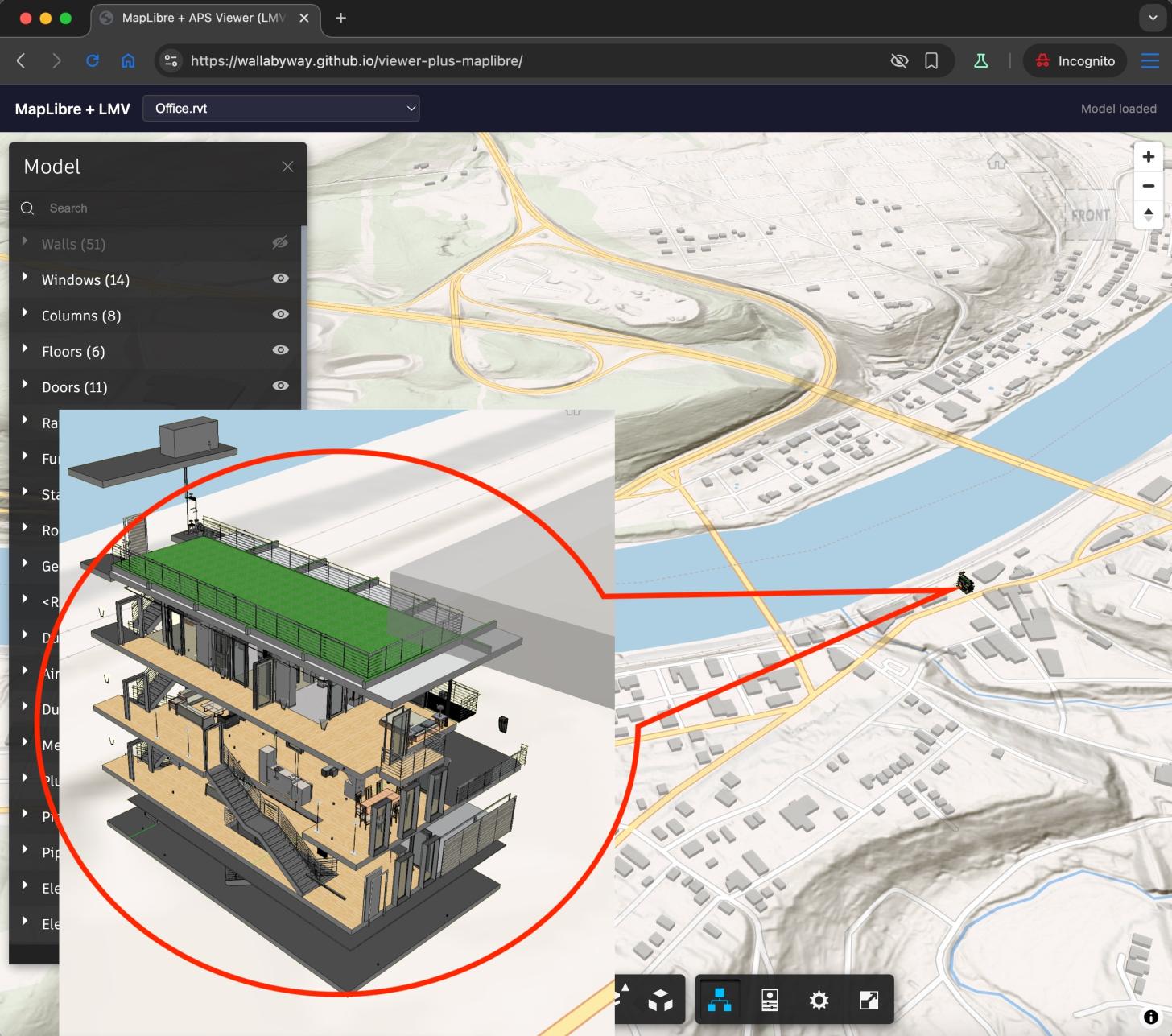
What if you could drop a full BIM model onto an open-source web map — not as a glTF 3D mesh, but rendered by the actual APS Viewer engine?
This is part 2 of the series: Add Esri terrain to APS Viewer - Part 1
Introduction
Three weeks ago I was at the Esri Developer Summit in Palm Springs. George Owen took the stage to demo the MapLibre ArcGIS Plug-in — Esri's official bridge for bringing ArcGIS services into MapLibre GL JS (blog post). It was compelling. Esri is investing in open-source mapping, and MapLibre's CustomLayerInterface is the hook that makes it possible.
I walked out of that session thinking: could MapLibre share the webGL context with APS Viewer?
I've been exploring BIM + GIS for a while now. Earlier I used geo-three to render Esri's terrain tiles into the geo-three / three.js scene. But terrain and geoThree is limited to distance and no vector tile maps or 3D buildings.
This post describes what happened when I tried to render an Autodesk Revit model on a MapLibre map by making MapLibre and LMV (Autodesk's internal viewer engine) share a single WebGL context. Not a screenshot overlay. Not an iframe. Two renderers, one canvas, one depth buffer.
Live Demo
Setup & Running
npm install
npm run dev
This starts a Vite dev server on http://localhost:5180 with a proxy to the APS public demo API (no API key required). Open the URL shown in the terminal.
The demo loads the Snowdon Towers Revit model from Autodesk's sample bucket and places it on a MapLibre map with 3D terrain at Brownsville, PA. Use the dropdown to switch between available models. The LMV viewer UI (toolbar, model browser, properties panel) is overlaid on the map.
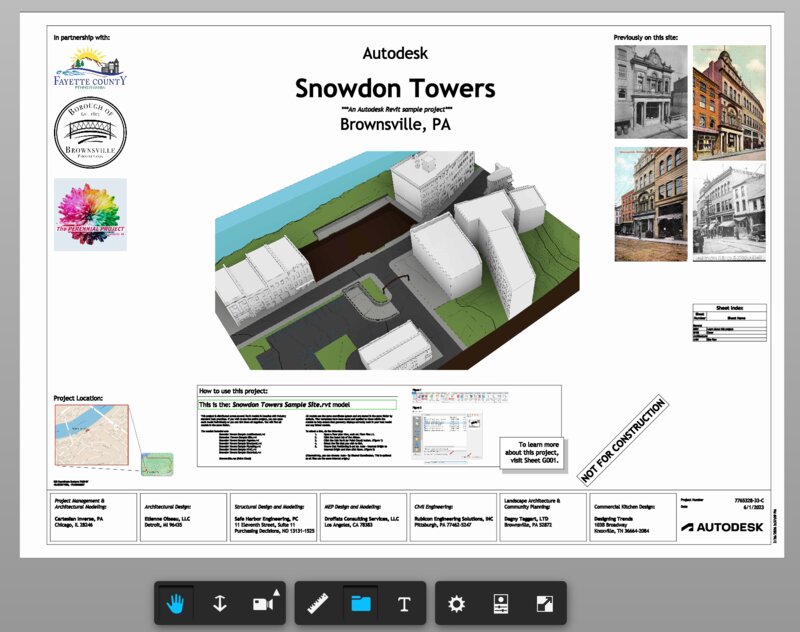
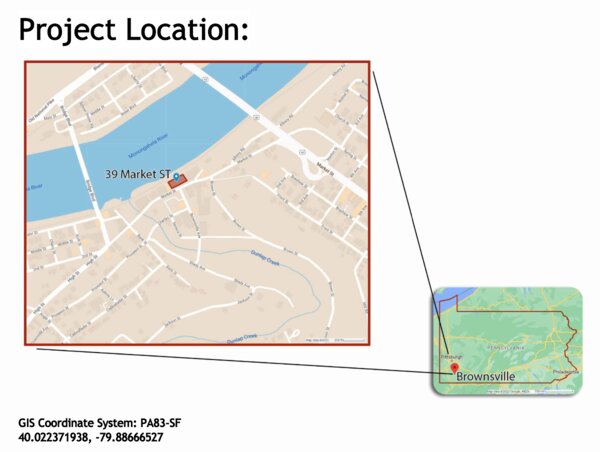
Geo-pinned in main.mjs:
const modelOrigin = [-79.88666527, 40.022371938];
const modelAltitude = 10;
const modelRotationDeg = 30;
Requirements
- Node.js 18+
- A modern browser with WebGL2 support
The Approach
MapLibre GL JS supports custom WebGL layers through its CustomLayerInterface. You register a layer object with onAdd() and render() methods. Inside render(), you receive the raw WebGL2RenderingContext and MapLibre's view-projection matrix. You can draw whatever you want.
The APS Viewer SDK (aka LMV) uses three.js revision 71 as its rendering engine. We extract LMV's constructor from a throwaway instance and create a new one targeting MapLibre's canvas.
The full technique breaks down into five parts:
Part 1: Sharing a Single WebGL Context
Two renderers on one canvas. The WebGL state machine is global — after each renderer draws, we reset everything R71 doesn't touch:
glr.resetGLState();
gl.bindVertexArray(null);
gl.bindBuffer(gl.ARRAY_BUFFER, null);
gl.bindBuffer(gl.ELEMENT_ARRAY_BUFFER, null);
gl.bindFramebuffer(gl.FRAMEBUFFER, null);
gl.useProgram(null);
Part 2: Bootstrapping LMV's Renderer
LMV's renderer class isn't on any public namespace. The trick: create a throwaway instance, grab the constructor, destroy it:
const temp = new Autodesk.Viewing.Viewer3D(div);
temp.start();
const RendererClass = temp.impl.glrenderer().constructor;
temp.finish();
Part 3: Camera Synchronization
A Revit model is in feet, MapLibre in Mercator. The relative-to-eye (RTE) technique keeps Float32 precise — tiny offsets instead of absolute coordinates:
const model64 = new Float64Array([
   s * cosR, -s * sinR, 0, 0,
  -s * sinR, -s * cosR, 0, 0,
   0,         0,        s, 0,
   dx,        dy,       dz, 1
]);
const result = mulMat4Float64(vpCentered, model64);
cam.projectionMatrix.elements.set(new Float32Array(result));
Part 4: Transparency and Compositing
LMV's blit overwrites the map. We intercept gl.disable(BLEND) to force alpha compositing during presentBuffer:
const origDisable = gl.disable.bind(gl);
gl.disable = function(cap) {
  if (forceBlend && cap === gl.BLEND) return;
  origDisable(cap);
};
Part 5: Adding 2D — AutoCAD Drawings on the Map
LMV's 2D pipeline uses MSDF/SDF shaders driven by a pixelsPerUnit uniform. Our skipCameraUpdate = true blocks the only code path that updates it:
tick()
  └─ skipCameraUpdate? ──YES──> SKIPPED (no pixel scale update)
                          NO ──> updateCameraMatrices()
                                   └─ matman.updatePixelScale(ppu, w, h, camera)
The Result
A Revit building rendered on a MapLibre map at Brownsville, PA. The model is geo-pinned — pan, zoom, and rotate the map and the building moves with it. MapLibre's 3D extruded buildings render alongside.
The entire implementation is under 300 lines across two files (main.mjs and lmv-loader.mjs).
Source
The complete source code for this demo is in this repository. The key files:
main.mjs— MapLibre custom layer, camera sync, model loadinglmv-loader.mjs— LMV initialization, renderer injection, transparency patchesindex.html— Minimal UI with model picker
Made with 'Blueprint'
Follow me on X @micbeale | Connect on LinkedIn