
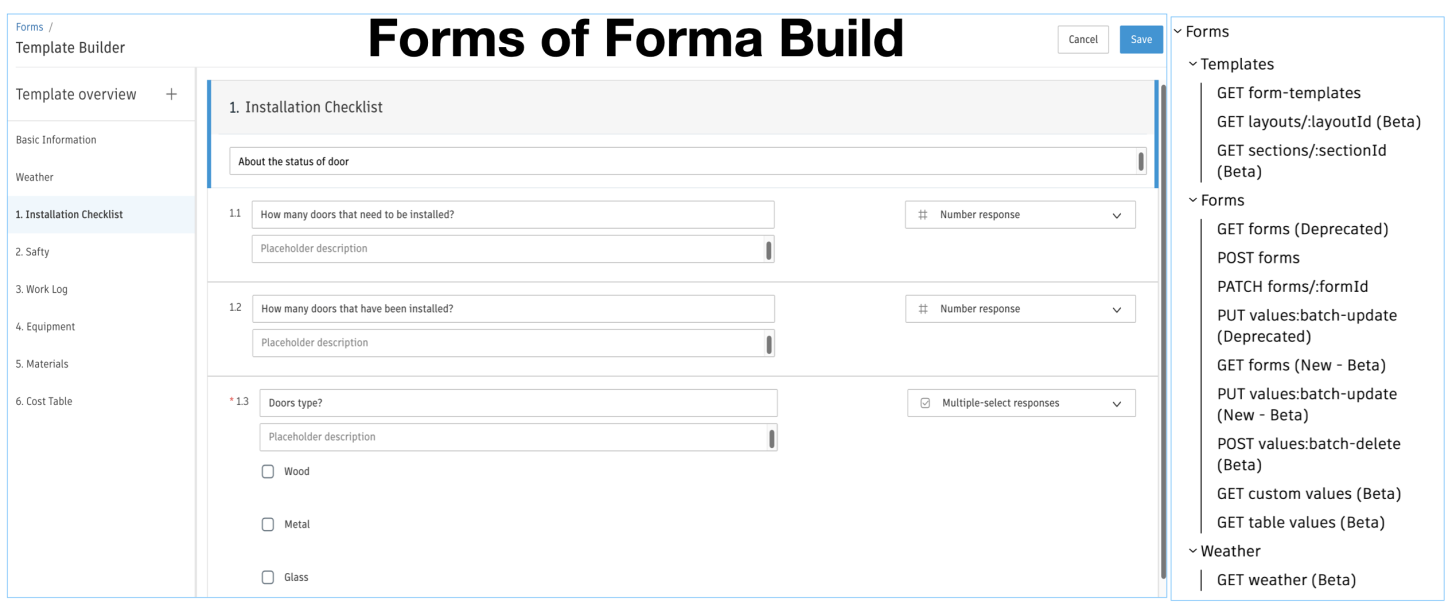
Previously, the Forms template API only returned basic template information. To retrieve the list of checklist questions, supported tables, and their columns defined in the web form, you had to inspect the actual content of a specific Form instance.
We are pleased to announce the public beta release of the Forms template Layout API. With this new API, you can directly obtain the full definitions of web form. In conjunction with this release, the relevant APIs of Form custom table are also available.
To support these improvements, some of the existing APIs have been upgraded to new versions. The legacy versions are scheduled to be deprecated on December 31, 2026. Please plan accordingly to migrate your integration at your earliest convenience.
Note: layouts are only for web forms. PDF form definitions are contained within their PDF content.
Overview
- New API
-
GET layouts/:layoutId: get the basic information of the layout and its sections
-
GET sections/:sectionId: get definitions of Questions and Tables
-
GET custom values: get the input values of Questions in form instance
-
GET PDF values: get the values extracted from a PDF-based form
-
GET table values: get the input values of Tables in form instance
-
POST values:batch-delete: delete specific rows of tables.
- GET weather: get weather data in the form instance.
-
- New Version API
-
GET forms (v2): response schema is updated. customValues (Questions) and tabularValues (Tables) are removed. To get input values, please use GET custom values and GET table values respectively. The weather data is also removed. To get detail data of weather, use GET weather with the id from GET forms.
-
PUT values:batch-update (v2): the ability is extended to support updating custom table values.
-
The migration guide and tutorials detail the latest updates and API usage. This blog summarizes key takeaways.
Form Layout
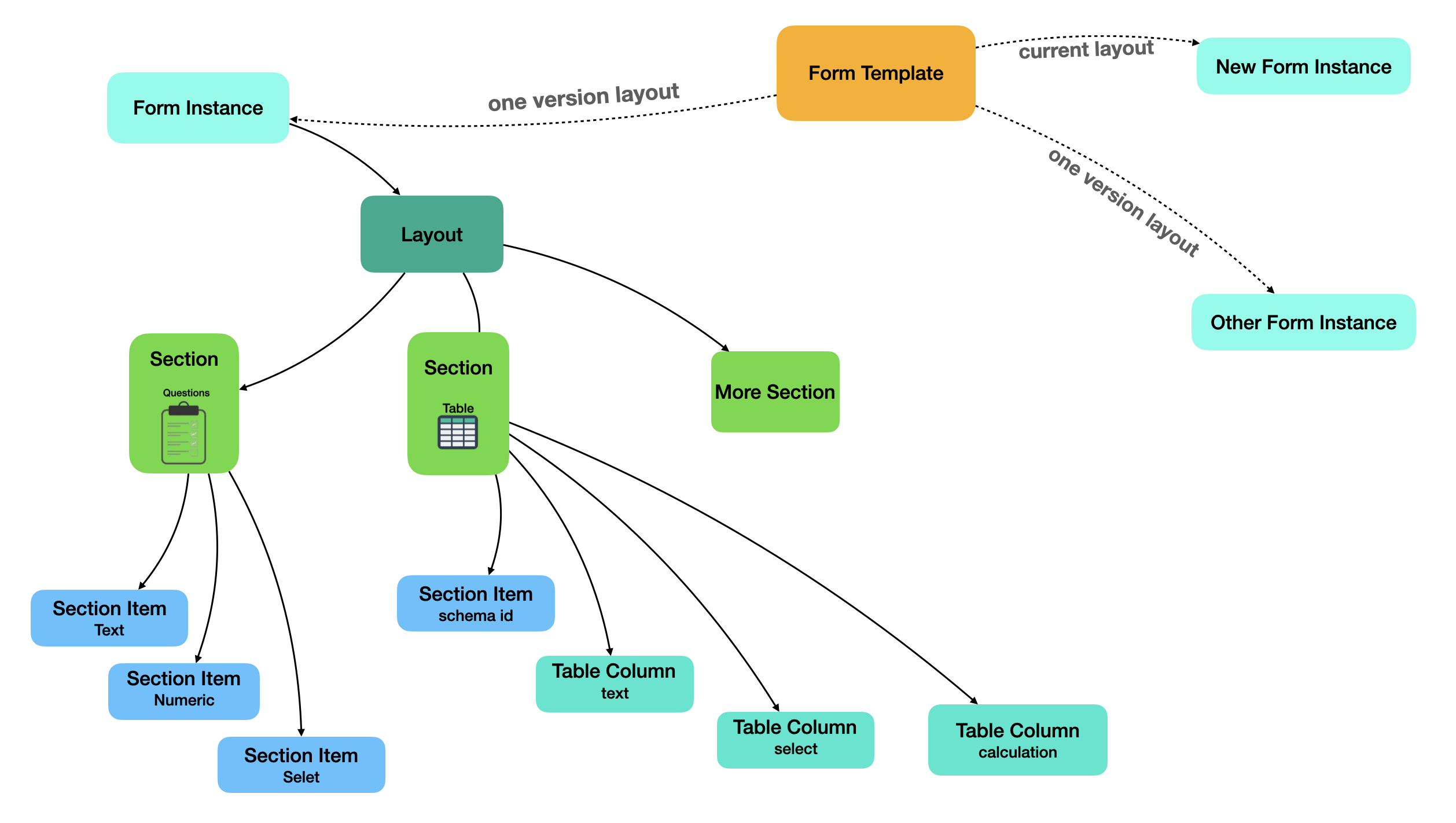
As shown in the above figure, a template is bound to a layout. The layouts are read-only. GET Templates returns the layout id of the latest version: currentLayoutId. Updates to a template (adding a question, section, table etc.) will create a new layout where new form instances going forward will use the new layout.
So once a Form instance is created, if the template's layout changes, the currentLayoutId and the Form instance's layout id will be different. When checking definitions or modifying values, use the layoutId corresponding to that Form instance version.
The layout contains a list of sections and their basic information.
"sections": [
    {
        "uid": "e716e2fc-ea81-4626-88cb-37555953be80",
        "displayIndex": 1,
        "label": "Door Status",
        "description": "About the status of door"
        ... ...
    },
    {
        "uid": "0bb19085-1fd0-419d-8b72-55c7e01a5c54",
        "id": "f0bbfd7a-65f5-4c67-a51c-1f45f4045de0",
        "displayIndex": 3,
        "label": "Cost Table",
        "description": "The table on cost of doors"
        ... ...
    }
]
The section contains specific definitions. If it is a Question section, the item in sectionItems describes the definition of each question.
"sectionItems": [
    {
        "uid": "57e59507-d193-4e04-b854-206094426d63",
        "displayIndex": 2,
        "label": "How many doors that have been installed?",
        "schema": "e08dd0bc-fb66-46e2-8795-02594cbc8254",
        "valueName": "numberVal"
        ... ...
    },
    {
        "uid": "65481c29-7912-4bc9-83de-b87208e6437d",
        "displayIndex": 3,
        "label": "Doors type? ",
        "schema": "60048650-3720-4907-bfdd-50f560214aba",
        "valueName": "arrayVal",
        "presets": [
            {
                "value": "Wood"
            },
            {
                "value": "Metal"
            },
            {
                "value": "Glass"
            }
        ]
        ... ...
    }
]
If it is a Table, only one one item with sectionItems. It contains more information about this section, including the schema ID (which will be used later for updating or creating table rows). The column definitions are described in tableColumns. Note: when operating on section layout, custom questions, or table columns, uid will be used to identify these objects.
"sectionItems": [
    {
        "uid": "f0d62ad7-591e-45ca-a5cd-135ea4ff8dd5",
        "type": "table",
        "schema": "a04c9030-8e02-4bf8-b375-dbda81111212",
        "addRowLabel": "Add entry"
        ... ... ...
    }
],
"tableColumns": {
    "f0d62ad7-591e-45ca-a5cd-135ea4ff8dd5": [
        {
            "uid": "dc972f0d-7170-4271-be48-9441b3425854",
            "sortIndex": 0,
            "type": "column",
            "presets": [
                {
                    "value": "Level 1"
                },
                {
                    "value": "Level 2"
                },
                {
                    "value": "Level 3"
                }
            ],
            "valuesProvider": "presets",
            "label": "Level",
            "columnKey": "level",
            "columnType": "text_val"
            ... ... ...
        },
         {
                "uid": "0708d3d9-dc12-49dd-b720-f8fc1c41b5f8",
                "sortIndex": 2,
                "type": "column",
                "label": "Unit Cost",
                "columnKey": "unitCost",
                "columnType": "number_val"
                 ... ... ...
            }
    ]
}
Custom Table
The structure of a custom table is the same as that of a built-in table, but it supports more data type of the columns, including calculations.
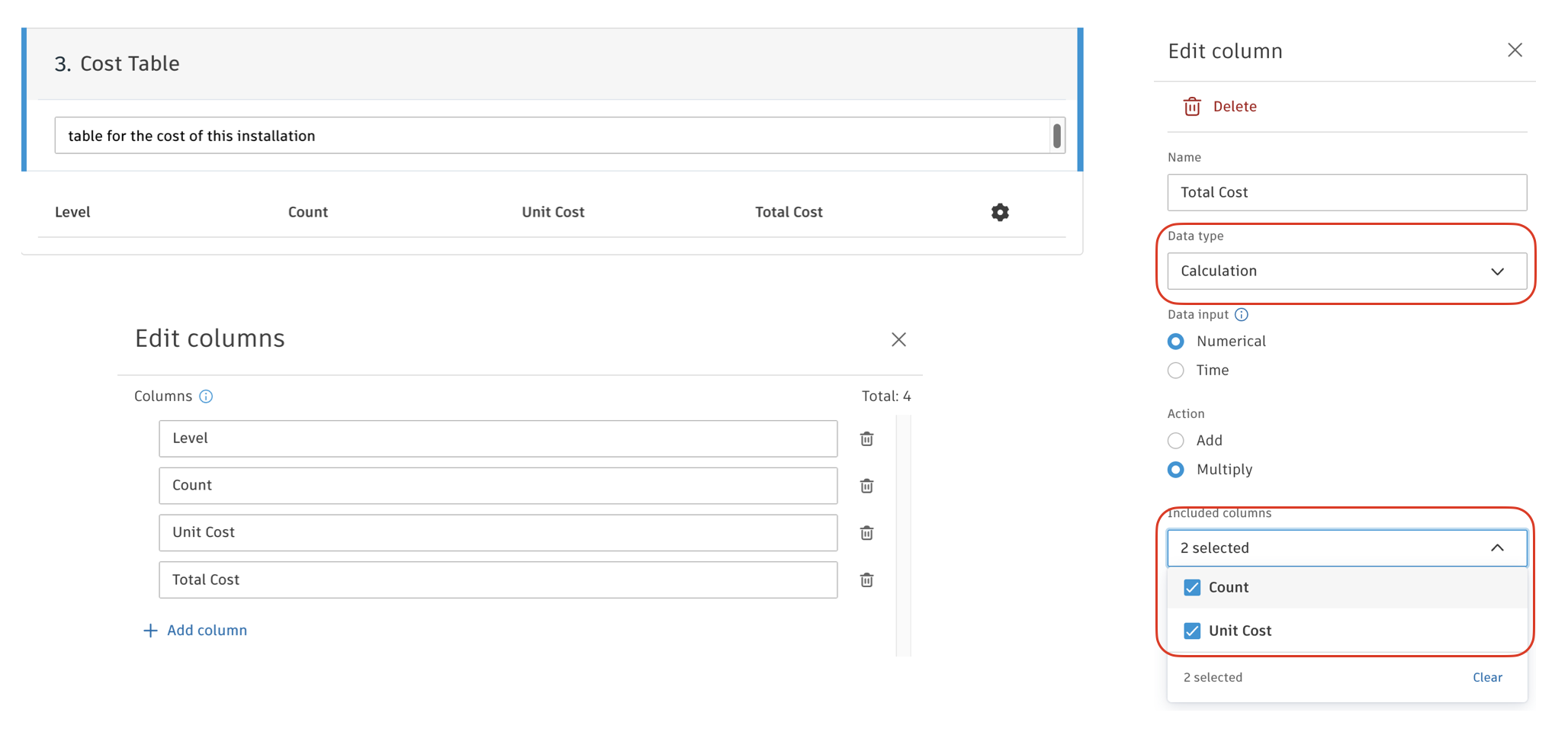
As mentioned above, each table has a schema id. When obtaining the input value of a table, the URL parameter fieldId of GET table values refers to the schema id. When updating or creating a row, follow the schema below. To unify, PUT values:batch-update (v2) replaces name with schema in tabluarValues. For built-in tables, you can use either their name or schema id. For custom tables, you must use the schema id. In addition, the columnId is the uid of table columns defined in the section.
{
     "tabularValues":[
         {
          "schema": "a04c9030-8e02-4bf8-b375-dbda81111212",
          "id": "5b4fe828-fd45-4a9e-a660-6b70cb47c39f",
           "columns": [
              {
                "columnId": "19b5d4e9-b7c0-44f4-9c8b-f3aa52fb5058",
                "numberVal": 70
              }
           ]
         }
     ]
}
Documentations
- Field Guide
- Tutorial
- API References
- Forms API Migration Guide (2026 April Release)
- Postman Collection
Should you have any questions or feedbacks, please contact APS Help.