
Backing Up 1,000 Forma Projects to S3 — Without Melting the API
So... You've got a big Forma account - Hundreds of projects. Maybe thousands !
Architects uploading Revit models, field teams pushing PDFs, project managers reorganizing folders at 2am.
Your job?
Back it all up to S3, Every... 24... hours !
Sounds simple. It's not.
The brute force problem
The obvious approach: loop through every project, walk every folder, list every file, compare against what you've already backed up. Download what's new.
For a hub with 1,000 projects averaging 100 folders each, that's 100,000 API calls just to check if anything changed. At the DM API's 300 requests/minute rate limit, that's 5.5 hours — and you haven't downloaded a single file yet.
Do that daily and you'll burn through your rate budget before lunch.
The rollup trick nobody is using
Here's the thing. Since February 2023, the Data Management API has quietly exposed a field called lastModifiedTimeRollup on every folder. It's been stable for a while now, but nobody outside of Autodesk, appears to have leveraged it for a delta backup system.
What does it do? It's a timestamp that propagates upward. When someone uploads a file deep in Project Files/Structural/Drawings/Rev3/, the rollup timestamp updates on Drawings/, then Structural/, then Project Files/, all the way to the project root. Instantly.
That means you can check an entire project with one API call. Fetch the root folder, compare its rollup against your cached value. Match? Skip the entire project. No match? Walk it.
On a typical day where 5% of projects have changes:
| Approach | API calls | Time at 300 rpm |
|---|---|---|
| Brute force (all folders) | ~100,000 | 5.5 hours |
| Rollup pruning (5% dirty) | ~6,500 | 22 minutes |
| Rollup pruning (nothing changed) | ~1,007 | 3.4 minutes |
That's a 15x reduction. And on quiet days — weekends, holidays — the entire hub check finishes in under 4 minutes.
Smart tree walking
It gets better. The rollup doesn't just work at the project level. It works at every folder in the tree.
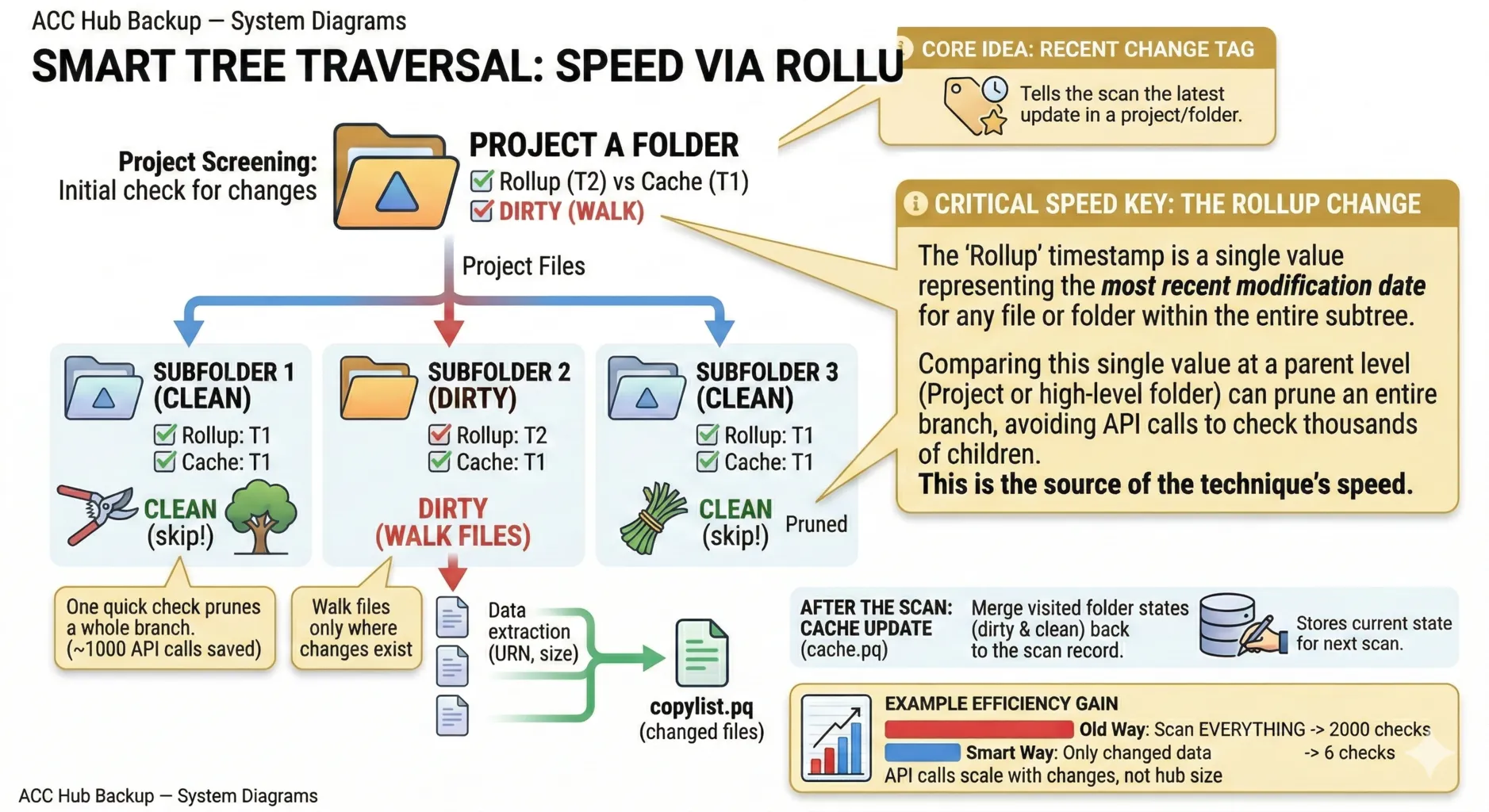
When a project is dirty, you don't walk the whole thing. You compare rollups at each subfolder and prune clean branches. If one team uploaded files to /Structural/Models/ but /Architectural/, /MEP/, and /Civil/ haven't changed, you skip those entire subtrees.
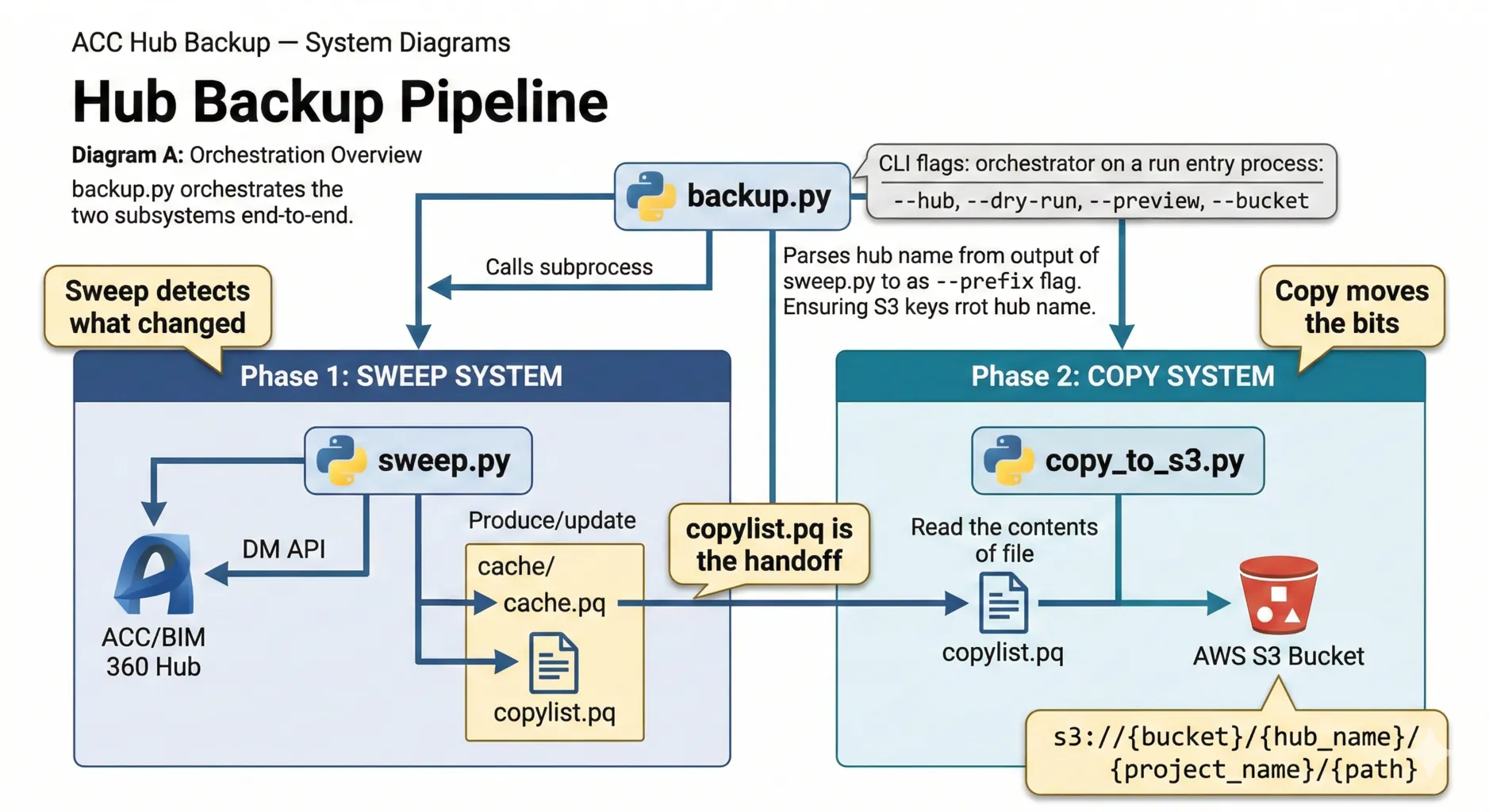
The sweep caches all these rollup values in a local parquet file (cache.pq). Next run, it compares live values against the cache. Changed? Walk it. Same? Prune it.
The output is another parquet file — copylist.pq — listing every changed file with its storage URN, version number, and path. This is the handoff to the copy system.
Streaming to S3 without touching disk
The copy system reads the copylist and does something neat: it downloads files from Autodesk's storage and uploads them to your S3 bucket in a single streaming pass. No temp files on disk.
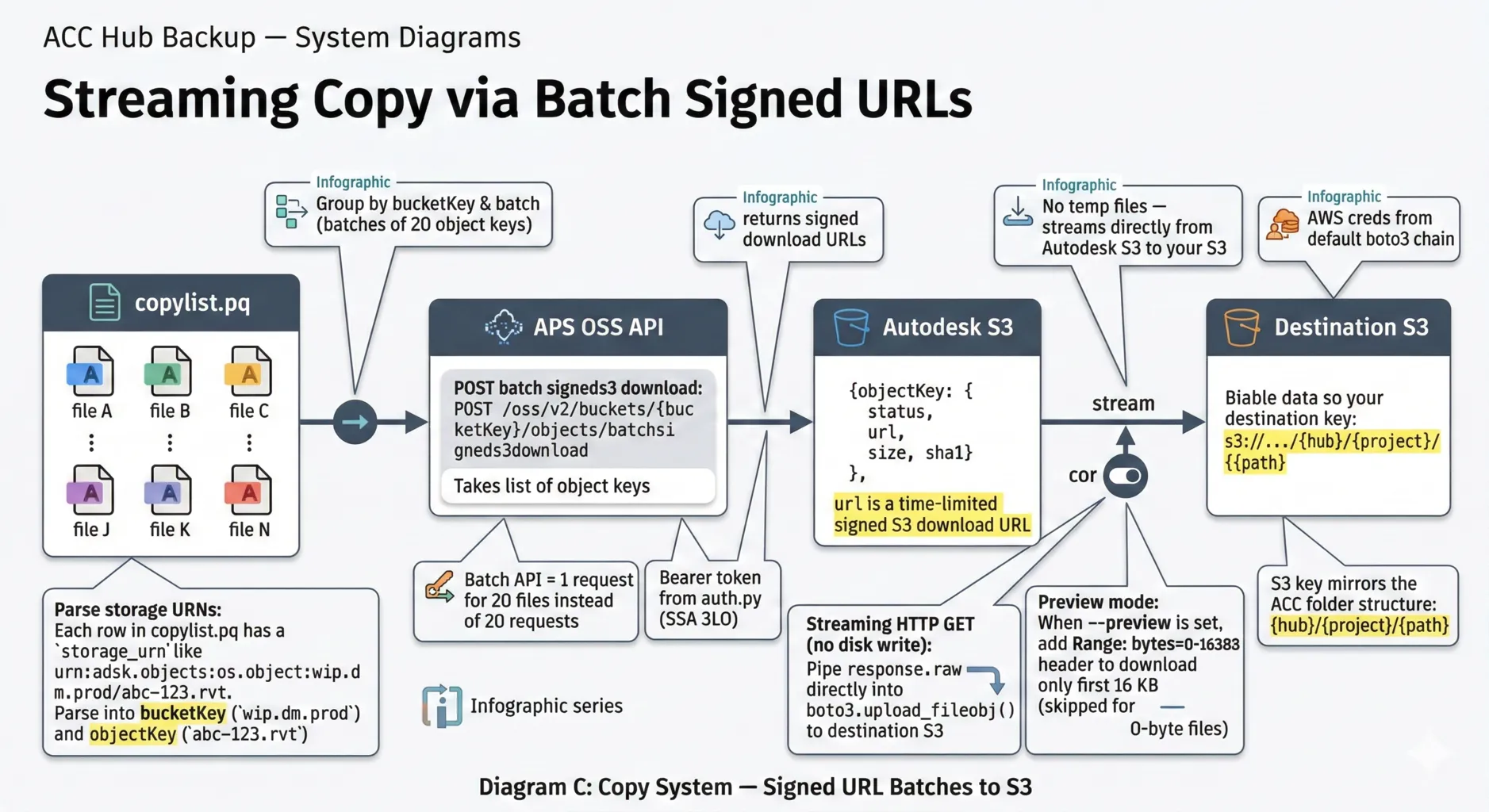
It works by batching up to 20 files at a time into a single API call (batchsigneds3download), which returns time-limited signed S3 download URLs. For each URL, it opens a streaming HTTP GET and pipes response.raw directly into boto3.upload_fileobj(). The file flows from Autodesk's S3 to your S3 without ever hitting your filesystem.
The S3 key structure mirrors the Forma folder hierarchy:
s3://my-bucket/My Hub/Project Alpha/Project Files/Structural/model.rvt
Each run also uploads the copylist as a date-stamped manifest (_manifests/2026-03-03.parquet), so you have an audit trail of exactly what was backed up and when.
The one gap: deletions
There's a catch. lastModifiedTimeRollup updates when files are added or modified. It does not update when files are deleted.
If someone deletes a file from a dormant project, the rollup doesn't change. The sweep skips the project. The deleted file stays on S3 forever as an orphan.
The same problem applies to folder moves — the sweep picks up files at their new location (the destination folder's rollup changes), but has no signal that the old path is stale.
The fix? A lightweight webhook listener that subscribes to the four "departure" events (dm.version.deleted, dm.version.moved.out, dm.folder.deleted, dm.folder.moved.out) and logs them. The backup script reads that log before each run and cleans up.
The full implementation — including a working Lambda prototype, registration CLI, and rate-limit handling — is in the repo.
The whole thing in one command
python backup.py --hub "My Construction Hub" --bucket my-s3-backupThat's it. Sweep, detect changes, download, upload, write manifest. Cron it daily and walk away.
The repo: github.com/wallabyway/acc-hub-backup
Everything's there — the sweep system, copy pipeline, webhook listener, parquet schemas, diagrams, and a README that goes deep on the architecture. MIT licensed, Python, works with any Forma hub.
The lastModifiedTimeRollup field has been sitting in the DM API since February 2023. It's been stable, it's documented, and it turns an impossible daily backup into a 22-minute cron job.
Follow me on Twitter/X @micbeale