API Basics
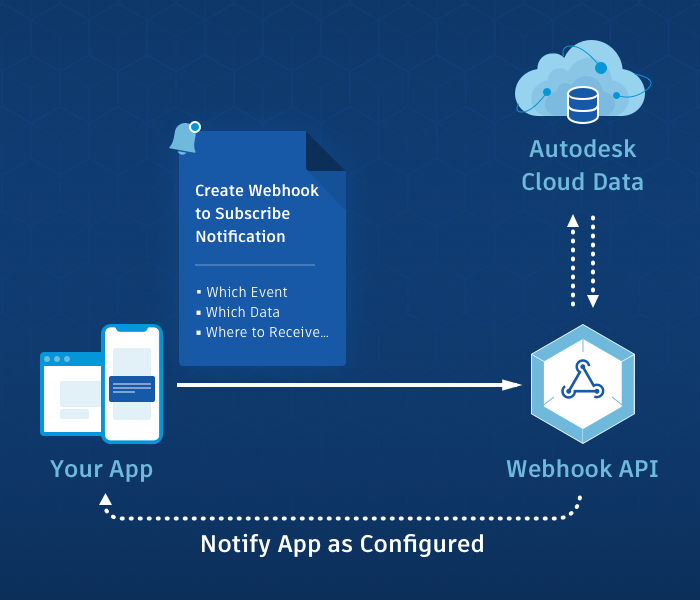
The Webhooks API lets your app subscribe to events in Autodesk Platform Services (APS), so that Autodesk notifies your app when something changes. Instead of polling an Autodesk service to ask whether anything has happened, your app waits to be told.
The model is the same for every Autodesk service:
- Subscribe. Your app creates a webhook that states which event to watch, which data to watch it in, and where notifications should be sent.
- Autodesk sends a callback. When the event occurs, the Webhooks service sends an HTTP POST request, called a callback, to the URL your app registered.
- Your app reacts. Your app confirms that the callback is genuine, responds to acknowledge it, and then does its own work.
Key Concepts
A webhook ties one event, in one defined part of your data, to one URL in your app. These are the five terms you need in order to create one.
| Term | What it means |
|---|---|
| Webhook | A subscription that connects an event, a scope, and a callback URL. Also referred to as a hook. |
| System | The Autodesk service that produces the event, identified by an ID. For example, data is the system ID for Data Management. |
| Event | The specific change your app wants to hear about. For example, dm.version.added. |
| Scope | The subset of data the webhook watches, given as a name and a value. For example, the folder scope and a folder URN. |
| Callback URL | The URL in your app that the Webhooks service sends notifications to. It must be reachable from the internet. |
Two points about scope are worth knowing early, because they decide how many callbacks your app receives:
- Scope is recursive. A webhook on a folder also covers the folders inside it. A webhook on a project root folder therefore covers the whole project.
- Valid scope names differ by event. The reference page for each event states which scope name it accepts. See Supported Events.
Authentication
All Webhooks operations require an APS access token, which your app sends in the Authorization header of the request. Which type of access token you need depends on the data your webhook watches and on the Autodesk service whose events you subscribe to.
See Authentication for Webhooks for guidance on choosing and using the right access token.
Example: Subscribing to an Event
Suppose your app needs to know whenever a new version of a file is added to one folder in Data Management. The webhook needs four things:
| System | data, the system ID for Data Management |
| Event | dm.version.added |
| Scope | folder, set to urn:adsk.wipprod:fs.folder:co.wT5lCWlXSKeo3razOfHJAw |
| Callback URL | https://myapp.example.com/callback |
The system and the event identify the subscription, so they appear in the request path. The scope and the callback URL are fields in the request body:
curl -X 'POST'
     -v 'https://developer.api.autodesk.com/webhooks/v1/systems/data/events/dm.version.added/hooks'
     -H 'Content-Type: application/json'
     -H 'authorization: Bearer <ACCESS_TOKEN>'
     -d '{
            "callbackUrl": "https://myapp.example.com/callback",
            "scope": {
                 "folder": "urn:adsk.wipprod:fs.folder:co.wT5lCWlXSKeo3razOfHJAw"
            }
      }'
What Happens When the Event Occurs
Someone adds a new version of a file to that folder. The Webhooks service sends a POST request to https://myapp.example.com/callback with a JSON body. The following example is abridged:
{
  "version": "1.0",
  "resourceUrn": "urn:adsk.wipprod:fs.file:vf.0zvdp3CoTzWDcZC_wL0kJA?version=1",
  "hook": {
    "system": "data",
    "event": "dm.version.added",
    "hookId": "1fcd3e30-9f3f-11e7-951f-0fd5337ed5ce",
    "callbackUrl": "https://myapp.example.com/callback",
    "scope": {
      "folder": "urn:adsk.wipprod:fs.folder:co.wT5lCWlXSKeo3razOfHJAw"
    }
  },
  "payload": {
    "name": "site-plan.rvt",
    "version": "1",
    "state": "CONTENT_AVAILABLE",
    "lineageUrn": "urn:adsk.wipprod:dm.lineage:0zvdp3CoTzWDcZC_wL0kJA",
    "modifiedTime": "2017-09-06T03:08:53+0000"
  }
}
The hook field describes the webhook that matched, and the payload field describes what happened. The fields inside payload are defined by the event, so see the reference page for the event you subscribe to, such as dm.version.added, for the full body and the headers that accompany it.
Your app must respond with a 2xx status code within 7 seconds. A non-2xx response, or no response within 7 seconds, counts as a failed delivery. Acknowledge the callback first and do your processing afterwards, rather than making the Webhooks service wait for your work to finish.
Refining What You Receive
Two optional fields help you receive fewer, more useful callbacks:
filtertakes a JsonPath expression that is evaluated against the callback payload, so your app is notified only when the payload matches. See Callback Filtering.hookAttributeholds a small JSON object of your own, which is returned to you in every callback for that webhook. It is useful for context that the payload does not carry, such as your own record ID. See the Field Guide.
Webhook Lifecycle
A webhook moves through the following stages. The status field of a webhook tells you where it currently stands.
- Created. A new webhook is
activeand receives a callback for every matching event. - Delivering. The Webhooks service guarantees at-least-once delivery, so the same event can occasionally arrive more than once. Your callback should be able to handle a repeat without doing its work twice.
- Retrying. If a delivery fails, the Webhooks service retries it over the following 48 hours.
- Inactive. If deliveries continue to fail, the Webhooks service sets the status to
inactiveand stops sending callbacks. You can re-enable the webhook using the Update a Webhook operation, or set theautoReactivateHookfield so that the Webhooks service attempts reactivation for you. - Deleted. A webhook lasts until you delete it, unless you set the
hookExpiryfield when you create it, in which case it is deleted automatically at that time.
Event Delivery Guarantees is the authoritative source for the retry schedule, the rules that inactivate a webhook, and the automatic reactivation lifecycle.
Secret Token
The access token described in Authentication authorizes the calls your app makes to Webhooks operations. It plays no part when the Webhooks service calls your callback URL. Because your callback URL is reachable from the internet, anyone can send a request to it, so your app needs a separate way to confirm that a callback genuinely came from the Webhooks service. That is what a secret token is for.
When you set a secret token, the Webhooks service uses it to compute an HMAC hash signature of each callback payload and sends that signature in the x-adsk-signature header. Your callback recomputes the signature from the body it received, using the same secret token, and compares the two values. A match indicates that the callback came from the Webhooks service and that the payload was not altered in transit. A mismatch means the callback should be rejected.
A secret token is not an OAuth credential. You choose its value yourself, it carries no scopes, and it grants no access to APS data. You set one using the Create Secret Token operation, or for an individual webhook using the Update a Webhook operation. The access token you use to set it determines which webhooks it applies to: a two-legged access token sets the secret token for the webhooks owned by the calling app, and a three-legged access token sets it for the webhooks owned by the calling user.
For a worked example, including the code that recomputes the signature, see How to verify payload signature.
Behavior Varies by Autodesk Service
The concepts on this page apply everywhere, but the values do not. Each Autodesk service defines its own system ID, its own event names, and the scope those events accept. For example, Data Management events belong to the data system and are scoped by folder, while Cost Management events belong to the autodesk.construction.cost system and are scoped by project.
Individual services can also add requirements of their own, such as a specific access token type, a product subscription, or a role in a project. Those requirements are stated in the tutorial for that service, which is where to look before you write any code.
- For the systems, events, and scopes a service supports, see Supported Events.
- For the prerequisites and a working request for your service, see the Creating a Webhook tutorial for it in the How-to Guide.
Next Steps
- Authentication. Choose and acquire the right access token: Authentication for Webhooks.
- Create your first webhook. Follow the tutorial for your service, for example Creating a Webhook (Data Management), or browse them all in the How-to Guide.
- Look up a field. Every field of a webhook is described in the Field Guide.
- Understand delivery. Retries, inactivation, and reactivation are covered in Event Delivery Guarantees.
- Work out which region applies. A webhook belongs to one Autodesk Region, and every request that touches it has to name that region. See Regionalization and Data Residency.
- Secure your callback. Verify signatures using How to verify payload signature.