Creating New Base Model
Based on the type of Connector you select, create a class that will inherit the model definitions from the following classes that the SDK provides.
- ConnectorBase.BaseReadOnlyExchangeModel for Read-only Connector.
- ConnectorBase.BaseWriteOnlyExchangeModel for Write-only Connector.
- ConnectorBase.BaseReadWriteExchangeModel for Read-Write Connector.
The ConnectorBase.BaseReadOnlyExchangeModel, ConnectorBase.BaseWriteOnlyExchangeModel, and ConnectorBase.BaseReadWriteExchangeModel are abstract classes that provide default implementation to bind the Connector UI with the Data Exchange SDK, ForgeAuth and the ACCHostingProvider. These default implementations can be overridden to customize the Connector behaviors.
All the base models require you to override the following abstract methods:
- GetExchangesAsync: Retrieve a collection of exchanges based on the specified exchange search filter. The search can be performed by exchange, folder, and project criteria. The filter also carries a
ForceRefreshflag that tells your implementation whether to bypass any locally cached exchange list and re-read from the host document. See Refreshing the exchange list below. - SelectElementsAsync: Passes a list of Exchange Id’s as a parameter, where it should highlight the Exchange elements on the platform application.
Following are the methods that you can override:
For BaseWriteOnlyExchangeModel and BaseReadWriteExchangeModel:
UpdateExchangeAsync: This method is called when an Exchange is created or updated and is the place where the Client data -> FDX translation should be implemented.
For BaseReadOnlyExchangeModel and BaseReadWriteExchangeModel:
OnGetLatestExchangeDataAction: This method is called when an Exchange is added to the client and is the place where the FDX -> Client data translation should be implemented.
UnloadExchangesAsync: This method is called when an added Exchange is being unloaded. This can be used to implement code to clear the corresponding data from the client document.
SetExchangeVisibilityAsync: (Optional) Override this method to control the visibility of loaded exchanges in the host application without unloading them. This enables users to temporarily show or hide exchanges, similar to layer visibility controls. See Implementing Exchange Visibility Control for a complete guide.
ReadOnly Model
A ReadOnly Model inherits from BaseReadOnlyExchangeModel.
An implementation of the ReadOnly model requires you to implement GetExchangesAsync, SelectElements and UnloadExchangesAsync abstract methods.
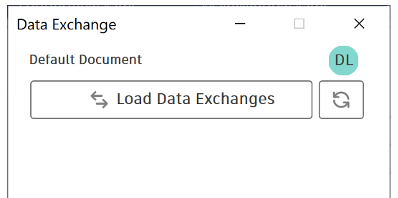
For a ReadOnly Model, the Application class launches the user interface as shown in the following image. The Read Connector enables you to read or load the Data Exchanges.
WriteOnly Model
A WriteOnly Model inherits from BaseWriteOnlyExchangeModel.
An implementation of the WriteOnly model requires the implementation of GetExchangesAsync, SelectElements and UpdateExchangeAsync abstract methods.
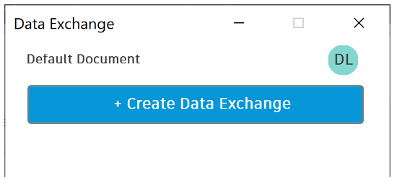
For a Write Model, the Application class launches the user interface as shown in the following image. The Write Connector enables you to create a Data Exchange.
Read-Write Model
A Read-Write Model inherits from BaseReadWriteExchangeModel.
An implementation of the Read-Write model requires the implementation of GetExchangesAsync, SelectElements, UpdateExchangeAsync and UnloadExchangesAsync abstract methods.
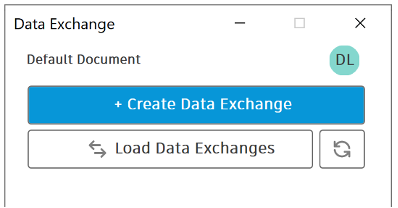
For a Read-Write Model, the Application class launches the user interface as shown in the following image. The Read-Write Connector combines the features of both Read and Write Connectors in the same interface.
Exchange visibility
The SetExchangeVisibilityAsync method controls the visibility of loaded exchanges in the host application. This method is called when a user selects hide or show options from the exchange context menu in the Connector UI.
Override the SetExchangeVisibilityAsync method
public override async Task<bool> SetExchangeVisibilityAsync(List<string> exchangeIds, bool visible)
{
    foreach (var exchangeId in exchangeIds)
    {
        // Implement host-specific visibility logic
        // visible = true: Show the exchange
        // visible = false: Hide the exchange
    }

    return true;
}
The visible parameter indicates the desired visibility state. When true, the exchange elements appear in the host application views. When false, the elements are hidden but remain loaded in memory.
UI integration
The Connector UI provides context menu options for loaded exchanges:
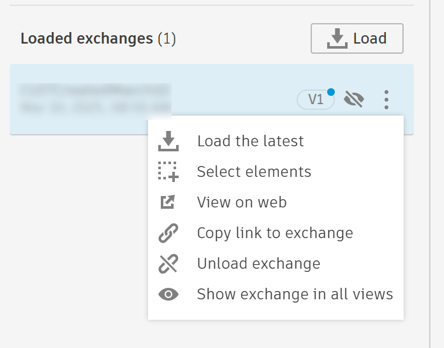
- Show exchange in all views - Calls the method with
visible = true - Hide exchange in all views - Calls the method with
visible = false(appears when exchange is visible)
The context menu icon indicates the current visibility state of the exchange.
Visibility state
The GetExchangesAsync method returns exchange items with the IsExchangeVisible property. This property indicates whether an exchange is currently visible in the host application.
Note: Hidden exchanges remain loaded in the host application. The visibility state persists only during the current connector session.
Refreshing the exchange list
When a user clicks the Refresh button in the Connector UI, they expect to see the latest exchanges — not a stale cached list. The ForceRefresh flag on the ExchangeSearchFilter passed to your GetExchangesAsync implementation lets you honor that intent, while still serving fast cached results for routine, programmatic refreshes.
The Connector UI calls GetExchangesAsync whenever the exchange list needs to be populated, and sets ForceRefresh to distinguish the two triggers:
| Trigger | ForceRefresh | Expected behavior |
|---|---|---|
| The user clicks the Refresh button in the Connector UI | true |
Treat as a user-initiated hard refresh: invalidate any locally cached exchange data and re-read exchanges from the host document. |
A programmatic refresh, such as the host calling RefreshExchangeList() after a document switch, create, or delete |
false (default) |
You may return cached results for a faster response. |
ForceRefresh defaults to false, so existing connectors that ignore the flag continue to behave exactly as before.
Honoring the flag
Inspect filter.ForceRefresh and skip your cache only when it is true. On a hard refresh, re-read from the host document and update your local cache so it reflects the latest data:
public override async Task<List<DataExchange>> GetExchangesAsync(ExchangeSearchFilter filter)
{
    // Soft (programmatic) refresh: reuse the cached list for a fast response.
    if (!filter.ForceRefresh)
    {
        var cached = GetCachedExchanges(); // your model's cache accessor (see note below)
        if (cached.Count > 0)
        {
            return cached;
        }
    }

    // Hard refresh (user clicked Refresh), or the cache is empty:
    // re-read from the host document and refresh the local cache.
    var exchanges = await FetchExchangesFromHostAsync(filter); // your fetch logic
    UpdateLocalCache(exchanges);                               // your cache-update logic
    return exchanges;
}
In this example, FetchExchangesFromHostAsync and UpdateLocalCache are placeholders for your own implementation; GetCachedExchanges is the abstract method every base model already implements.
About
GetCachedExchanges: All base models must implementGetCachedExchanges, which returns the exchanges currently held in your local cache (an empty list if none — nevernull). The SDK also calls it independently to detect which exchanges have updates available, so keeping this cache current after a hard refresh benefits more than just the list view.
Runtime Application Mode Control
If your connector uses a BaseReadWriteExchangeModel, you can change the Connector UI mode at runtime without reinitializing the bridge. This is useful when the host application needs to restrict capabilities based on context — for example, a CAD application that supports full read/write for project documents but only read-only for family/template documents.
Prerequisites
- The connector must be initialized with a
BaseReadWriteExchangeModel. CallingSetApplicationModeon a connector initialized with a read-only or write-only model throws anInvalidOperationException. - The
ApplicationModeenum provides three values:ReadOnly,WriteOnly, andReadWrite.
Switching modes
Call SetApplicationMode on the IInteropBridge instance (returned by InteropBridgeFactory.Create) to switch between modes. Typically, you call this method in response to host application events such as opening or activating a document:
// bridge is the IInteropBridge instance created during connector initialization
// (see Initializing the Connector UI)

// When the user opens a template document, restrict to read-only
bridge.SetApplicationMode(ApplicationMode.ReadOnly);

// When the user opens a project document, restore full capabilities
bridge.SetApplicationMode(ApplicationMode.ReadWrite);
For the full bridge initialization sequence, see Initializing the Connector UI.
Error handling
Wrap the call in a try-catch if the mode may not be valid for the current connector configuration:
try
{
    bridge.SetApplicationMode(ApplicationMode.ReadOnly);
}
catch (InvalidOperationException ex)
{
    logger.Error($"Failed to set application mode: {ex.Message}");
}