Overview
The Autodesk Data Exchange .NET SDK is a library for building connectors — the plugins that share structured design data between Autodesk and non-Autodesk applications through the cloud. This guide is for developers building a connector that reads from or writes to Data Exchanges.
Why Data Exchange exists
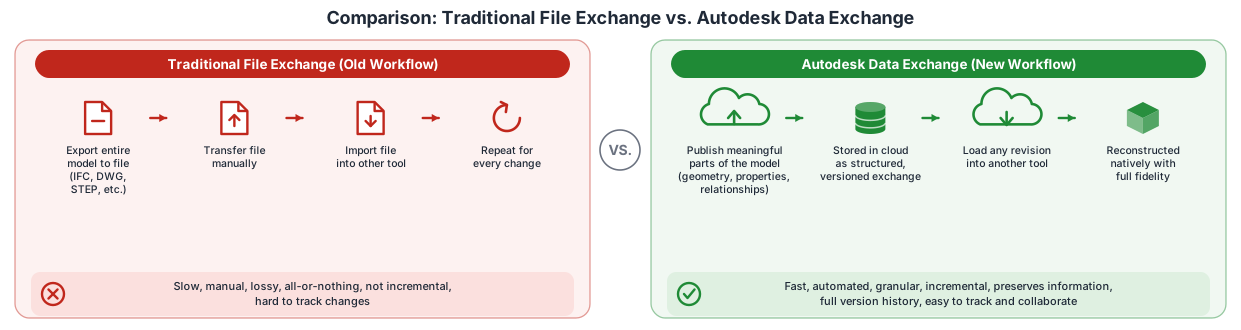
A building or product is designed across many tools — Revit, Rhino, Inventor, Civil 3D, and more. Traditionally, moving design data between them meant exporting and importing files such as IFC, DWG, or STEP. That approach is slow and manual, it loses information, and it is all-or-nothing: you re-export the entire file whenever anything changes, and the receiving tool gets a flattened approximation instead of the real structured data.
Autodesk Data Exchange replaces file swapping with a cloud-based, granular, and structured way to share design data between applications. Instead of shipping a file, a producer publishes the meaningful parts of its model — geometry, properties, and the relationships between them — into a cloud container called an exchange. A consumer in a different tool reads that exchange and reconstructs the data natively in its own application.
Key concepts
Think of an exchange as a shared, versioned, structured package of design data that lives in the cloud. Each time a producer pushes changes, the exchange gains a new revision, so there is a full, traceable history. A consumer can load any exchange and combine it with its own model.
How the SDK and connectors divide the work
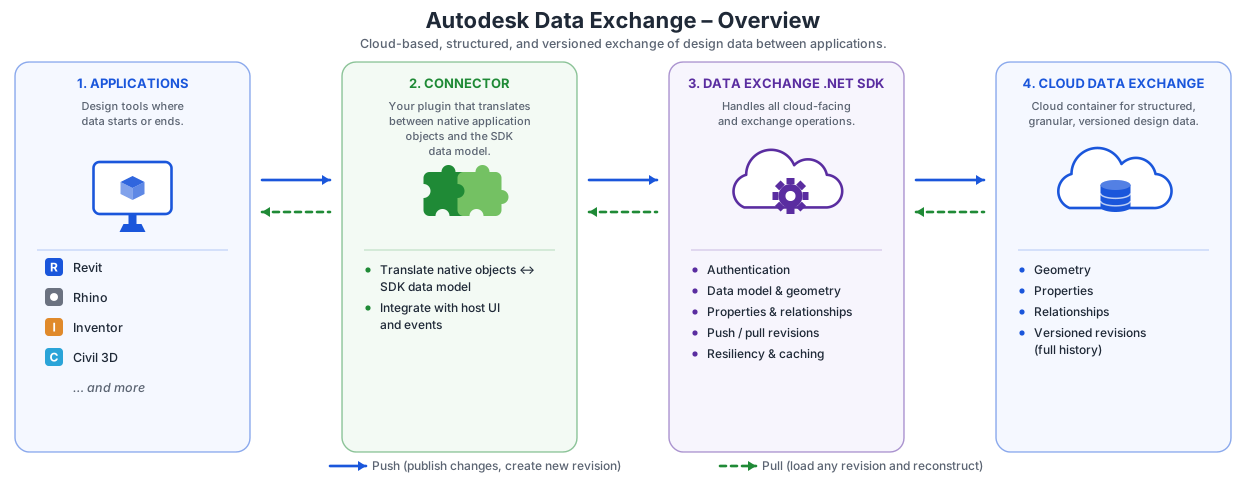
The Data Exchange SDK handles everything that faces the cloud, and your connector handles everything that faces the host application:
| Layer | Responsibility |
|---|---|
| Data Exchange SDK | Authentication, exchange operations, the in-memory data model, geometry packing, pushing and pulling revisions, and resiliency. This layer is application-agnostic. |
| Your connector | Translating native objects (for example, Revit elements or Rhino objects) to and from the SDK data model, and wiring up the host application's UI and events. |
The SDK preserves geometry, properties, design structure, and data granularity as it moves data to and from the cloud, so the consuming application reconstructs the real structured data rather than a flattened file.
Almost every connector operation is a variation of two flows: a producer builds the data model from the host model and pushes it to create a new revision, and a consumer pulls a revision and recreates the data in the host application. For a detailed walkthrough of these flows, see Exchange lifecycle.
The following diagram summarizes how these pieces fit together:
SDK components
The SDK ships in two parts. Most connectors use the headless client; add the UI component only if you need a prebuilt desktop interface. The Connector UI is optional, runs as a separate process from the host application, uses the core SDK for all Data Exchange operations, and handles only user interaction.
| SDK Component | Headless (API-Driven)(Autodesk.DataExchange.Client) | UI-Based(Autodesk.DataExchange.UI) |
|---|---|---|
| Description | Core API for programmatic access to Data Exchange services. Supports client-side caching, delta tracking, and automation. |
Desktop application with a graphical interface for managing Data Exchanges. Requires Autodesk.DataExchange.Client. |
| Best For | Backend automation, scripting, batch operations, and cloud workflows. | Building UI-based tools or connectors for interactive, user-friendly workflows. |
| Use Cases |
|
|
| Samples | Sample Console App | Sample UI Connector |
| Methods | SDK Reference > Autodesk.DataExchange | SDK Reference > Autodesk.DataExchange.UI |
Next steps
- Install the SDK and add the NuGet packages to your project.
- Initialize the SDK and authenticate against Autodesk Platform Services.
- Work through a tutorial to create your first exchange, with or without the UI.
- Browse the code samples for console and UI connectors.
- Look up types and methods in the SDK reference.
Terms of service
Data Exchange SDK is subject to APS Terms of Services.