
Autodesk Tandem now supports the Webhooks API and provides dedicated events to support the development of automated workflows.
This article provides details about Tandem specific events which were recently released, with practical tips and examples.
Webhook Registration
Use the common Webhooks API to register a webhook for Tandem events – there is no difference from other events:
curl -X 'POST'\
     -v 'https://developer.api.autodesk.com/webhooks/v1/systems/adsk.tandem /events/dt.alert/hooks'\
     -H 'Content-Type: application/json'\
     -H 'authorization: Bearer <your access token>'\
     -d '{
            "callbackUrl": "<your callback url such as https://d402-165-85-169-194.ngrok-free.app/callback>",
            "scope": {
                "twinUrn": "{{twinUrn}}"
            }

        }'
Where:
- access_token - is a token for user (3 legged) or APS application (2 legged) which has access to your facility
- twinUrn – scope of the event. In the case of Tandem events, the scope depends on the event: either facility (twinUrn) or model (modelUrl).
All endpoints from the Webhooks API work with Tandem events. For example, you can use GET systems/:system/events/:event/hooks to get a list of hooks for specific events.
Template change
There are two events available related to facility template:
- dt.applyTemplate is triggered when a facility template is applied to the facility.
- dt.removeTemplate is triggered when a facility template is removed from the facility.
Those events can be used to load/unload data from the facility template – for example for caching purpose.
Both events can be subscribed to per facility using the twinUrn field:
{
    "callbackUrl": "YOUR_CALLBACK_URL",
    "scope": {
        "twinUrn": "urn:adsk.dtt:6_4HY5tARaCEJFJLHJjfEg"
    }
}
The payload field contains details related to the applied template:
{
  "version": "1.0",
  "resourceUrn": "urn:adsk.dtt:WtMe53OeTWuvLaCP4bvZkw",
  "hook": {
    "hookId": "c8156587-3113-400c-ad92-b566eb19771a",
    "tenant": "urn:adsk.dtt:4n9u5YaVTpCgjigN5ER7KQ",
    "callbackUrl": "http://bf067e05.ngrok.io/callback",
    "createdBy": "7HqqekpIbAfWIKu9G1Yxx9SOCX9rtn6p",
    "event": "dt.applyTemplate",
    "createdDate": "2025-02-13T03:11:50.294+0000",
    "system": "adsk.tandem",
    "creatorType": "Application",
    "status": "active",
    "scope": {
      "twinUrn": "urn:adsk.dtt:4n9u5YaVTpCgjigN5ER7KQ"
    },
    "urn": "urn:adsk.webhooks:events.hook:c8156587-3113-400c-ad92-b566eb19771a",
    "__self__": "/systems/adsk.tandem/events/dt.applyTemplate/hooks/c8156587-3113-400c-ad92-b566eb19771a"
  },
  "payload": {
    "timestamp": "2025-03-14T16:33:01.126Z",
    "details": {
      "classificationUuid": "T06LliEdSOaL5_dchpe8Og",
      "templateUuid": "BmubmBl7QAKj64KpWkP7fA"
    }
  }
}
Element change
The dt.mutation event is sent when an element in the facility is modified. The integration can analyze the change and trigger an action in an external system - for example user changes status of an asset to "be replaced". When event is received the system creates ticket, assigns it to technician and provides more details about the asset.
The event can be subscribed to per model using the modelUrn scope:
{
    "callbackUrl": "YOUR_CALLBACK_URL",
    "scope": {
        "modelUrn": "urn:adsk.dtm:WtMe53OeTWuvLaCP4bvZkw"
    }
}
The facility typically includes multiple models, so you can use GET twins/:twin to get details of the facility.
The payload field contains details related to the updated parameters:
{
    "version": "1.0",
    "resourceUrn": "urn:adsk.dtm:CPLXRtNCTlOSKVGQZVhLJw",
    "hook": {
        "hookId": "345475aa-2278-4c90-8a0d-d99407992a99",
        "tenant": "urn:adsk.dtm:CPLXRtNCTlOSKVGQZVhLJw",
        "callbackUrl": "https://td-data-dev.ngrok.io/callback",
        "createdBy": "pErXeluFbvApeQYUoA7dnUoA6AoUsEv8",
        "event": "dt.mutation",
        "createdDate": "2026-01-26T13:09:17.903+00:00",
        "lastUpdatedDate": "2026-01-26T13:09:17.898+00:00",
        "system": "adsk.tandem",
        "creatorType": "Application",
        "status": "active",
        "scope": {
            "modelUrn": "urn:adsk.dtm:CPLXRtNCTlOSKVGQZVhLJw"
        },
        "hookAttribute": null,
        "autoReactivateHook": true,
        "urn": "urn:adsk.webhooks:events.hook:345475aa-2278-4c90-8a0d-d99407992a99",
        "callbackWithEventPayloadOnly": false,
        "__self__": "/systems/adsk.tandem/events/dt.mutation/hooks/345475aa-2278-4c90-8a0d-d99407992a99"
    },
    "payload": {
        "timestamp": "2026-01-26T13:11:38.763Z",
        "keys": [
            "AAAAAHnIeY08f0VTo9ntDonFta0AMHY4"
        ],
        "details": {
            "attributes": [
                "n:ia",
                "z:1hw"
            ]
        }
    }
}
Alert Trigger
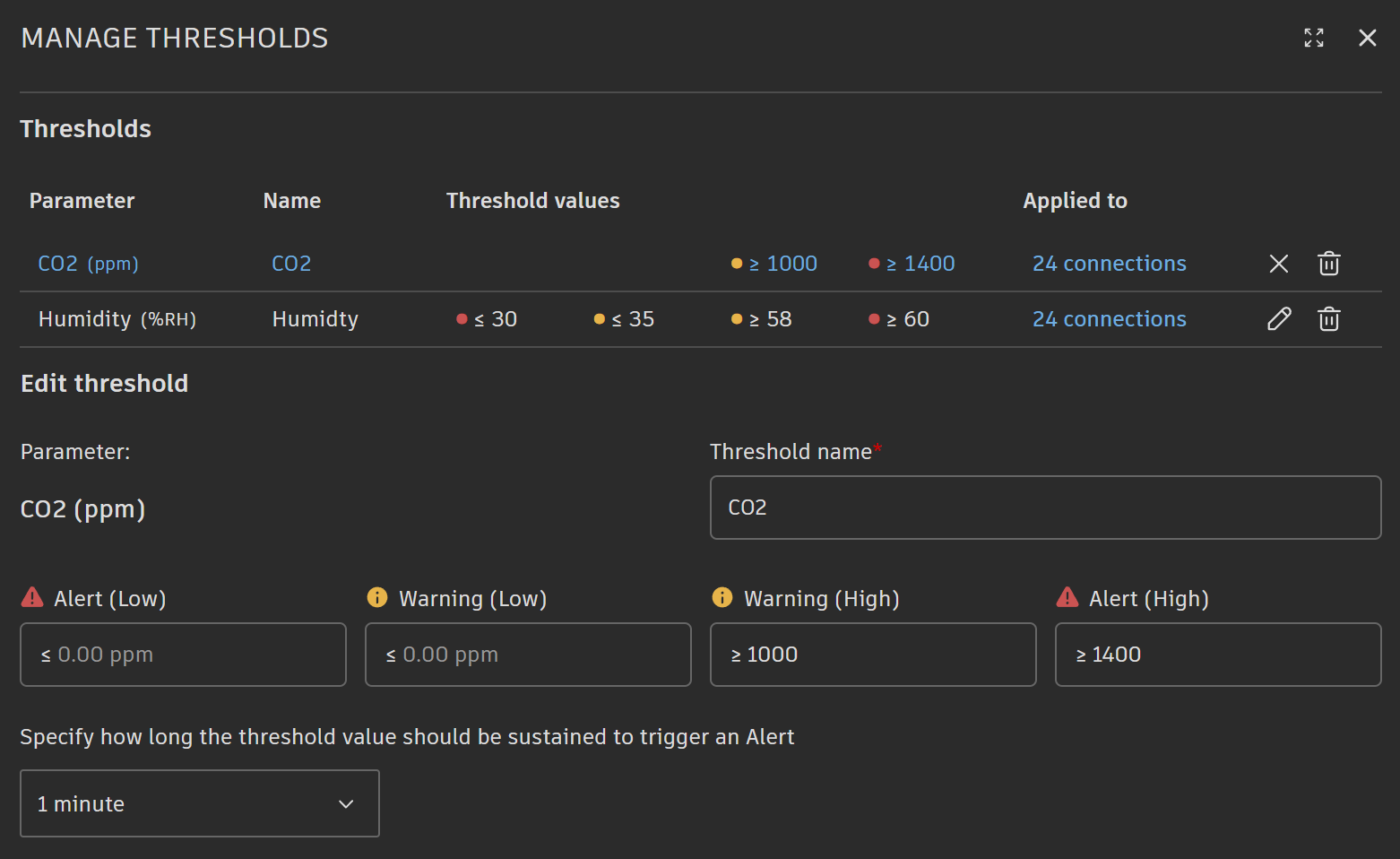
For any stream parameter, the user can define thresholds, for example, minimum and maximum temperature. When the parameter value is outside of the thresholds, Tandem provides visual notifications – the icon of the stream marker is changed, and limits are also shown in the related chart.
When the value is outside of the thresholds for a specific interval, the alert is triggered – and external systems can use dt.alert events to monitor such scenarios. For example:
- Failure prevention – a facility management system can monitor the temperature of HVAC units– when the value is above the defined threshold, the system creates a maintenance ticket, assigns it to a technician, and provides more details including a link to the asset.
- Energy optimization – an energy management system can monitor power usage – when it is above the defined limit, a notification is sent to building ops including more details (i.e., location).
Below is a sample payload to register the hook for an event:
{
    "callbackUrl": "YOUR_CALLBACK_URL",
    "scope": {
        "twinUrn": "urn:adsk.dtt:6_4HY5tARaCEJFJLHJjfEg"
    }
}
Tandem monitors incoming stream data and will trigger an alert automatically based on the stream configuration. Note that alert is triggered in following scenarios:
- The stream changes its state (i.e. from normal to warning or from warning to normal).
- The stream remains in the new state for a configured duration. By default, this time is set to 10 minutes but can be adjusted per threshold:
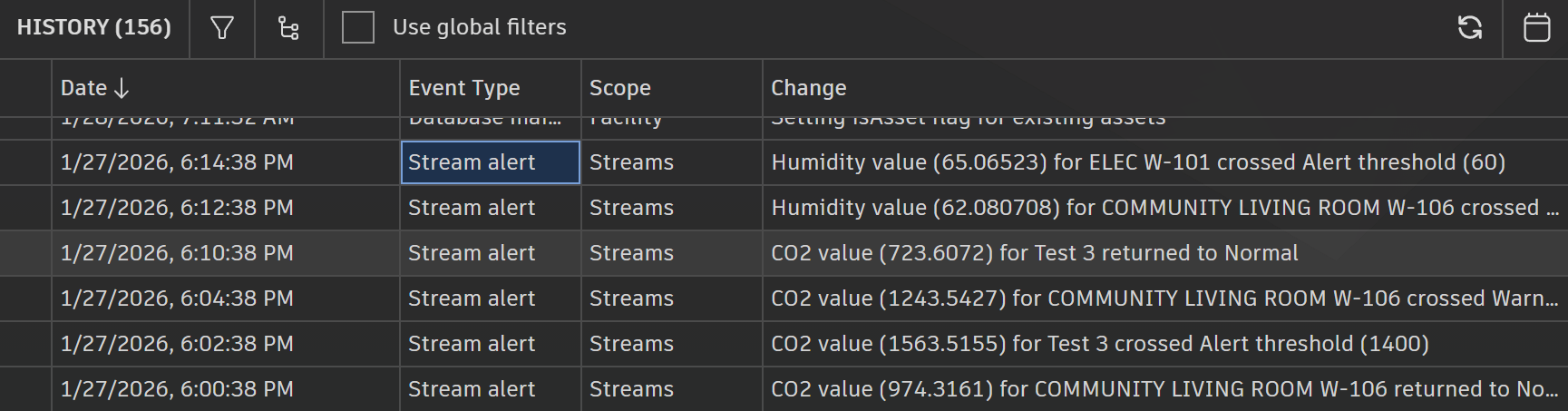
Information about the alert is stored in the history log:
Notifications are sent to every subscriber of the event. The payload field has additional details about the alert:
{
    "version": "1.0",
    "resourceUrn": "urn:adsk.dtt:JTPLuERzTBaLxCXm52PP5Q",
    "hook": {
        "hookId": "fb9166f3-88d9-4683-b25f-ceba964c85b2",
        "tenant": "urn:adsk.dtt:JTPLuERzTBaLxCXm52PP5Q",
        "callbackUrl": "https://td-data-dev.ngrok.io/callback",
        "createdBy": "pErXeluFbvApeQYUoA7dnUoA6AoUsEv8",
        "event": "dt.alert",
        "createdDate": "2026-01-26T13:00:21.678+00:00",
        "lastUpdatedDate": "2026-01-26T13:00:21.675+00:00",
        "system": "adsk.tandem",
        "creatorType": "Application",
        "status": "active",
        "scope": {
            "twinUrn": "urn:adsk.dtt:JTPLuERzTBaLxCXm52PP5Q"
        },
        "hookAttribute": null,
        "autoReactivateHook": true,
        "urn": "urn:adsk.webhooks:events.hook:fb9166f3-88d9-4683-b25f-ceba964c85b2",
        "callbackWithEventPayloadOnly": false,
        "__self__": "/systems/adsk.tandem/events/dt.alert/hooks/fb9166f3-88d9-4683-b25f-ceba964c85b2"
    },
    "payload": {
        "timestamp": "2026-01-26T13:57:51.605Z",
        "details": {
            "alertState": 2,
            "attrName": "CO2",
            "attrUnit": "partsPerMillion",
            "eventTimestamp": 1769435871593,
            "previousState": 0,
            "spentSec": 0,
            "streamId": "AQAAAFD5KGegdk7woLEjSN_joNcAAAAA",
            "streamName": "ELEC W-101",
            "substreamEncId": "z:KQ",
            "thresholdLevel": "upper:alert",
            "thresholdValue": 1400,
            "value": 1500.1606
        }
    }
}
Considerations
- Event subscriptions can be created either by an application or by a user who has access to the facility.
- Events are delivered asynchronously. This means that subscribers will receive them with delay.
- When alert is not delivered check history log first.
Wrap Up
In this article, you learned how to use the API to work with Tandem events. For additional details, visit the APS documentation.
Feel free to contact us in case of any questions or if you need any help with the Tandem API: aps.help@autodesk.com. You can also submit your questions via StackOverflow and mark them using the autodesk-tandem tag.