

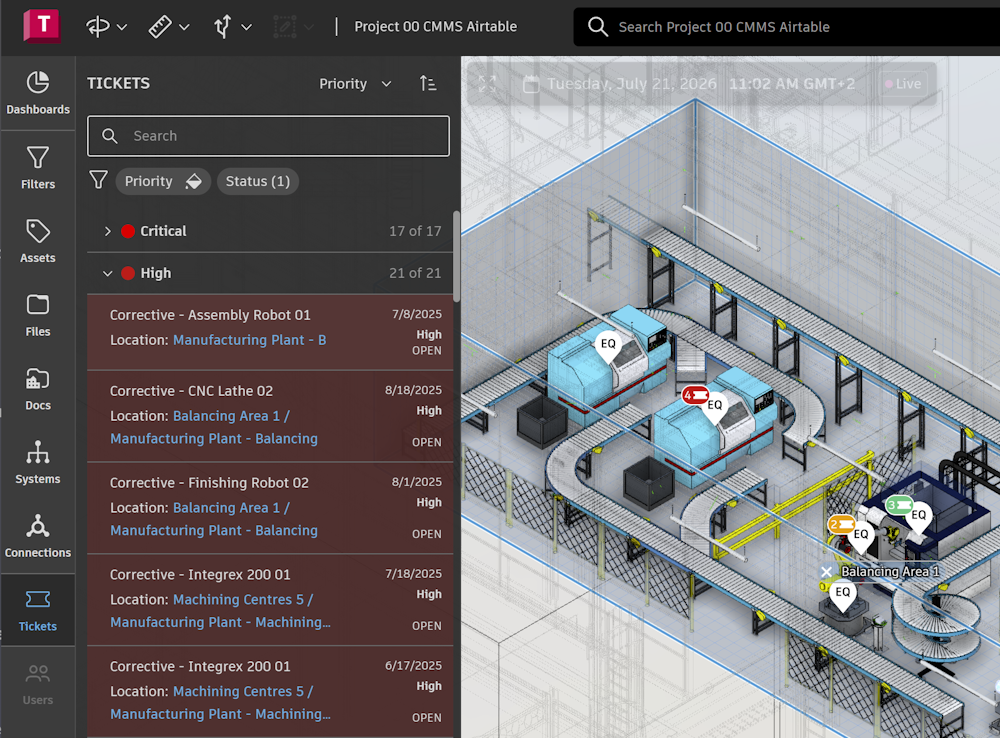
Autodesk Tandem provides possibility to display tickets managed by external systems. For example application can bring maintenance and service information from CMMS application and provide possibility to view issues in the context of the facility, assets and systems.
This article provides details how to interact with tickets using API:
- Create ticket
- List tickets
- Update ticket
Create ticket
To create ticket use POST create endpoint – same endpoint can be used to create other elements (i.e. streams). The tickets are stored in default model. Note that default model is not created automatically – check if model exists in the facility. Optionally it can be created using POST defaultmodel endpoint. When creating new ticket following data should be provided – identifier of the field is also included:
- Flags (n:a) field is used to control type of element. In case of the ticket the value is 0x01000007 (16777223).
- Name (n:n) field of the ticket. The name is displayed in the user interface,
- Priority (n:pr) field defines priority of ticket. It can be one of the values (Low, Medium, High).
- Open Date (n:od) field defines when ticket was created.
Additionally, there are optional fields:
- Close Date (n:cd) field defines date when ticket will be closed.
- Parent (x:p) field specifies associated asset. It is xref key of the asset.
- Rooms (x:r) field defines relationships to spaces. It is xref array of space elements. Tandem application sets spaces based on associated asset.
- Level (l:l) field specifies relationship to level. It is full key of level. Tandem application sets level based on associated asset.
It is also possible to apply custom classification (n:v) and set values for related properties.
Note There are predefined constants available for JavaScript and Python.
Below is sample payload to create ticket associated with asset:
{
  muts: [
    [
      "i",
      "n",
      "n",
      "0001"
    ],
    [
      "i",
      "n",
      "a",
      16777223,
    ],
    [
      "i",
      "x",
      "p",
      "4IwF5VjMSRyPn5-qO09DgwAAAAB5NVfW7XRNQbGd6ccH0wH0AAlPxg"
    ],
    [
      "i",
      "n",
      "pr",
      "Low"
    ],
    [
      "i",
      "n",
      "od",
      "2025-11-13"
    ]
  ],
  desc: "Create ticket"
}
The API returns key of new element and timestamp when the ticket was created:
{
  key: "NILeNjRFRl2I9ogU70xDkQAAAAA",
  timestamp: 1763054635511
}
List tickets
To get all tickets for the facility use POST scan endpoint against default model. Check flag of the element - it should match to 0x01000007 (resp. 16777223). POST scan endpoint can be also used to query ticket properties.
Update ticket
To update ticket use same approach as for updating other elements - POST mutate endpoint. In the example below there is payload to change close date of the ticket:
{
  "keys": [
    "H_pwafaOSk2EClLjcqgo1ABb2Dg"
  ],
  "muts": [
    [ "i", "n", "cd", "2025-11-15"]
  ],
  "desc": "Update close date"
}
In case of updating multiple tickets it is recommended to use batch update and send all changes in one payload:
{
  "keys": [
    "KZmY9O01RnqifHEG_QXfpwAAAAA",
    "MvzT9zRVRNyPb6v7NIzBEQAAAAA",
    "XdsE57LdTSqImoNNaiFnkwAAAAA"
  ],
  "muts": [
    [ "i", "n", "cd", "2025-11-15"],
    [ "i", "n", "cd", "2025-11-15"],
    [ "i", "n", "cd", "2025-11-15"]
  ],
  "desc": "Update close date - multiple"
}
The response includes a timestamp of change:
{
  "timestamp": 1755590812404
}
This can be used to find changes in the history log of the facility.
Recommendations
- Check if default model exist before creating a ticket.
- Make sure to specify flag when creating ticket.
- Use RFC3999 formatted string when the type of property is a date.
- Use bulk updates when possible. This reduces the load to the server.
- When updating multiple tickets, the size of payload is limited to 10 MB.
Wrap Up
In this article you learned how to use the API to work with tickets. For additional details, visit the APS documentation. You can find the code samples on GitHub (JavaScript and Python).
Feel free to contact us in case of any questions or if you need any help with the Tandem API: https://aps.autodesk.com/get-help. You can also submit your questions via StackOverflow and mark them using the autodesk-tandem tag.