
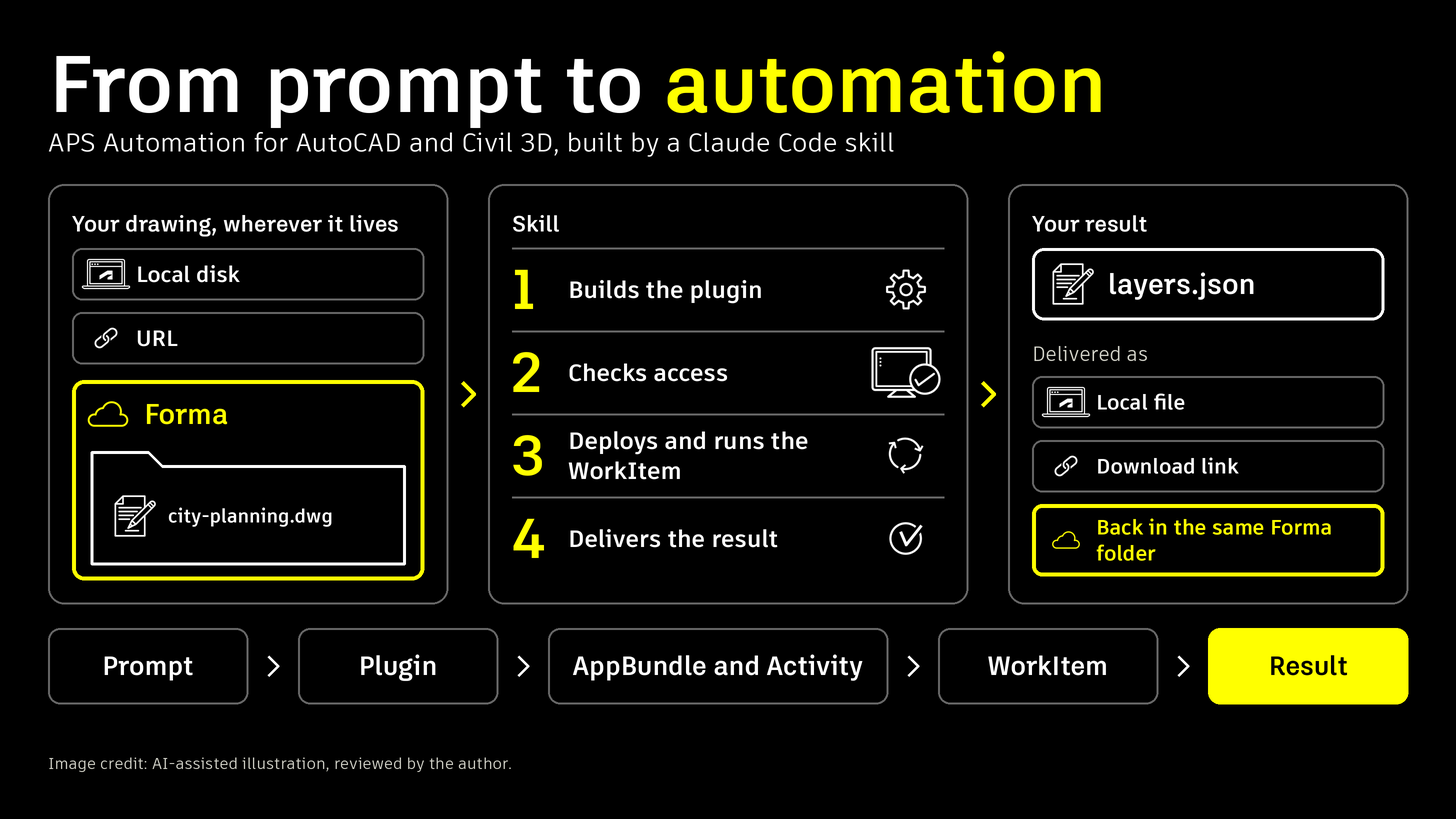
Getting a first Design Automation app running means getting many things right at once: a headless .NET plugin, an AppBundle and an Activity, authentication, and a WorkItem that reads your drawing and returns a result. When the drawing lives in Forma, there is more, because files are protected by user permissions and the app needs a Secure Service Account and a signed activity.
aps-da-acad-c3d is a Claude Code plugin that builds APS Automation apps for AutoCAD and Civil 3D from a plain-language request. You say what you want done and where the drawing is. It builds, deploys, runs, and delivers the result. The drawing can be on local disk, at a URL, or in Forma, and Forma is the showcase here because the result can go straight back into the same folder. Here it is end to end on a drawing in Forma: one prompt extracts the layers of city-planning.dwg to layers.json and puts the file back in the same Forma folder as the drawing.
What it does
The skill takes defaults from your request, such as AutoCAD, the current product year, and JSON output, and asks only for what it cannot work out. Then it:
- creates a
.gitignorefirst, so keys, run output, and build output are never committed; - writes a non-interactive .NET plugin from a tested template, packages it as an AppBundle, and registers the Activity;
- checks that the service account can reach your Forma folder, before it spends time on a run;
- reads the drawing version you named, submits a signed WorkItem, and saves the result;
- optionally puts the result back into Forma next to the drawing, as a new file or a new version.
The drawing can also be on local disk or at a URL. In that case the skill uses your app's own token, and nothing else needs to be set up.
Why Forma needs a service account
Files in Forma are protected by user permissions, so your app's own token cannot read them or write back to them. A Secure Service Account (SSA) is a non-human user of your app that signs in with a key, so Design Automation can work on those files without anyone signing in.
Two steps still need a person: an account admin registers your client id under Custom Integrations, and a project admin adds the service account to the project. The skill checks both, and if either is missing it prints a ready-to-send message for your admin, with the client id, the service account email, and your folder link.
Try it yourself
Install the plugin in Claude Code:
/plugin install aps-da-acad-c3d --marketplace autodesk-platform-services/aps-da-acad-c3d-skillCreate a .env file in your working folder or any parent folder. These five values are all you provide; the scripts work out the rest:
APS_CLIENT_ID=
APS_CLIENT_SECRET=
APS_NICKNAME=
SSA_FIRST_NAME=
SSA_LAST_NAME=
The two SSA_ values are for Forma input only. Claude never asks for, reads, or prints this file. Then start Claude Code in an empty folder and give the whole request in one prompt:
/aps-da-acad-c3d:aps-da-acad-c3d Create an APS automation application to extract layers to layers.json from `city-planning.dwg` version 2 in Forma - <Forma folder link>. Put layers.json back into Forma, in the same folder as the drawing. Use auto mode.To test the plugin on your machine with accoreconsole before it goes to the cloud, end the prompt with your install folder, for example AutoCAD is installed at C:\Program Files\Autodesk\AutoCAD 2027.
Auto mode and pair mode
In auto mode, Claude runs everything itself. It assumes your values and admin steps are already in place. If a script shows that something is not, it stops and tells you to switch to pair mode. In pair mode, Claude gives you the exact commands and explains each step, and you run them in your own shell.
Keeping secrets safe
- A plugin hook blocks Claude from reading
.env,.pemfiles, and the signing key. It matches command text, so treat it as a safety net, not a sandbox. - The service account key is saved in
~/.aps, readable only by you. APS shows it once, so keep that folder. - Presigned URLs are credentials, so the scripts do not print them unless you ask.
What is next
This is a preview. Two parts have not been run live yet: the WebSocket option with a signed submit, and creating a brand-new service account from scratch. When a run succeeds, the skill offers to take it further: a backend that submits WorkItems and learns the outcome over the Automation WebSocket API instead of polling, or a web app where people sign in with their own Autodesk account and pick a drawing from a Forma tree.
Resources
- aps-da-acad-c3d-skill on GitHub. Requires Windows, PowerShell 7, and a .NET SDK that matches your product year. AutoCAD or Civil 3D is needed only for the optional local test.
- Secure Service Accounts overview
- Issues and ideas. Please open an issue before you raise a pull request, and remove tokens, signed URLs, and project ids before you paste anything.