
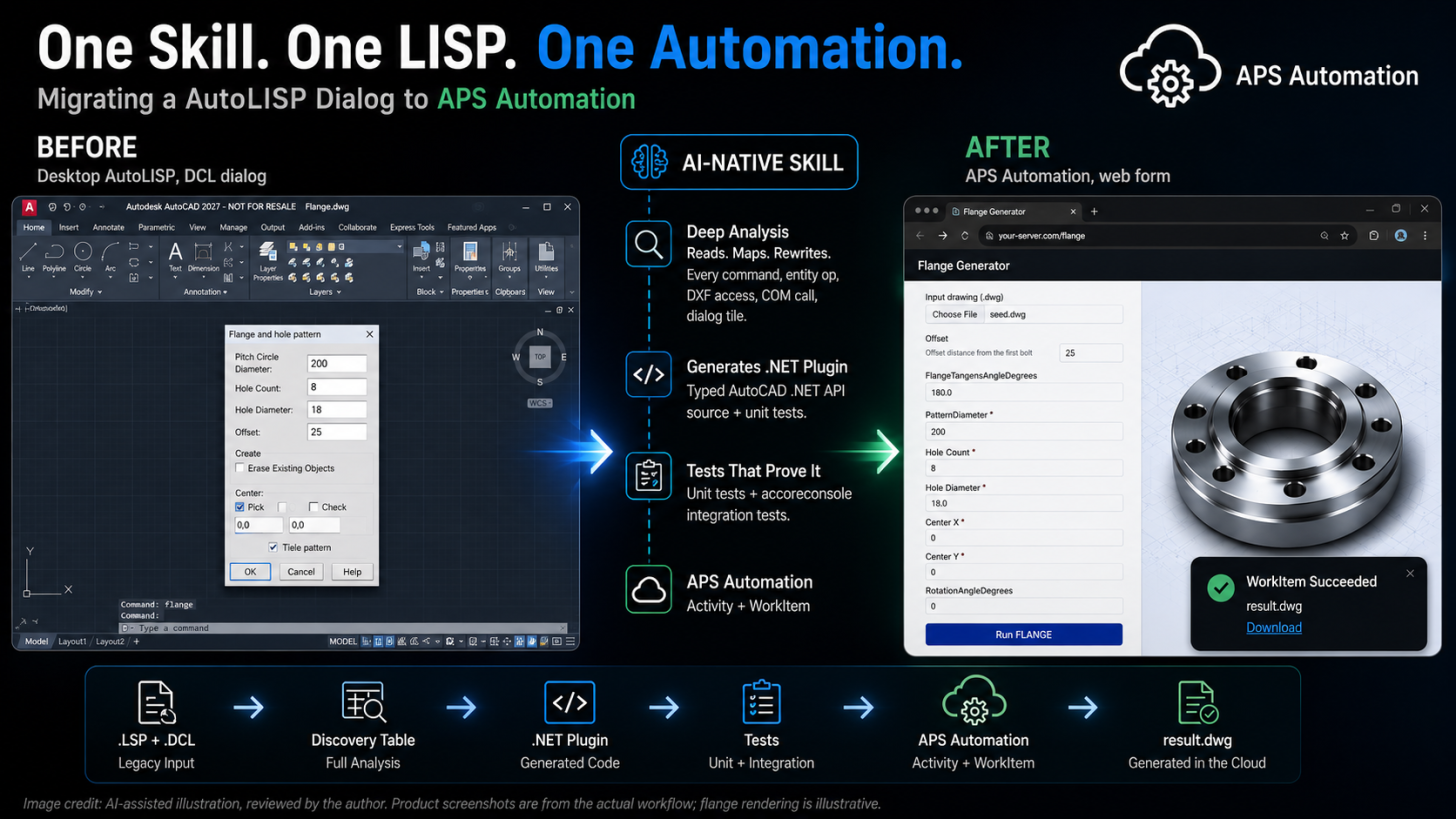
AI-assisted illustration, reviewed by the author. Product screenshots are from the actual workflow; flange rendering is illustrative.
One LISP. Flange.lsp is a 1998 parametric flange generator, desktop-only, driven by a DCL dialog. Dead on arrival in headless Design Automation: the dialog has no screen to draw on, and the underlying logic never had to be anything but desktop code.
One Skill. /lisp-to-dotnet read it, mapped every LISP pattern to a typed .NET equivalent, scaffolded the whole DA project, and wrote its own tests.
One Automation. FLANGE now runs as a real APS Design Automation Activity. Browser form in, result.dwg out. No AutoCAD desktop touched.
That's the shape of the problem this skill exists to solve, and Flange is the clearest example of it, but the mechanism behind it is general, not a one-off trick.
The wall it gets around
AutoLISP's Visual LISP layer (vla-*, vlax-*) depends on COM/ActiveX, and that runtime simply doesn't exist in Design Automation's headless engine. Basic AutoLISP (entget, ssget, entmod) runs fine headless. But almost every real-world LISP plugin leans on a COM call, or a DCL dialog, somewhere, and that's the wall. Autodesk customers have decades of this kind of automation, still running their daily CAD workflows, almost none of it reachable from the cloud as-is.
The fix is a rewrite to the typed AutoCAD .NET API. Not a small ask for a LISP-only developer, and not something that scales by hand across a whole customer base.
What the skill actually does
lisp-to-dotnet is a Claude Code skill: point it at a real .lsp file, and it reads every command, entity operation, DXF access, and COM call, maps each one to its .NET equivalent, and generates a complete Design Automation plugin: source, unit tests, accoreconsole integration tests, and a deployable bundle.
claude "/lisp-to-dotnet Flange.lsp"
.lsp + .dcl file
   |
   v
Discovery Table: every command/entity op/DXF access/COM call/dialog tile, catalogued
   |
   v
.NET plugin: source + unit tests + accoreconsole integration tests
   |
   v
APS Design Automation: real AppBundle + Activity + WorkItem
   |
   v
HTML form + Node server: the DCL dialog's actual replacement, one layer up
DCL tiles get treated the same as any other interactive input. The dialog's own mechanics (load_dialog, action_tile, and the rest) get stubbed (there's no screen in a cloud worker to show them on), but every value a tile gathered is still real input, extracted into the same parameter contract as a getpoint or getkword call. Flange's hole-pattern dialog (pitch circle diameter, hole count, hole diameter, offset) became typed fields in the generated plugin, and those same fields became a browser form talking to the same Design Automation Activity.
Proof, not simulation
Five independent migrations, including FlangeDA, HatchBDA, and AcresDA, each went all the way to a real APS Design Automation WorkItem submitted against the live cloud service, and each came back with a real result.
Beyond the hand-picked examples: a dry run across 62 real-world .lsp files by Jimmy Bergmark of JTB World (decades of genuinely useful, freely-shared AutoLISP, reuse explicitly welcomed on the site itself), checking whether the skill's analysis held up outside a handful of curated samples. All 62 produced a correct analysis, no silent skips, and surfaced real corpus data-quality issues (a few files with genuinely corrupted source) that only show up when you throw messy, real files at a tool instead of clean ones. Seven representative files went through full migration end to end; all seven passed, and along the way the skill's own guidance got fixed for real bugs, including one where an unhandled exception inside a generated command was crashing the AutoCAD host process instead of failing cleanly, which would have quietly broken every future migration's error handling if a real test run hadn't caught it.
The part that actually matters
The interesting failures weren't in AutoLISP syntax. They were in knowing where the DA sandbox's walls actually are. A COM property with no typed .NET equivalent isn't always obvious from documentation; sometimes you have to reflect on the real installed DLLs, or trace it back to the original IDL, to know for certain a gap is permanent rather than a missed API lookup. A genuine capability gap has to fail cleanly and visibly (logged, not thrown) so a cloud WorkItem reports a clear reason instead of hanging.
That's the value: not just generating code that compiles, but encoding the hard-won judgment calls about what's really possible headless, so the next migration doesn't have to rediscover them.
One skill turned a 1998 desktop LISP dialog into a cloud API: no hand-written glue, no dialog, no desktop.
Try it yourself
Install the skill (no cloning, no manual copying):
/plugin marketplace add https://github.com/autodesk-platform-services/aps-lisp-dotnet-skill.git
/plugin install lisp-to-dotnet@aps-lisp-dotnet-skill
/reload-plugins
Then point it at any AutoLISP file you've got lying around:
claude "/lisp-to-dotnet your-file.lsp"The skill takes it from there: DCL check, Discovery Table, scaffold, code generation, build, tests, prompting you at each side-effecting step rather than running them silently.
Source: github.com/autodesk-platform-services/aps-lisp-dotnet-skill