

Manufacturing Data Model API v3 is now GA and though its documentation already provides migration info it can be useful to offer some of the same from a different perspective as well.
First thing to point out is that you'll need a new hub type that supports Collaborative Editing in order to use this API. All hubs will be migrated to this new type at a certain point, but you can request such a hub in the meantime here.
In the latest version of the API we don't have separate timeless (Component) and version based (ComponentVersion, DesignItemVersion) objects. Instead they are combined into a single object like so:
| v2 | v3 | |
|---|---|---|
| DesignItem | DesignItem | Model |
| DesignItemVersion | - | |
| Component | Component | |
| ComponentVersion | ||
Whenever you work with Model or Component they are in context of a specific time, which works like a kind of version id. If you don't provide the time in your query then the current time will be used. The retrieved object will have both timeless properties like the id of the model and time (or version) specific properties like thumbnail.
In v3 the partNumber is much more special than it was before, not just a simple string property that you can change like description. That's why we now have a separate mutation to change that: assignModelPartNumber for Model and renumberPartNumberGroup for Component.
When it comes to properties, we also removed DYNAMIC and DYNAMIC_AT_VERSION behaviours, leaving us with only TIMELESS and STANDARD, and only for Component and Drawing.
In v2, ComponentVersion had information about all other components it contained - see the occurrences and allOccurrences fields.
In v3, each Component is wrapped in a Model object that keeps track of all that (see assemblyRelations field) and also exposes the available versions via the history field.
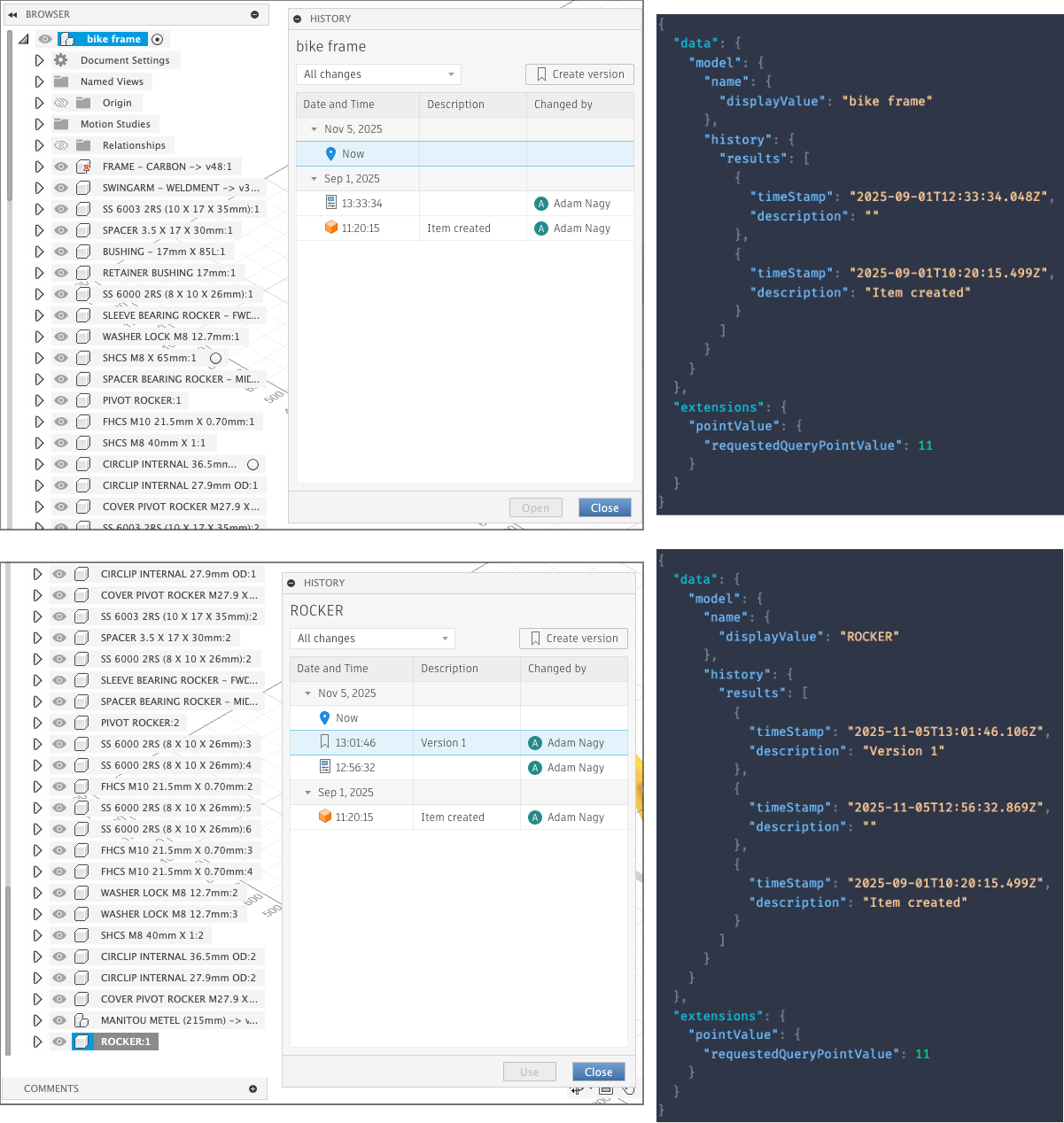
As an example, if I wanted to check all the modifications (what you can access via the History menu item in the UI) in the root component and a sub component, I can use the following query:
query GetHistory($modelId:ID!) {
  model(modelId: $modelId) {
    name {
      displayValue
    }
    history {
      results {
        timeStamp
        description
      }
    }
  }
}
Depending on the modelId I pass in, I get the same results as in the UI:
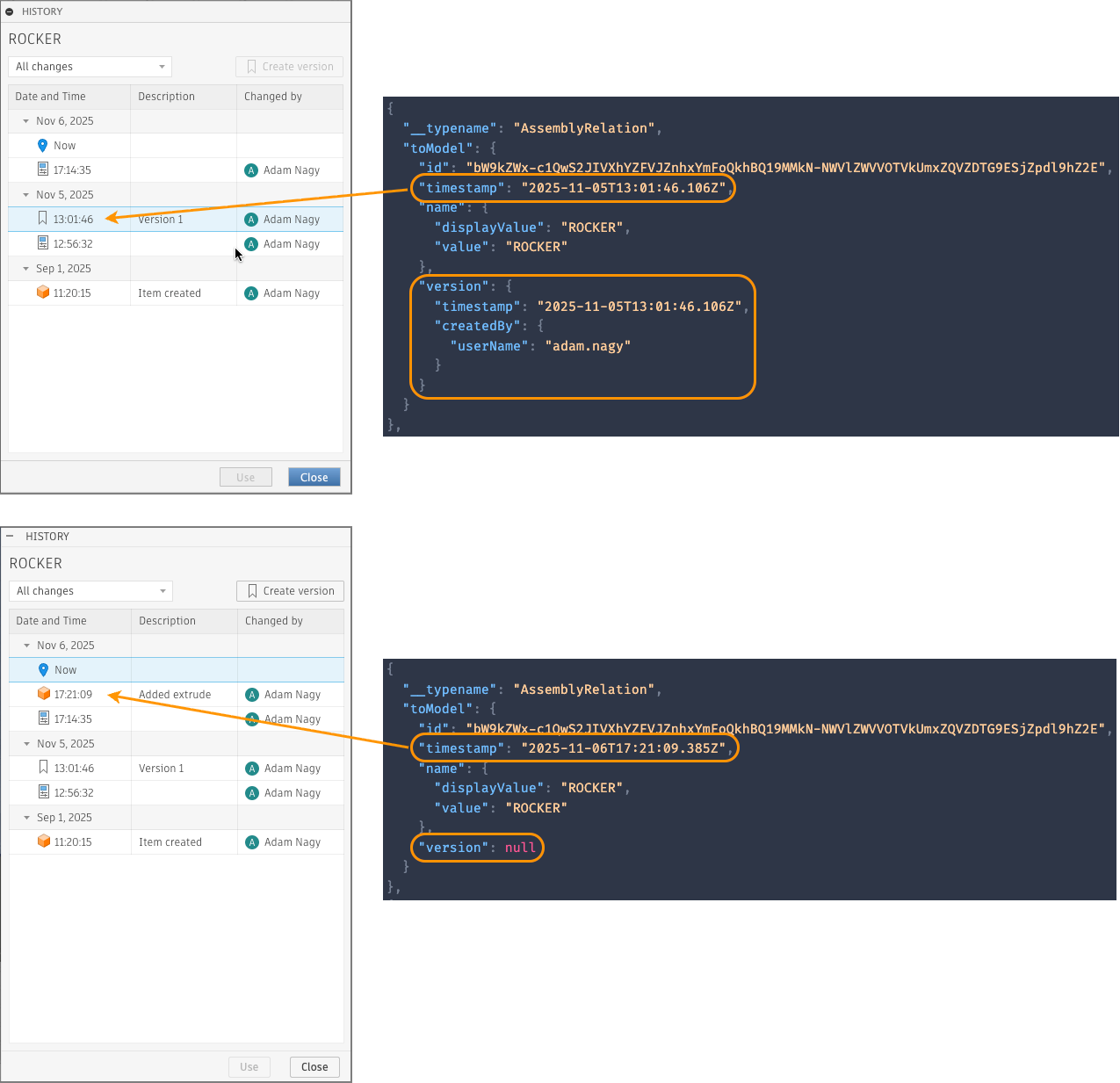
Model object includes a version field, but that only works in context of the assemblyRelations field, and only if the given Model version is based on one that was created using the Create version in the History dialog (which is like a milestone). Otherwise it's just null.
query GetSubModels($modelId:ID!) {
  model(modelId: $modelId, composition: AS_SAVED) {
    name {
      displayValue
    }
    assemblyRelations {
      results {
        __typename
        toModel {
          id
          timestamp
          name {
            displayValue
            value
          }
          version {
            timestamp
            createdBy {
              userName
            }
          }
        }
      }
    }
  }
}
All the major changes are related to how versioning is done when using the new hub types that are enabled for Collaborative Editing, and how those capabilities are exposed in the latest version of the API.
You can learn more about all that from the product side in the Fusion documentation:
https://help.autodesk.com/view/fusion360/ENU/?guid=TPD-DESIGN-MILESTONES#vers-chngs-ce