

As more Autodesk Platform Services APIs move to consumption-based pricing, and more API usage comes included with eligible Autodesk product subscriptions, knowing how your applications actually consume APIs matters more than it used to. Today we're adding APS Usage Insights to Autodesk Assistant, so you can get that picture by asking for it.
Ask about your usage
Until now, understanding your consumption meant opening usage reports, filtering by application and API, and comparing periods by hand. With APS Usage Insights, you ask instead — and the answer comes back grounded in your actual APS usage data.
You can explore consumption for a single application, across a hub, or at team level: what an application used last month, which API drove it, how this month compares with last, which application in a hub consumed the most.
From what you used to what comes next
Autodesk Assistant already understands APS. It explains what the APIs do, walks you through implementation, and estimates what a planned solution will cost through Cost Advisor. What it didn't have was your consumption.
That's what changes here. With your historical usage in the conversation, Assistant's cost estimates start from what you actually consume rather than from assumptions you have to supply. Ask which API drove the most usage for an application last month, then follow up with what your costs look like if that doubles, or how to keep them down as the application scales — and the answers build on each other in the same conversation.
Three capabilities, working together: APS Knowledge to understand what's possible, APS Usage Insights to see what you've consumed, and Cost Advisor to plan what's next.
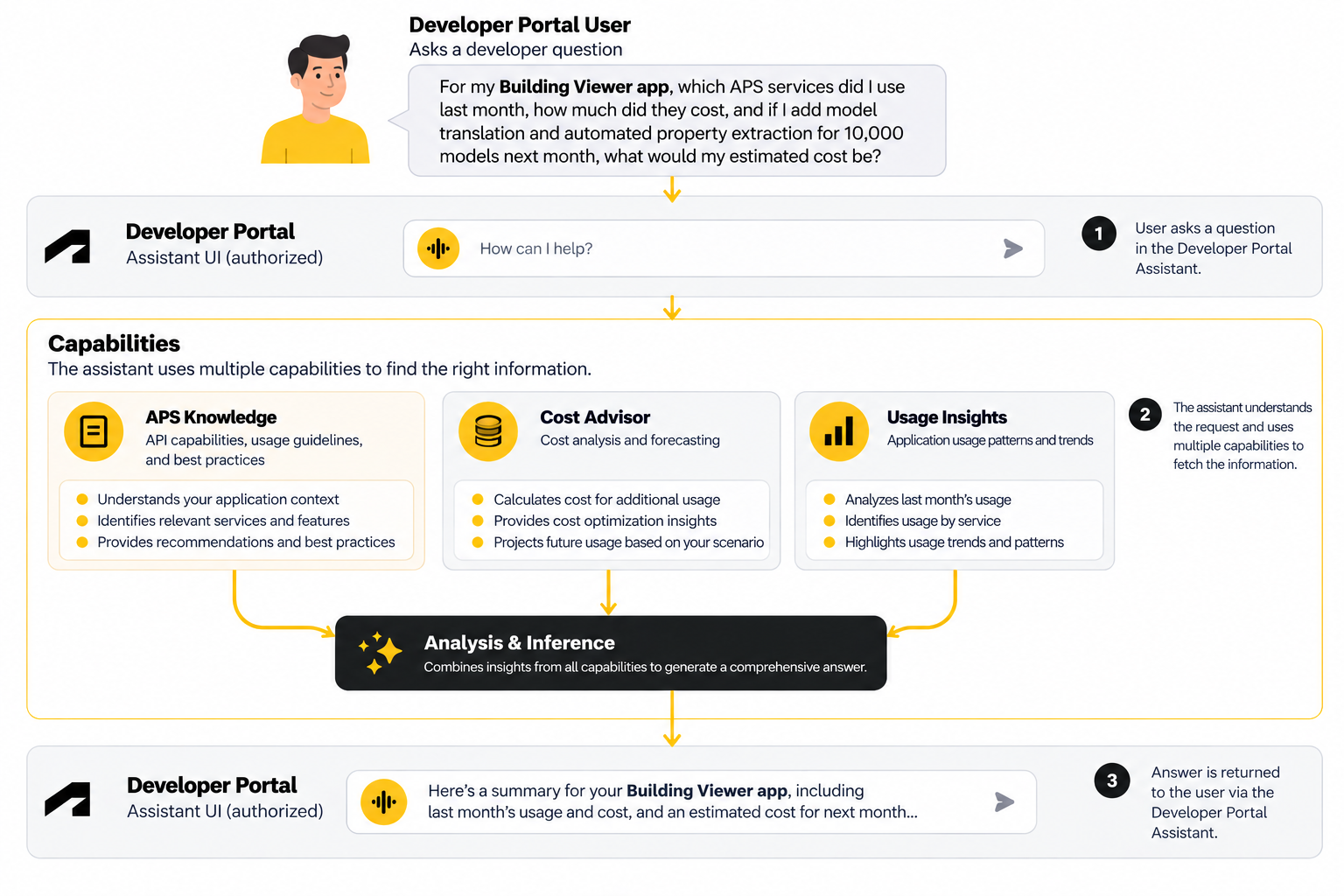
See it in action
The example starts with a simple question about an application's usage, identifies the APIs behind it, and moves into future cost scenarios — without leaving the conversation.
Get started
Sign in to the APS Developer Portal, open Autodesk Assistant, and ask:
▎ "Show me the API usage for my application [Application Name] over the past 30 days."
Then keep going. Find out what drove the usage, what it cost, and what it will cost as you grow.
Frequently asked questions
What kinds of questions can I ask?
Replace the placeholders with your own application name, client ID or hub name.
Application usage
- "Show me the API usage for my application [Application Name] over the past 30 days."
- "Break down API usage for client ID [Client ID] by API."
- "Which API consumed the most for [Application Name] last month?"
Hub and team usage
- "Show me API usage for my hub [Hub Name] over the past 30 days."
- "Which application consumed the most API usage in [Hub Name] last month?"
- "What was my team's total API usage last month?"
Trends
- "Compare API usage for [Application Name] this month versus last month."
- "How much did [Application Name] cost last month?"
- "What were the API charges for [Client ID] in September?"
Planning ahead
- "Based on last month's usage for [Application Name], what would my costs be if usage doubled?"
- "How is the most-used API in [Application Name] priced?"
- "How can I manage API costs for [Application Name] as usage grows?"
Can Autodesk Assistant estimate future costs from my usage?
Yes. Cost estimation through Cost Advisor was already available; APS Usage Insights lets you bring your real consumption into that conversation, so the estimate starts from what you've actually used. These remain estimates based on available pricing and the assumptions in your question, not guaranteed forecasts.
Does Autodesk Assistant show my actual API charges?
No. Your actual charges are available only in manage.autodesk.com. APS Usage Insights shows your API usage — the units your applications consumed — not billed amounts.
You can still get an approximate cost. Once your usage is on screen, ask Autodesk Assistant what that usage would cost, and it will apply the published rates for those APIs to the usage shown and return an approximate figure. Treat it as indicative rather than as your bill, and use manage.autodesk.com for actual charges.
Who can see my API usage data?
APS Usage Insights follows your existing APS permissions:
- Application owners — usage for the applications they own
- Application collaborators — editors and viewers see usage for applications where they hold that role
- Hub administrators — usage across all applications in their hub, including hub-level totals
- Team administrators — usage for the hubs and applications owned by their team
- Hub members without application access — no usage for applications they aren't authorized to see
The underlying APS APIs enforce these boundaries. Autodesk Assistant doesn't grant access or surface anything you aren't already authorized to see.
Is this real-time token balance?
No. APS Usage Insights covers historical API usage — consumption that has already happened, not live telemetry.
How is this different from Cost Advisor?
They complement each other. APS Usage Insights tells you what you've actually consumed. Cost Advisor explains API pricing and included capacity, and estimates the cost of usage you're planning. Together with APS Knowledge, they take you from what you've used to what you should do next — in one conversation.