
Disclosure: parts of this post were produced with the assistance of AI tools, then reviewed and edited by the author
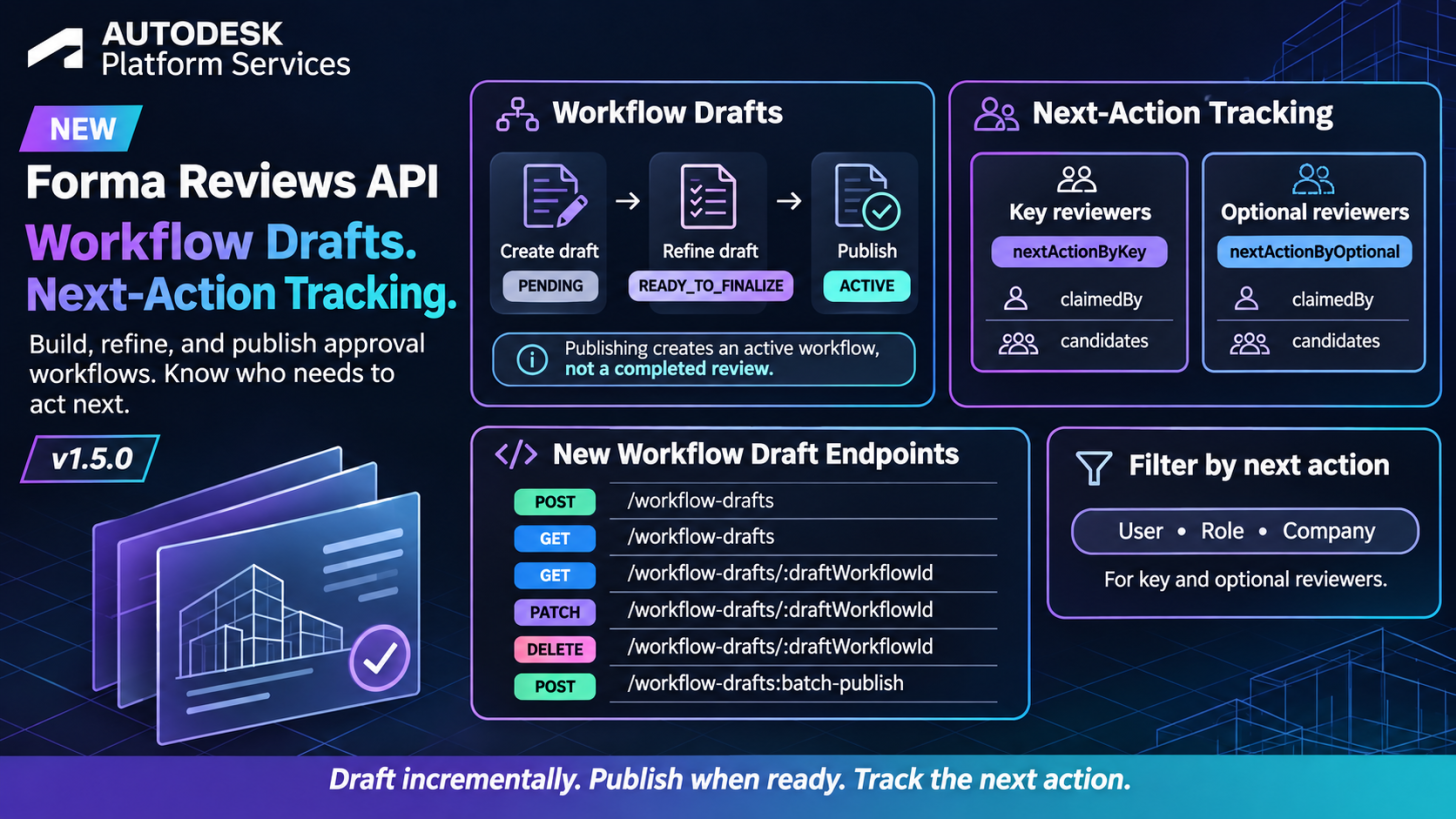
In the previous blogs, we shared that the Autodesk Forma Reviews API provided write support and later added update attributes and extended initiator edit permissions. We are pleased to announce the next update (v1.5.0, released on November 17, 2026): you can now build an approval workflow as a draft, refine it step by step, and publish it when it is ready. We have also added next-action information to reviews, so you can tell who needs to act next.
What is new
Two things changed in v1.5.0: workflow drafts and next-action tracking.
Workflow drafts
Until now, POST workflows required a complete definition in one request, including name, steps, and copyFilesOptions. With drafts, you can create a workflow with just a name, fill in steps and options over several calls, and publish one or more drafts together. The new endpoints are:
- POST workflow-drafts: Create a draft approval workflow.
- GET workflow-drafts: List the drafts in a project, with paging, sorting, and filters on
nameandstatus. - GET workflow-drafts/:draftWorkflowId: Retrieve a single draft.
- PATCH workflow-drafts/:draftWorkflowId: Update a draft partially.
- DELETE workflow-drafts/:draftWorkflowId: Delete a draft.
- POST workflow-drafts:batch-publish: Publish one or more drafts as active workflows.
A draft starts as PENDING and becomes READY_TO_FINALIZE once it meets the basic requirements. After you publish it, you get an ACTIVE workflow, and its ID is the workflowId you pass to POST reviews.
Next-action information on reviews
GET reviews, GET reviews/:reviewId, and POST reviews now return two more objects, nextActionByKey and nextActionByOptional, next to the existing nextActionBy. They correspond to the key reviewers and optional reviewers of the current step. Each has the same shape as nextActionBy (claimedBy and candidates), and each is empty when no reviewer of that type has a pending task.
GET reviews also has six new filters, each taking a single ID (comma-separated values return 400):
filter[nextActionByKeyUser],filter[nextActionByKeyRole],filter[nextActionByKeyCompany]filter[nextActionByOptionalUser],filter[nextActionByOptionalRole],filter[nextActionByOptionalCompany]
A quick walkthrough
All requests use the base URL https://developer.api.autodesk.com/construction/reviews/v1/projects/{projectId} with Authorization: Bearer <ACCESS_TOKEN> and Content-Type: application/json.
The tutorial has the full request and response bodies.
1. Create a draft. Only name is required, and it must be unique in the project.
POST /workflow-drafts

{ "name": "Structural Draft Approval Workflow" }
2. Update the draft until status is READY_TO_FINALIZE. Fields you leave out stay unchanged. An array you send, such as steps, replaces the stored one, so send the whole array and do not include step IDs.
PATCH /workflow-drafts/{draftWorkflowId}

{
  "steps": [
    {
      "name": "Submit",
      "type": "INITIATOR",
      "candidates": { "users": [{ "autodeskId": "<USER_AUTODESK_ID>" }] }
    },
    {
      "name": "Final approval",
      "type": "APPROVER",
      "duration": 3,
      "dueDateType": "CALENDAR_DAY",
      "candidates": { "users": [{ "autodeskId": "<USER_AUTODESK_ID>" }] }
    }
  ],
  "copyFilesOptions": { "enabled": false }
}
3. Publish.
POST /workflow-drafts:batch-publish

{ "draftWorkflowIds": ["<draftWorkflowId>"] }
Use results[].id from the response as the workflowId when you create a review.
A few things worth knowing
- Permissions: The draft endpoints are for project admins only. With a 3-legged token, the user must be a project admin. With a 2-legged token, add the
x-user-idheader (you can get the ID fromGET projects/{projectId}/users). Use thedata:readscope for reads anddata:writefor changes. - What a draft needs before it can be published: A draft needs two to seven steps, starting with an
INITIATORstep and ending with anAPPROVERstep, at least one candidate per step, and a configuredcopyFilesOptions. READY_TO_FINALIZEis not a guarantee: Batch-publish applies the full validation. It returns200even when every draft fails, so always checkerrors[]as well asresults[]. It deletes the drafts that publish successfully and keeps the failed ones so you can fix them.- PATCH is a partial update: Send any of the supported fields you want to change, and the fields you leave out stay unchanged. Each field you send must still meet its own minimum requirements. For example,
stepsneeds at least two items, so an emptystepsarray returns400(data.steps should NOT have fewer than 2 items). If you send an array such assteps, it replaces the whole stored array. To change one step, send all the steps. - Not for BIM 360: These endpoints are not compatible with BIM 360 projects.
About the Reviews API
The Reviews tool is a module within Forma Data Management. It provides a tool to send files for review using the approval workflow feature, which enables project administrators to facilitate, control, and automate the distribution of files to project members. Project members assigned as reviewers can then review and comment on the files, and members selected as approvers can give final approval for the files to be used. You can find information about the Reviews tool in the product help.
Documentation
- Change history: This page lists the release notes for each version of the Reviews API, including v1.5.0.
- Field guide: This page provides an overview of the terminology and background information related to Reviews and the Reviews API. It also includes information about the scope of the current release and its limitations.
- Step-by-step tutorial: Create a draft approval workflow: This newly added page provides instructions on how to create, update, verify, and publish a draft approval workflow.
- Reference guide: This section lists a set of endpoints for creating and managing workflow drafts, as well as retrieving reviews and review details.
Code samples on GitHub
If you have any questions or feedback, please don’t hesitate to contact us through our APS support channel.