

For a long time, the Data Connector API has been the standard way to bulk retrieve project data. However, to capture incremental changes today, consumers must currently pull the full dataset each time and then compare it with the previous snapshot.
We are pleased to announce the public beta release of delta extraction for Data Connector, also known as Change Data Capture (CDC). This new capability enables Data Connector to retrieve only data that has changed since the last extraction, significantly improving extraction efficiency while reducing the volume of redundant data transferred.
The following new service groups are now exposed for CDC. More groups will be added in the future.
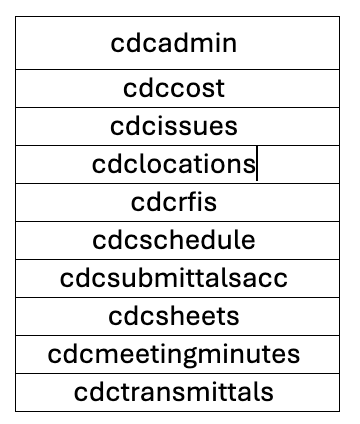
Just like standard extraction groups, these CDC service groups support ONE_TIME jobs and other scheduled interval jobs. If no date‑related parameters are provided, the endpoint extracts all records, behaving exactly like non‑CDC service groups. In typical usage, CDC groups are used together with date filters. Along with this CDC release, we have also added the missing CUSTOM enum option for the dateRange parameter.
Behavior rules for date filtering:
- When dateRange = CUSTOM, the provided startDate and endDate are used as entered.
- When dateRange = null, the provided startDate and endDate are also used as entered.
- When any predefined dateRange value is set, startDate and endDate are ignored, and the time range is computed dynamically by the system. These dynamically computed dates have persisted to the job record once the scheduler creates the job entry. For example, for a daily recurring job with dateRange=YESTERDAY, each daily run embeds the calculated “yesterday” date range at job creation time, rather than recalculating it at extraction execution time. This ensures consistent extraction windows are independent of the exact job run time.
{
    "description": "test CDC Data with Custom Range",
    "scheduleInterval": "ONE_TIME",
    "effectiveFrom": "2026-05-06T00:00:00.000Z",
    "dateRange": "CUSTOM",
    "startDate": "2026-01-01T00:00:00.00Z",
    "endDate": "2026-05-01T00:00:00.00Z",
    "serviceGroups": [
        "cdcissues",
        "cdcrfis"
    ],
    "projectId": "854c194f-05b3-4117-b926-69fa36c33c0c"
}
{
    "description": "test CDC Data with Predefined Range",
    "scheduleInterval": "DAY",
    "dateRange": "YESTERDAY",
    "serviceGroups": [
        "cdcissues",
        "cdcrfis"
    ],
    "projectId": "854c194f-05b3-4117-b926-69fa36c33c0c"
}
When performing CDC extractions from Data Connector, we recommend using overlapping time frames in your requests. Overlapping windows help capture all changes and account for system latency and event propagation delays. Example for extraction twice a day (ONE_TIME schedule)
First Request:
- startDate= YEAR-MONTH-DAYT00:00:00.000Z
- endDate= YEAR-MONTH-DAYT12:00:00.000Z
Second Request :
- startDate= YEAR-MONTH-DAYT11:59:00.000Z
- endDate= YEAR-MONTH-(NEXT DAY)T00:00:00.000Z
A few more notes:
- CDC service groups do not enforce a maximum date range limit. They will extract whatever time window is specified in the request.
- The mixing CDC and non‑CDC service groups is supported in the same request to avoid breaking existing integrations. This also allows customers to maintain existing workflows for services that do not yet have CDC coverage (such as relationships or markups).
- projectStatus should not be included in the request payload for CDC calls. Since CDC only returns recent changes, the filtering by project status is unnecessary.
- All other API behaviors remain identical to the full extraction workflow.
The data schema documentation has also been updated with detailed CSV column definitions for all CDC service groups. https://developer.api.autodesk.com/data-connector/v1/doc
Updated Documentations:
We hope this new CDC capability helps streamline your data integration workflows and reduce your overall data extraction overhead. Please share your feedback through this form.
(Disclaimer: The cover illustration for this post was created using Gemini AI.)