
If you've built an APS application before, the stack probably looked familiar: an Express or ASP.NET server to hold your OAuth tokens and proxy the APIs, plus a separate front end (React, Angular, or plain JavaScript) to render the UI and host the Viewer. It works, but there's a lot of plumbing: REST endpoints on the server, fetch calls on the client, request/response types you keep in sync by hand, and a build pipeline that glues the two halves together.
In this post I want to show how Svelte and SvelteKit collapse a lot of that plumbing, and how they fit naturally into the things APS apps always need to do: log a user in with 3‑legged OAuth, call the Data Management and other APIs, and embed the APS Viewer. At the end I'll point you at a small but complete sample app you can clone and run.
What are Svelte and SvelteKit?
Svelte is a UI framework, the same category as React, Vue, or Angular. The thing that makes it different is when the work happens. React ships a runtime (the virtual DOM diffing engine) to the browser and does its reconciliation work while your app runs. Svelte is a compiler: it turns your components into small, imperative JavaScript that surgically updates the DOM, at build time. There's no framework runtime to download, and no virtual DOM to diff. The result is less JavaScript shipped to the browser and, for most apps, a simpler mental model: your component looks a lot like plain HTML, CSS, and JS.
SvelteKit is the application framework built on top of Svelte, the equivalent of Next.js for React or Nuxt for Vue. It gives you file-based routing, server-side rendering, API endpoints, and a deployment via adapters (Node, Vercel, Cloudflare, static, and more). For an APS developer, the important part is that SvelteKit is full-stack: the same project holds both your server code (where your client secret and tokens live) and your UI, with a first-class, type-safe bridge between them.
How does it compare?
| Compared to | How Svelte/SvelteKit stacks up |
|---|---|
| React/Next.js | Smaller bundles, less boilerplate; smaller (but fast-growing) ecosystem |
| Vue/Nuxt | Conceptually close; wins on bundle size and reactivity ceremony |
| Angular | Lighter and less opinionated; fewer batteries included |
For the kind of internal tools and dashboards that APS apps so often are (browse a hub, pick a project, preview a model, review some issues), Svelte's low ceremony and small footprint are a genuinely good fit.
A taste of modern Svelte
Two recent features are worth seeing, because they're exactly what makes APS apps pleasant to build: runes for reactivity and remote functions for talking to the server.
Runes
Svelte 5 introduced runes: $-prefixed symbols that declare reactive state explicitly. They replace the older implicit-reactivity rules with something you can read at a glance:
<script lang="ts">
  let { urn }: { urn: string } = $props();  // component properties
  let count = $state(0);                    // reactive state
  let doubled = $derived(count * 2);        // recomputed when count changes

  $effect(() => {                           // runs when its dependencies change
    console.log('count is now', count);
  });
</script>

<button onclick={() => count++}>{count} (doubled: {doubled})</button>
$state makes a variable reactive, $derived computes a value from other reactive values, and $effect runs side effects when its dependencies change. Component inputs use the $props() rune.
In the sample app, the main page derives its entire UI state from the URL query string with $derived, so every view is shareable and bookmarkable:
const view = $derived((page.url.searchParams.get('view') ?? 'files') as 'files' | 'issues');
const hubId = $derived(page.url.searchParams.get('hub') ?? '');
const projectId = $derived(page.url.searchParams.get('project') ?? '');
Remote functions
This is the feature that changes how you write the server/client boundary. A remote function is a function you write in a .remote.ts file that runs on the server but that you call directly from the browser as if it were local. SvelteKit handles the network round-trip, serialization, and type safety for you: no REST endpoints, no fetch, no hand-maintained types.
A query is a server function the client can call. You can even validate its arguments with a schema (the sample uses valibot):
// src/routes/data.remote.ts
import { query } from '$app/server';
import * as v from 'valibot';

export const projects = query(v.string(), (hubId) =>
  withAuth([], (token) => listProjects(token, hubId))
);
And in a component you just… call it. The returned object is reactive and works directly with Svelte's {#await} block:
<script lang="ts">
  import { topFolders } from '../../routes/data.remote';
  let { hubId, projectId } = $props();

  const rootsQ = $derived(topFolders({ hubId, projectId }));
</script>

{#await rootsQ}
  <div>Loading folders…</div>
{:then roots}
  <FolderNode entries={roots} />
{:catch err}
  <div>{err.message}</div>
{/await}
listProjects and your APS client secret never leave the server. The browser only ever sees the data you return. That's the whole pattern, and it's why an APS app written in SvelteKit needs so little glue code.
Putting it together for APS
Now the part you came for: how these pieces map onto the things every APS app has to do.
Handling 3‑legged OAuth
OAuth is fundamentally a server concern: your client secret and the user's tokens must never reach the browser. SvelteKit's server routes (+server.ts files) are the natural home for the flow, and the official @aps_sdk/authentication SDK does the heavy lifting:
// src/lib/server/aps/oauth.ts
import { AuthenticationClient, ResponseType, Scopes } from '@aps_sdk/authentication';

const auth = new AuthenticationClient();

export function getAuthorizeUrl(state: string): string {
  return auth.authorize(env.APS_CLIENT_ID, ResponseType.Code, env.APS_CALLBACK_URL, scopes(), { state });
}

export function exchangeCode(code: string) {
  return auth.getThreeLeggedToken(env.APS_CLIENT_ID, code, env.APS_CALLBACK_URL, {
    clientSecret: env.APS_CLIENT_SECRET
  });
}
The flow lands in two tiny route handlers:
/auth/loginsets a randomstatenonce in a short-lived cookie and redirects the user to Autodesk's consent screen./auth/callbackverifies thestate(CSRF protection), exchanges the authorization code for tokens, and starts a session.
The session itself is stored in a signed, HTTP-only cookie: no server-side session store to run. The payload is base64url-encoded JSON with an appended HMAC-SHA256 signature, so the client can read nothing and tamper with nothing.
The nicest touch is token refresh. A SvelteKit server hook runs on every request, so it's the perfect place to transparently refresh an access token that's about to expire:
// src/hooks.server.ts
export const handle: Handle = async ({ event, resolve }) => {
  const session = readSession(event.cookies);
  if (session) {
    if (session.expiresAt - Date.now() < REFRESH_THRESHOLD_MS) {
      const t = await refresh(session.refreshToken);
      // …persist the new token to the cookie…
    }
    event.locals.session = session;   // now available to every remote query
  }
  return resolve(event);
};
Because the hook drops the session on event.locals, every remote function downstream gets the current, valid access token for free.
Calling APS APIs
With the token available server-side, calling APS is just a matter of using the official SDKs inside your server helpers. Data Management:
// src/lib/server/aps/files.ts
import { DataManagementClient } from '@aps_sdk/data-management';

const dm = new DataManagementClient();

export async function getFolderContents(token: string, projectId: string, folderId: string) {
  const res = await dm.getFolderContents(projectId, folderId, { accessToken: token });
  // …map the response into a minimal shape the UI needs…
}
…and Forma Issues looks the same, with the @aps_sdk/construction-issues client. These helpers are then exposed to the UI as remote query functions (as shown above), so the browser never touches an APS endpoint directly. Each query reads the session, forwards the access token, and returns only the trimmed-down data the UI actually renders.
Embedding the APS Viewer
The Viewer is a client-side library loaded from Autodesk's CDN, so it lives in a regular Svelte component. The component loads the Viewer SDK once, then reacts to a urn prop with $effect:
<!-- src/lib/components/Viewer.svelte -->
<script lang="ts">
  import { viewerToken } from '../../routes/data.remote';

  let { urn }: { urn: string } = $props();

  async function initViewer() {
    await ensureViewerSdk();  // injects the CDN <script> + CSS once
    Autodesk.Viewing.Initializer({
      env: 'AutodeskProduction2',
      api: 'streamingV2',
      getAccessToken: async (cb) => {
        // Fetch a fresh token from the server via a remote function.
        const q = viewerToken();
        await q.refresh();
        const t = q.current;
        if (t) cb(t.access_token, t.expires_in);
      }
    }, /* … */);
  }

  // Reload whenever the urn prop changes.
  $effect(() => {
    if (urn && urn !== lastUrn) loadDocument(urn);
  });
</script>

<div class="viewer-host" bind:this={host}></div>
The sample reuses the same remote-function pattern: viewerToken() is a server query that hands back the user's access token and its true remaining lifetime. Because the server hook already keeps that token fresh, the Viewer always gets a valid token.
The sample app
The complete sample is published here:
github.com/autodesk-platform-services/aps-sveltekit-demo
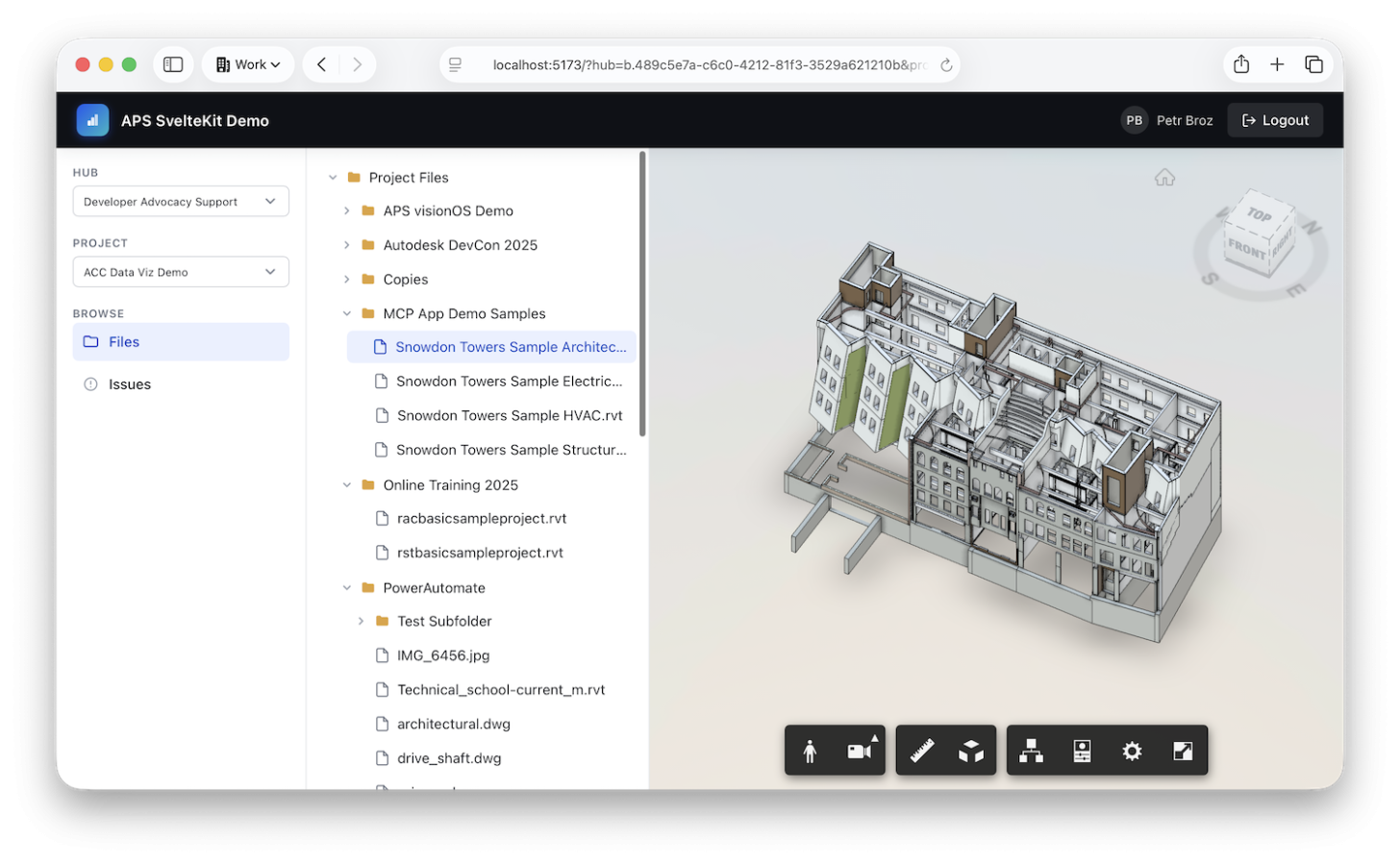
It's a small SvelteKit app that lets a user sign in with their Autodesk account and browse their data in Forma or Fusion:
- 3‑legged OAuth sign-in, with the session in a signed, HTTP-only cookie and transparent token refresh.
- Hub & project picker in a sidebar.
- A lazily-loaded file tree: folders load on demand as you expand them.
- Model preview: selecting a file with a viewable derivative opens it in the APS Viewer.
- Issues: browse a project's issues and inspect each one's details.
Under the hood it's deliberately minimal so the patterns stay visible:
- Svelte 5 with runes for all UI state.
- SvelteKit remote functions for type-safe, server-only data loading, with no hand-written REST layer.
- The official APS SDKs (
@aps_sdk/authentication,@aps_sdk/data-management,@aps_sdk/construction-issues). - valibot for validating remote-function arguments.
@sveltejs/adapter-nodefor a plain Node.js production server.
Clone it, create a Traditional Web App in the APS Developer Portal, drop your client ID and secret into a .env file, and yarn dev. The README walks through the rest.