
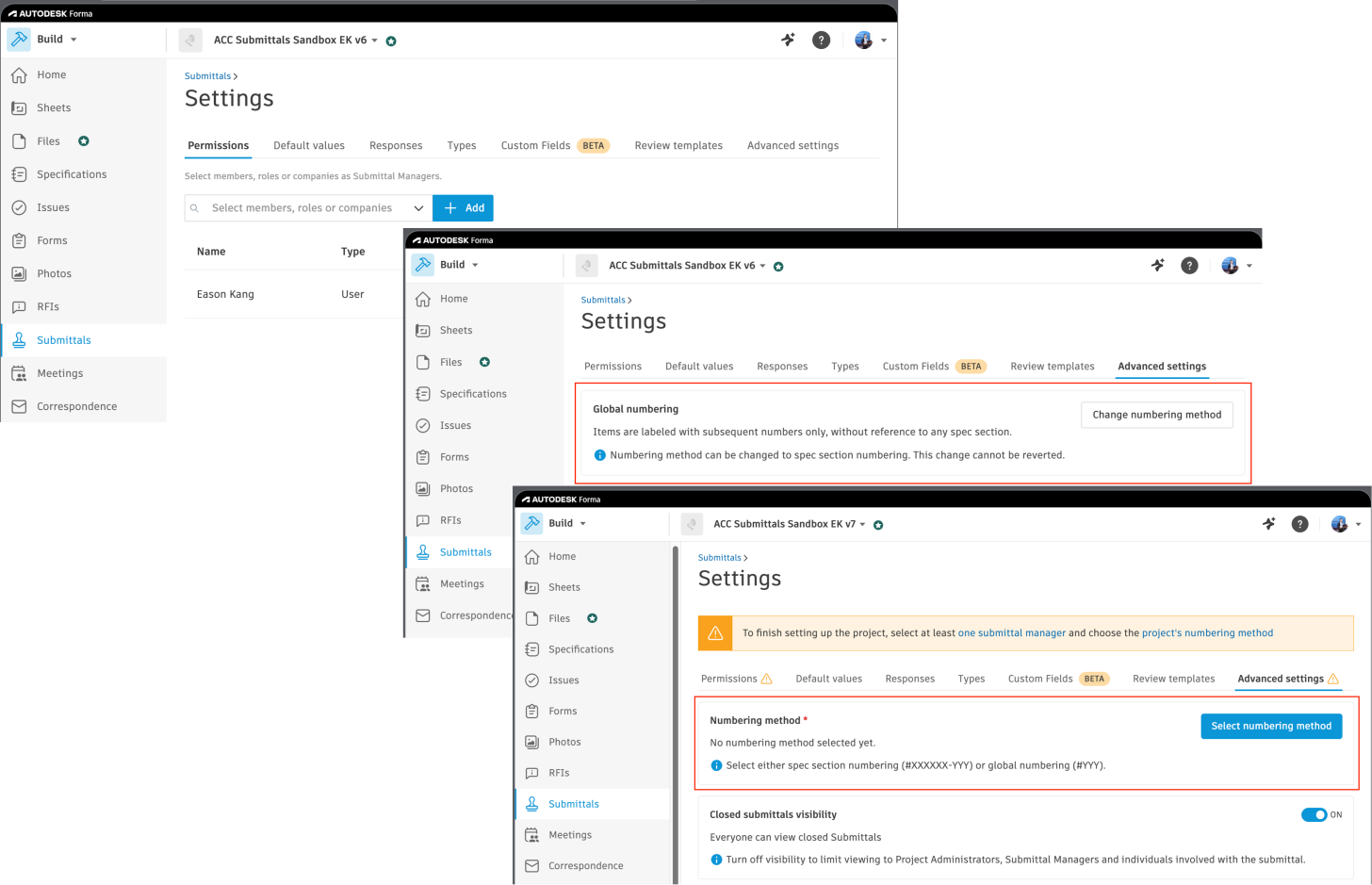
We are pleased to announce that Autodesk has released a new set of Autodesk Forma Submittals API endpoints for managing project-level settings, including Submittal Manager mappings and custom identifier sequence type configuration.
Submittals is one of the modules in Autodesk Forma Build. It provides a tool to easily create and organize submittal items, such as shop drawings and specifications, to submit/notify for review and distribution among stakeholders, and to track progress and report on it. You can find information about the Submittals feature in the product help.
In this fourth phase of the Submittals API, we have released four (4) new endpoints for configuring project settings before creating submittal items:
WRITE endpoints
- POST mappings: Creates an admin mapping that designates a user, role, or company as a Submittal Manager for the project.
- DELETE mappings: Removes an existing Submittal Manager mapping from the project.
- POST custom-identifier:change-sequence-type: Changes the custom identifier numbering sequence type for the project (Global vs. Spec section). This is an async operation that returns an async job object.
READ endpoints
- GET async-jobs/{asyncJobId}: Retrieves the status and result of an async job triggered by `POST custom-identifier:change-sequence-type`.
The following Q&A may answer some of your questions:
Q1. What is the difference between the Global and Spec section sequence types?
A1. Both are custom identifier numbering schemes for submittal items:
- Global (sequenceType: "1"): A single sequential counter shared across all submittal items in the project. For example, items are numbered 1, 2, 3, and so on, regardless of which spec section they belong to.
- Spec section (sequenceType: "2"): Each spec section maintains its own sequential counter. The `customIdentifierHumanReadable` for an item will be in the `<specId>-<sequence>` format. For example, if a spec's ID is `033100` and the item is the first under that spec, its human-readable identifier will be `033100-01`.
Q2. Can I revert from the Spec section back to the Global sequence type after changing it?
A2. No. Changing the sequence type from Global to Spec section is a one-way, irreversible operation. You can only change from the Global → Spec section, not the other way around. For new projects where no sequence type has been set yet, either value can be chosen as the initial configuration.
Q3. POST custom-identifier:change-sequence-type returns an async job object right away. How do I know when it's done?
A3. After calling `POST custom-identifier:change-sequence-type`, take the id from the response and poll GET async-jobs/{asyncJobId} until the asyncState reaches a terminal value of either "3" or "4":
| asyncState | Meaning |
| "1" | Pending |
| "2" | Started |
| "3" | Success |
| "4" | Failure |
On failure, the resultsPayload field in the response will contain error details. If existing submittal items are present, the job will also renumber them to match the new sequence type, which may take a moment to complete.
Q4. I want to delete a Submittal Manager mapping, but the API returns an error. What should I do?
A4. Deletion is blocked if the mapped entity is currently assigned as the manager on any submittal item. You need to reassign those items first. The recommended flow is:
- Call GET mappings to get the `autodeskId` of the mapping you want to delete.
- Call GET items with `filter[manager]=<autodeskId>` to find all affected items.
- Call PATCH items/{itemId} on each item to assign a different manager.
- Call DELETE mappings/{mappingId} once no items remain assigned to the original manager.
Q5. Do I need Admin permissions to use these new endpoints?
A5. Yes. All four new endpoints require the caller to have Admin role (`"4"`) on the project. You can verify your permissions by calling GET users/me and checking that roles contains `"4"` and permittedActions contains `"AdminMapping::create"`. (Note that these endpoints are not compatible with BIM 360 projects.)
Documentation
- Field Guide: Terminology and background information about Submittals and the Submittals API, including the scope of the current release and its limitations.
- Step-by-step Tutorial – Set Up Submittals for a New Project: A new tutorial that walks through verifying permissions, creating a Submittal Manager mapping, setting the custom identifier sequence type, and polling the resulting async job.
- Reference Guide: Lists all Submittals API endpoints, including the new endpoints we released this time.
Code Samples on GitHub
If you have any questions or feedback, please contact us through our APS support channel.