
A few months ago, we published Building Custom MCP Servers with Autodesk Platform Services, a broad look at SDKs, transports, and state management for MCP servers that talk to Autodesk Platform Services. Authentication got one section in that post. It deserves more.
That's because auth is where most MCP server projects stall. You already know how to get an APS token for a web app. But an MCP server sits between an AI client and APS, and that introduces a second, completely separate OAuth relationship: the one between the MCP client and your server. The 2026-07-28 revision of the MCP specification makes that relationship stricter, too. Remote servers are now expected to behave as OAuth 2.1 resource servers backed by a dedicated authorization server, and to identify clients via Client ID Metadata Documents (CIMD).
In this post, we'll walk through the authentication patterns we recommend for custom APS MCP servers, and at the end map them onto the new aps-mcp-auth-examples repository, which implements every one of them. If you just want the code, go there. And if you'd rather watch than read, we covered the same ground in our AU 2026 session, Production-Ready Auth for MCP Servers.
What we'll cover:
- Why MCP auth is two independent problems, not one
- The four ways your server can authenticate to APS, and when to use each
- The three ways MCP clients can authenticate to your server
- A decision table for picking a combination
- How all of that maps onto the example code
Two Boundaries, Not One
Every APS MCP server has two authentication boundaries:
| Boundary | Who's talking | Question it answers |
|---|---|---|
| Layer 1 | MCP client ↔ your MCP server | Is this client (and the user behind it) allowed to call my tools? |
| Layer 2 | Your MCP server ↔ APS | Which APS identity should this tool call run under? |
These two never mix. The token a client presents to your server is never forwarded to APS, and the APS token your server holds is never handed back to the client. Each boundary has its own authorization server, its own tokens, and its own lifecycle. Conflating them is the single most common mistake we see, and most of the patterns below exist to keep them apart.
How the MCP Server Authenticates to APS
Rather than thinking about four separate modes, split them into two groups based on one question: does the APS identity depend on who's calling?
Caller-Independent: 2LO and SSA
With 2-legged OAuth (2LO), your server uses one app-wide APS identity. With a Secure Service Account (SSA), it uses one non-human identity that can be granted access to hubs and projects like a regular user. Either way, there's no interactive sign-in, the identity is ready the moment the process starts, and every caller sees the same data.
The two aren't interchangeable, though. A 2LO token only works with APIs that accept 2-legged access; many APS endpoints require a user context and will reject it. An SSA token, by contrast, carries the identity of a real (if non-human) Autodesk user, so it works with user-context APIs too, and the service account can be invited into hubs and projects with precisely the permissions it needs. Pick SSA whenever your automation needs to reach project data without a person signing in.
Caller-Dependent: 3LO and PKCE
With 3-legged OAuth (3LO) and its public-client variant PKCE, each user signs in with their own Autodesk account, and tool calls see exactly what that user would see in the product. This is what you want for anything that touches a specific person's hubs, projects, or files.
The thing to get right here is when the sign-in happens. The approach we recommend is to make sign-in lazy: the first tool call that needs a user identity returns a sign-in link as its result instead of data. The user opens the link, completes the usual Autodesk consent screen, and retries the call. From then on the server holds a refresh token for that user and renews the access token silently.
Note: a tidier variant of the same idea is URL-mode elicitation, added to MCP in the 2025-11-25 revision. Instead of smuggling the link through a text result, the server asks the client to send the user to a URL, and the client can present it as a proper sign-in prompt and tell the server when it's done.
The difference between the two modes is only how your server proves its identity to APS when it redeems the authorization code: with a client secret (3LO) or with a per-login code verifier (PKCE). Use 3LO when the server runs somewhere a secret can be kept, PKCE when it doesn't.
Which APS Auth Mode?
| Mode | APS identity | User interaction | APS app type | Use it when |
|---|---|---|---|---|
| 2LO | One, app-wide | None | Server-to-Server | Tools only need data the app itself owns (e.g. OSS buckets, Model Derivative) |
| SSA | One, non-human user | None | Server-to-Server + SSA | Automation against Autodesk Forma projects a service account has been invited to |
| 3LO | Per user | Sign in once, then refresh | Traditional Web App | Tools act on behalf of a specific person, and the server can keep a secret |
| PKCE | Per user | Sign in once, then refresh | Desktop, Mobile, Single-Page App | Same as 3LO, but the server runs where a secret can't be kept (e.g. a locally spawned process) |
How Clients Authenticate to the MCP Server
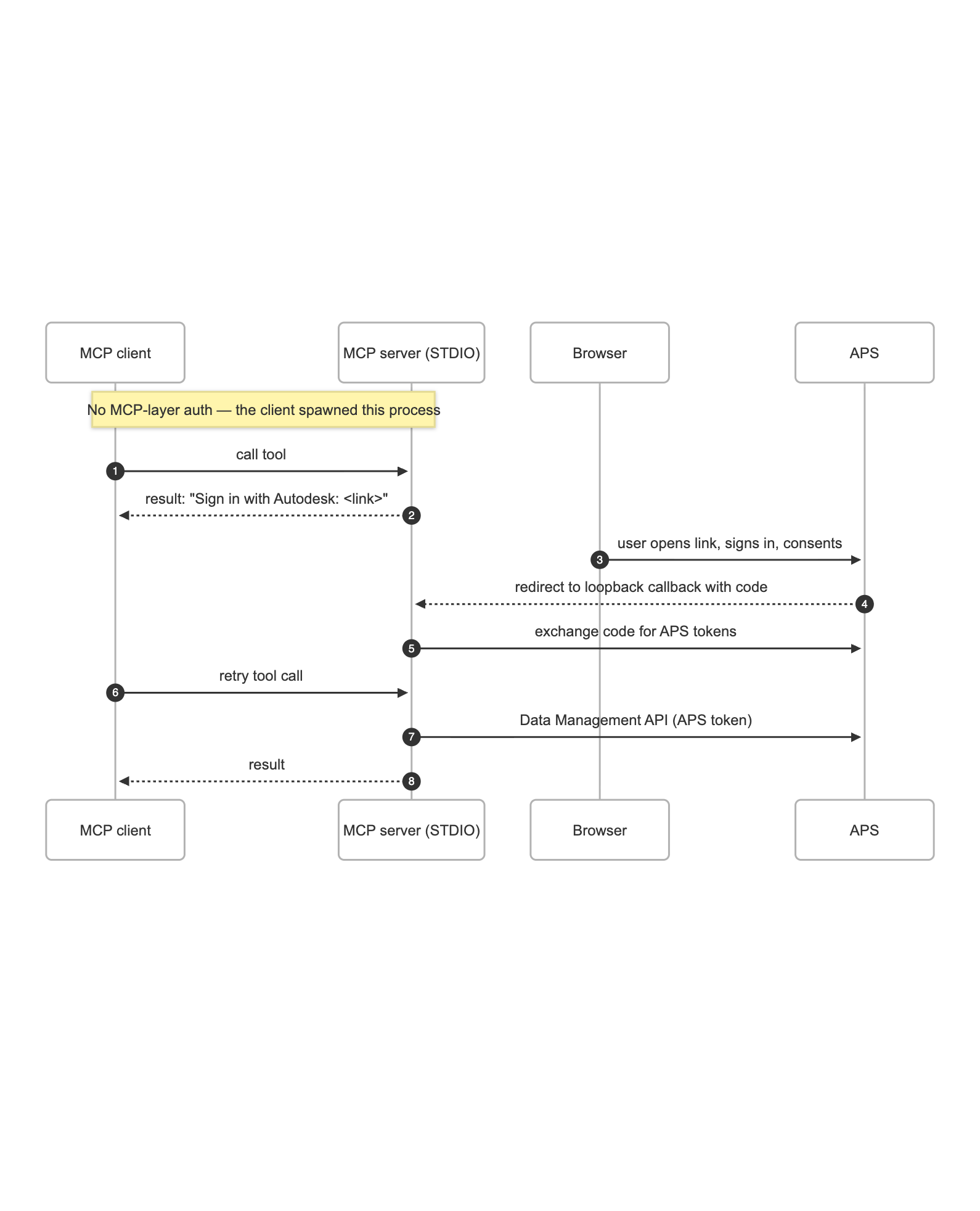
Now the other boundary. There are three options, from "none" to "a full OAuth proxy". The diagrams below show the first-use flow for each combined with 3LO on the APS side, since that's where both layers are visible; for 2LO and SSA, the APS sign-in steps simply disappear.
Local (STDIO): No Layer 1 Auth
When a desktop client like Claude Desktop spawns your server as a local process and talks to it over STDIO, there's nothing to authenticate. The client already runs with the user's local privileges, so the connection is as trusted as any other command the user can run. Layer 1 simply doesn't exist here.
Remote with an External Identity Provider
Once your server is reachable over HTTP, the MCP spec requires Layer 1. The recommended way to do it is to not build an authorization server yourself. Bring your own identity provider (Auth0, WorkOS, Okta, or anything else that publishes OIDC discovery metadata and a JWKS), let it issue tokens, and have your server only verify them.
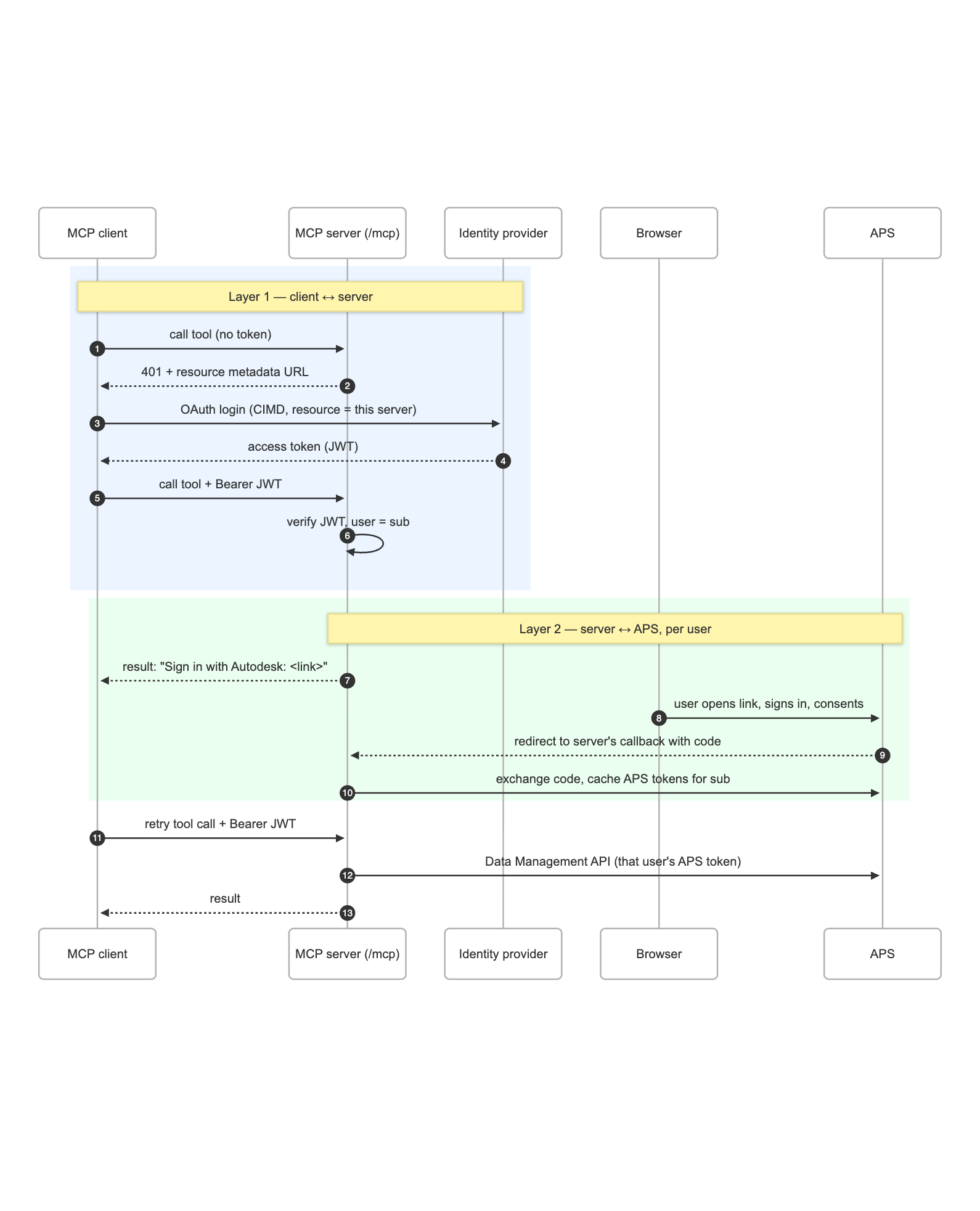
Your server's Layer 1 responsibilities then shrink to three things:
- It publishes RFC 9728 protected-resource metadata so that a client which gets a
401can discover which authorization server to talk to. - It verifies each incoming token's signature, issuer, and audience against the IdP's published keys.
- And it extracts a stable user identifier (the
subclaim) from the verified token.
The first two are standard OAuth resource-server plumbing that MCP SDKs increasingly provide out of the box.
That sub is where the two layers meet. With 2LO or SSA it's irrelevant, since every caller shares one APS identity. With 3LO or PKCE it's the key under which the server keeps each user's APS session: the first time a given IdP user calls a tool, they get the sign-in link described above; after that, the server finds their cached APS tokens by sub. The user authenticates twice on first use, once with your IdP and once with Autodesk, and then not again until a session expires. A token without a sub should be rejected outright, otherwise distinct callers silently collapse onto one APS identity.
Remote with an OAuth Proxy
The third option is for when you don't have an IdP to bring, or when you want Autodesk sign-in to be the only sign-in. Put a small, dedicated OAuth proxy service in front of your MCP server. The proxy acts as the Layer 1 authorization server toward MCP clients, and as a confidential OAuth client toward APS. It mints its own "MCP tokens" and holds the user's APS tokens internally, so a single Autodesk login produces both.
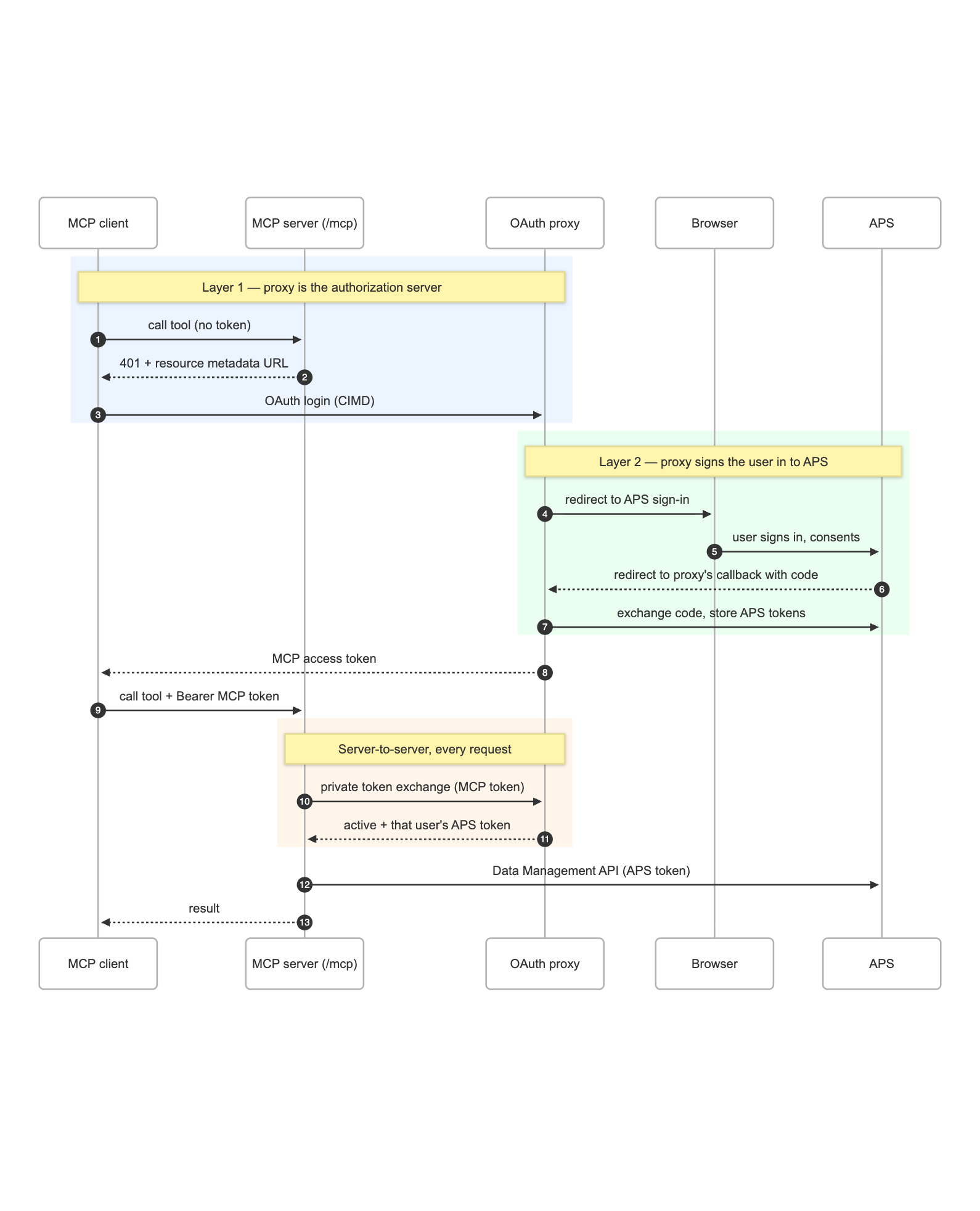
The MCP server never inspects those tokens itself. On each request it hands the client's token to a private, server-to-server exchange endpoint on the proxy and gets back two things: confirmation that the token is one the proxy issued, and the APS access token the proxy holds for that user. The exchange endpoint isn't advertised in any discovery document and is locked down with the shared app credentials, so only the MCP server can call it. From the tools' point of view nothing changes; they receive an APS token to use, and whether it came from a per-user session or a shared app identity is decided the same way as in the other two options.
Because the proxy always performs the real APS 3-legged flow, 3LO and PKCE are indistinguishable from the MCP server's point of view. It only ever sees the resulting token.
Why Not Just Forward the APS Token?
If you've built APS web apps before, there's an obvious shortcut: have the MCP client obtain an APS token and send it to your server as the bearer token, then pass it straight through to APS. One token, one flow, done.
Don't. The MCP spec explicitly forbids token passthrough, because it turns your server into a confused deputy: it ends up exercising authority it was never granted, on behalf of whoever hands it a token. Keep the two layers separate and let each token carry its own audience.
Which Pattern Should You Use?
Cross the two axes and you get this. As of October 2026, here's what we'd reach for:
| Your situation | Layer 1 (client ↔ server) | Layer 2 (server ↔ APS) |
|---|---|---|
| Personal tool on your own machine, your own data | None (STDIO) | PKCE |
| Personal or team automation over data the app or a service account owns | None (STDIO) | 2LO or SSA |
| Remote server for your organization, which already has an IdP | External IdP | 3LO for per-user data, SSA for shared project data |
| Remote server where Autodesk sign-in is the only sign-in | OAuth proxy | 3LO |
From Concepts to Code
Everything above maps onto the aps-mcp-auth-examples repo fairly directly. Every example exposes the same two Data Management tools (list-projects and list-contents) and differs only in how it handles auth, which keeps the comparison honest.
Layer 2 lives in the shared/ package as four interchangeable "auth provider" classes, plus the two tools, which only ever ask a provider for an access token and don't know or care where it came from. Layer 1 is one folder per option. An APS_AUTH_MODE environment variable (2lo, ssa, 3lo or pkce) picks the Layer 2 provider independently of which example you run, so all twelve combinations can be tried from the same code:
| Layer 1 option | Example | Notes |
|---|---|---|
| Local (STDIO) | aps-mcp-server-local |
TypeScript; loopback callback on localhost for 3LO/PKCE |
| External IdP | aps-mcp-server-remote-auth0 |
TypeScript + Express; Auth0, but any OIDC/JWKS provider works |
| OAuth proxy | aps-mcp-server-remote-proxy + simple-oauth-proxy |
TypeScript server, Python proxy |
If you'd like to see each flow play out one message at a time, with the credentials each component holds at every step, the repo also hosts animated walkthroughs of every combination.
Wrap-Up
You can now look at any APS MCP server design and ask the two questions that matter: how does the server authenticate to APS, and how do clients authenticate to the server? Pick caller-independent or caller-dependent for the first, pick none, an external IdP, or a proxy for the second, and keep the two tokens from ever crossing. Everything in https://github.com/autodesk-platform-services/aps-mcp-auth-examples is a working, swappable instance of one of those combinations, so start from the row in the table that matches your situation and adapt from there.
Resources
- aps-mcp-auth-examples on GitHub
- MCP Authorization specification (2026-07-28)
- APS Authentication (OAuth) developer guide
- APS Secure Service Accounts developer guide
- Building Custom MCP Servers with Autodesk Platform Services
- AU 2026: Production-Ready Auth for MCP Servers
Happy building! 🛠️ And if you run into anything that doesn't match what you read here, let us know in the repo's issues.