
Delivering value with transparency and predictability
Autodesk Platform Services (APS) helps customers extend the value of Autodesk products with powerful APIs and services for data access, automation, and integration across AEC and manufacturing.
As our APS business model continues to evolve, we’re focused on delivering that value in a way that’s transparent and predictable. Moving forward, pricing changes for our APIs will be communicated at least 90 days in advance, giving you time to understand what’s changing, plan ahead, and adapt without disrupting existing workflows.
As APS adoption grows, we’re also aligning API access more closely with Autodesk product subscriptions, making it easier to build and scale solutions using the products you already rely on.
What’s changing
Pricing for Autodesk Data Model APIs is being introduced in phases:
- Manufacturing Data Model APIs: Pricing took effect on August 17, 2026.
- AEC Data Model APIs: Pricing took effect on October 6, 2026.
All customers will continue to have limited access through the APS Free tier to explore and experiment with these APIs.
If you have a qualifying Autodesk product subscription, you’ll receive monthly API usage included with your subscription. This included usage helps you move faster from day one, enabling you to build and automate workflows without additional API purchases. Monthly usage included with your subscription supports real-world production workflows, not just experimentation, while flexible paid options provide a clear path to scale as your needs grow.
To take advantage of the usage included with your product subscription, your APS apps must be in the same team where the product subscription is assigned. Usage capacity is pooled at the team level, so all apps in that team can share the available capacity. Learn more about managing a team here.
If your usage exceeds what’s included, APS paid offerings—Prepay with Flex or Pay as You Go—offer a predictable way to scale. You only pay when you need higher-volume access or export capabilities.
A complete breakdown of qualifying AEC Data Model and Manufacturing Data Model API products, along with included monthly usage caps and new API rates, is listed below. The amounts shown are based on a single subscription. If you purchase multiple subscriptions, total included amounts increase accordingly and are pooled at the team level.
Note: The AEC rates below apply only to Data Out. Data Out is the granular data your tools retrieve from the AEC Data Model through queries: individual objects, their properties, and their geometry. Each request is a query to the AEC Data Model APIs, like one that asks for every window in a model along with its properties. Data Out is measured in megabytes, based on the size of the data each query returns, not the size of the model it comes from, so narrower queries, filtered to the elements and properties you need, use less data. You’re not charged per query, and nothing is charged until your Data Out goes beyond your included usage.
You aren’t charged for Data In or administration. Data In means data you bring into the AEC Data Model, like extended properties. Administration covers tasks like managing permissions, memberships, folder browsing, and how design data is organized. Data that moves between Autodesk products isn’t charged either. Your Autodesk account and the APS developer hub show your Data In and Data Out usage in megabytes.
Your development workflows stay the same, too. Opening models in Revit, downloading files from Forma Data Management, and exporting to IFC all happen within Autodesk products. These activities don’t use the AEC Data Model APIs, so this pricing doesn’t apply to them.
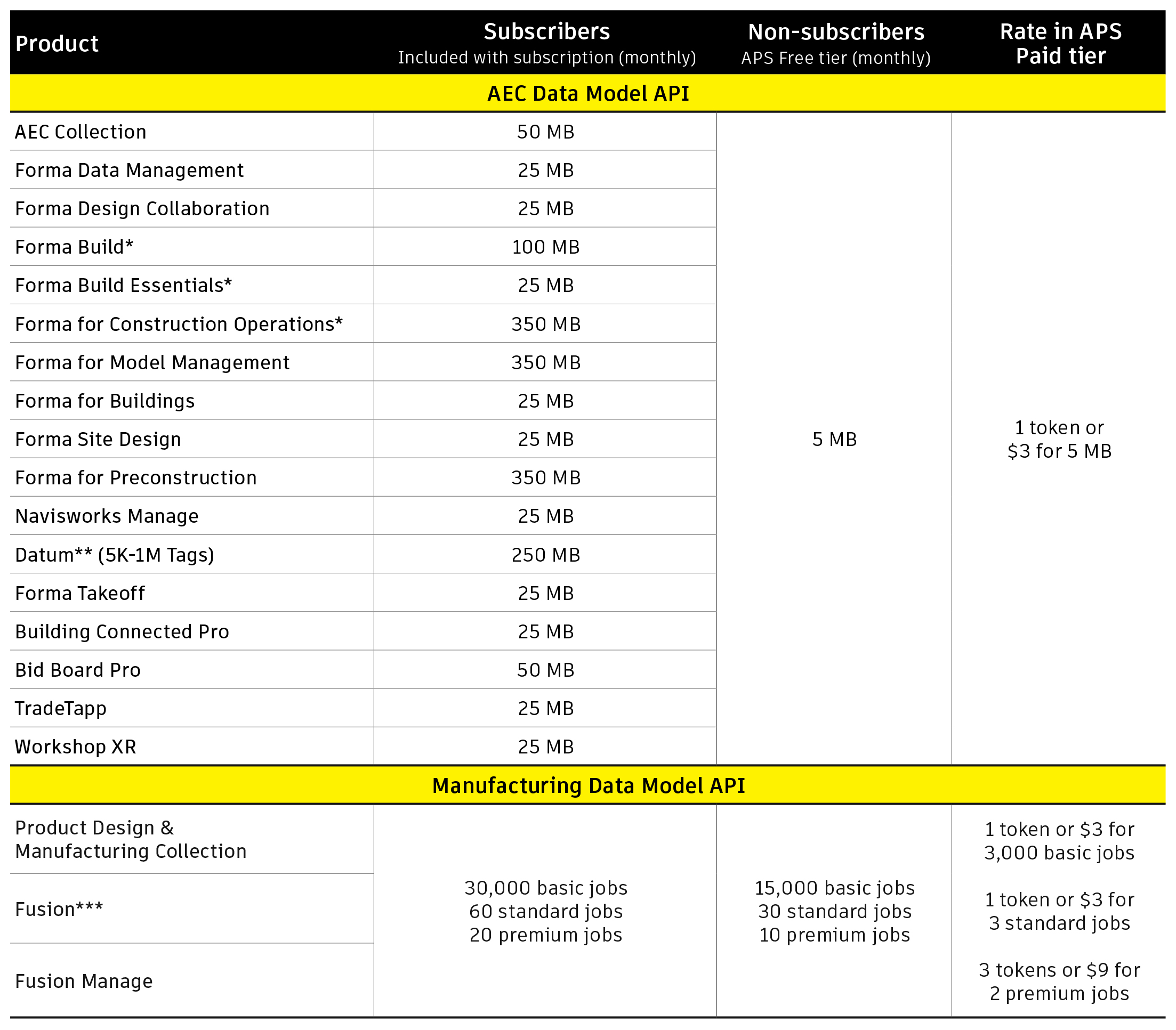
Manufacturing Data Model API Job Definitions: Jobs are categorized into four tiers based on the type of API operation performed. Free jobs include administrative tasks. Basic jobs apply to API requests that return Components, with each Component returned counting as one job. Standard jobs apply to GraphQL API queries initiated from the Model object to export derivative file types, as defined in the DerivativeFormatEnum. Premium jobs are reserved for future features and functionality.
The value of APS Data Model APIs
APS Data Model APIs give you direct, cloud-based access to structured design and manufacturing data, so you can build smarter, more automated, and more scalable solutions without relying on manual exports or desktop-based processes.
- Manufacturing Data Model APIs provide programmatic access to product and manufacturing data, allowing teams to retrieve assemblies, parts, and properties, integrate with ERP or PLM systems, and automate downstream workflows that move design data into production and business systems.
- AEC Data Model APIs enable teams to query model and project data at a granular level. This supports automation for reporting, quality checks, dashboards, and cross-project analysis, helping teams reduce manual effort and make more data-driven decisions. In this context, granular data means parameter-level information inside BIM objects allowing you to extract only what you need rather than working with the entire model. For example, the sample Revit model Snowdon Towers is 90MB in size. Using the APIs, retrieving all information about doors requires only 1.55MB, while doing the same for windows totals just 1.12MB. This highlights how AEC Data Model APIs enable more targeted and efficient access to project data.
By making this data programmatically accessible, APS helps teams connect systems, eliminate repetitive tasks, and build production-ready workflows that scale with their business.
What you need to do
Any usage beyond the Free tier will require either an active paid APS offering or a qualifying product subscription with included usage.
If you're already using Manufacturing Data Model APIs, we recommend taking the steps below:
-
Check your subscriptions: Confirm whether your organization has qualifying subscriptions that include usage. To take full advantage, ensure your APS developer hub (and associated apps) is on the same team as those subscriptions, since all capacity is shared at the team level.
-
Choose a payment option: If you don’t have a qualifying subscription, choose a payment option—Prepay with Flex or Pay as You Go—to avoid interruptions.
If you have questions or need support, our team is here to help.
*Forma Build (100MB) also includes Forma Build with BIM 360 and Forma Build with PlanGrid Crane. Forma Build Essentials (25 MB) also includes Forma Build Essentials with BIM 360 and Forma Build Essentials with PlanGrid Crane. Forma for Construction Operations (350 MB) also includes Forma for Construction Operations with BIM 360 and Forma for Construction Operations with PlanGrid Crane.
**Datum APIs are excluded from the APS paid offerings. The Datum listing in the chart reflects AEC DM access only.
***Includes Fusion with CAMplete TurnMill, Fusion with CAMplete TruePath, Fusion with EAGLE Premium & Standard, Fusion Legacy, Fusion with Netfabb, Fusion with PowerInspect, Fusion with PowerMill Standard & Ultimate, Fusion with PowerShape, Fusion with FeatureCAM, Fusion Early adopter Legacy, Fusion with Netfabb Standard, Netfabb Local Simulation, Product Design & MFG Collection, CFD - Ultimate, Fusion for Design, Fusion for Manufacturing, Moldflow Insight, Fusion with Moldflow Adviser, Fusion Startup
Frequently asked questions
Can I still access and export my data without additional AEC Data Model API charges?
Yes. Opening models in Revit, downloading files from Forma Data Management, and exporting to IFC all happen within Autodesk projects. These workflows don’t use the AEC Data Model APIs, so this pricing doesn’t apply to them.
How exactly is the bill calculated: per API call, per MB, or in tokens?
Autodesk categorizes 4 types of data use for AEC Data Model APIs: Administrative (e.g. authentication, folder browsing), data into the AEC Data Model, data within the Autodesk ecosystem, and data exported out of the Autodesk ecosystem (Data Out). Data Out is the only type of data charged. Billing is in megabytes (MB).
Does the pricing apply to all versions of the Manufacturing Data Model API?
Pricing applies to version 3 only, as version 2 will be retired soon. If you have a qualifying Autodesk product subscription, you receive included monthly usage on version 3 at no additional cost. We haven't set a retirement date for version 2. When we do, we'll publish it with a migration plan and give you advance notice to prepare.
Will my existing integrations or workflows stop working?
API usage that exceeds the included amount will require an active paid APS offering to avoid service interruptions.
Can I still experiment or prototype with the APIs?
Yes. You can experiment or prototype with APS APIs at no cost by signing up for the APS Free offering.
How do I maximize my ability to use the included usage I’ve already paid for?
To get the most out of your included usage, make sure your APS developer hub apps are in the same team as your product subscriptions. Since usage capacity is shared at the team level, keeping everything in one team ensures all apps can access the full available capacity. If your resources are split across teams, consider merging teams or moving subscriptions into a single team.
How can I estimate API costs ahead of the pricing change?
We recommend working with your developers to review your current API usage and forecast expected usage. You can then apply the pricing rates to those estimates to get a sense of your potential costs ahead of the pricing change.
How does this APS pricing change impact me if I have an active Enterprise Business Agreement (EBA)?
We recommend reviewing your agreement to understand how it applies to you. EBA customers receive included API capacity only if they have purchased eligible product subscriptions that bundle API access.
If an EBA customer has not purchased an eligible product subscription, APS access is provided through a consumption-based model, where usage is measured in tokens and billed according to the APS rate table.