
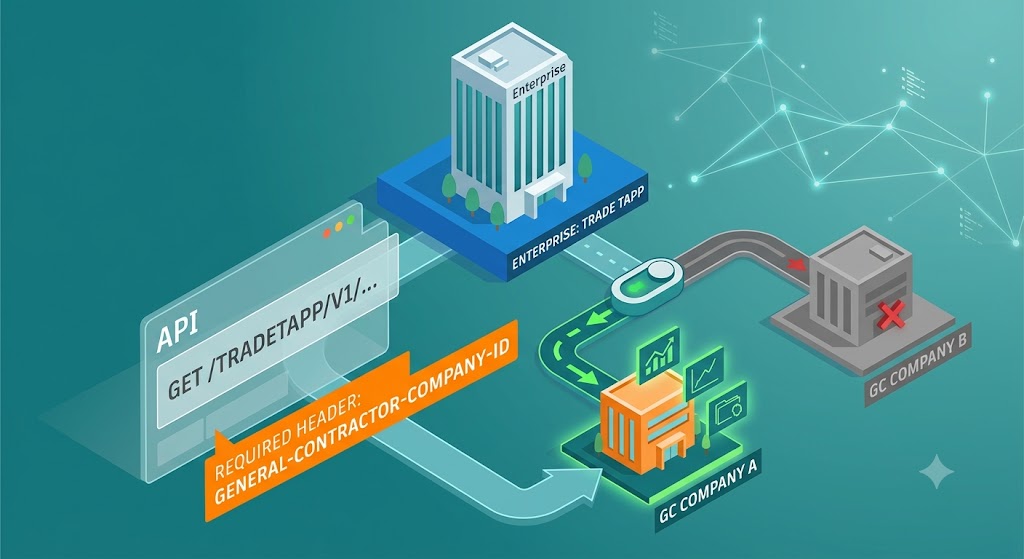
If your organization manages multiple general contractor (GC) companies under a single enterprise in TradeTapp, there's a new request header you'll need to use: general-contractor-company-id. This post explains when it's required and introduces the new GET /users/me endpoint.
In TradeTapp, a parent enterprise company doesn't have any data of its own. Instead, all data belongs to its child GC companies. For example, Company-A and Company-B are both child companies of Demo-Enterprise. When an enterprise user makes an API request, the API needs to know which child company's data to access. That's the purpose of the general-contractor-company-id header.
Previously, enterprise users couldn't use the public APIs because the enterprise company itself had no data to return. Now, by including the general-contractor-company-id header, you can specify which child GC company's data the request should target.
GET https://developer.api.autodesk.com/tradetapp/v1/...
Authorization: Bearer <token>
general-contractor-company-id: <child GC company ID>
A user who belongs only to Company-A cannot access Company-B's data. However, if that user is also added to the parent enterprise, the general-contractor-company-id header becomes required on every API request so the API knows which child company to operate on.
Discovering Available GC Companies
How do you know which GC company IDs a user can access? The new GET /users/me endpoint provides that information. It returns the user's profile, company, and enterprise hierarchy, allowing you to determine which company ID to include in the general-contractor-company-id header.
{
  "user": {
    "company": {
      "id": "string",       // GC's BuildingConnected company ID
      "name": "string",
      "enterprise": {
        "parentCompany": {},      // null if the company is not an enterprise child
        "childrenCompanies": []   // child GC companies, or [] if none
      },
      "additionalLinkedNetworkCompanyIds": []
    },
    "isAdmin": false,
    "role": "BASIC",   // BASIC | FINANCIAL | REVIEWER | REVIEWER_NO_FINANCIALS | APPROVER
    "userPermissions": [],
    "companyPermissions": []
  }
}
What About Single-GC Users?
If the user belongs to only a single GC company, nothing changes. You can continue calling the APIs exactly as you do today. No additional header is required.
(Disclaimer: The cover illustration for this post was created using Gemini AI.)