Task 3 – Generate Three-Legged Access Token
This task demonstrates how to obtain a fresh access token for an SSA, similar to the traditional 2-Legged Access Token sequence. The steps are as follows:
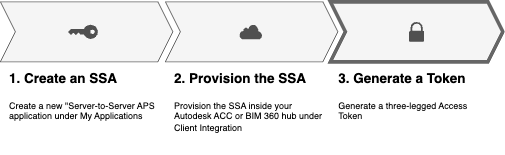
- Generate the JWT Assertion
- Exchange the JWT Assertion for a token
Start with your APS and SSA credentials (Client ID, Client Secret, and Private Key) to create a JWT token signature. Then exchange the JWT assertion for an access token using a POST request. The sequence flow diagram is shown below:
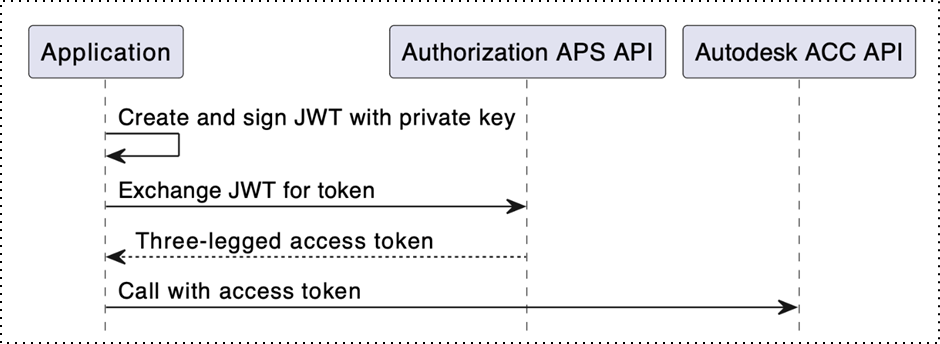
Once the access token is generated, use it to call three-legged access token endpoints such as Forma APIs. The token has a standard expiry time of up to 1 hour, and the scope is defined by the JWT assertion. It is recommended not to refresh the token after an hour; instead, simply generate a new access token as needed.
The operations used in this task are as follows:
| Operation | HTTP Request |
|---|---|
| Exchanging JWT assertion for token | POST/token |
Step 1 - Generate JWT Assertion
The JWT Assertion token must have the required headers and claims. See JWT Assertions for more information.
JWT assertions can be generated using several programming languages. Generate the JWT string and store it for token exchange.
Request
const jwt = require('jsonwebtoken');
// or
import jwt from 'jsonwebtoken';
// Choose whichever way of importing that suits your needs

const CONFIG = {
   APS_CLIENT_ID: "your-client-id",
   APS_SECRET_ID: "your-client-secret",
   SERVICE_ACCOUNT_ID: "your-service-account-id",
   KEY_ID: "your-key-id",
   PRIVATE_KEY: `-----BEGIN RSA PRIVATE KEY-----
 your-private-key
 -----END RSA PRIVATE KEY-----`,
   SCOPE: ["data:read", "data:write"],
   TOKEN_URL: "https://developer.api.autodesk.com/authentication/v2/token" // Autodesk API token endpoint
 };


// GenerateAssertionJWT generates the encoded JWT token in the form of a string
function generateAssertionJWT(keyID, privateKey) {
    return jwt.sign(
     {
       iss: CONFIG.APS_CLIENT_ID,
       sub: CONFIG.SERVICE_ACCOUNT_ID, // updated key reference
       aud: CONFIG.TOKEN_URL,
       exp: Math.floor(Date.now() / 1000) + 300,
       scope: CONFIG.SCOPE,
     },
     CONFIG.PRIVATE_KEY,
     {
       algorithm: "RS256",
       header: { alg: "RS256", kid: CONFIG.KEY_ID },
     }
   )
}

// Usage example
try {
    let token = generateAssertionJWT('<your key id>', '<your private key (string)>');
    console.log(token);
} catch (error) {
    console.error("Error generating token:", error);
}

// Token can be used in `assertion` field when requesting /token endpoint
// NOTE: Ensure that your system clock is set correctly before running this code.

static string GenerateJwtAssertion(string keyId, string privateKeyPem, string clientId, string ssa_id, string[] scope)
{
    // Create RSA from the PEM-formatted private key
    using RSA rsa = RSA.Create();
    //privateKeyPem = privateKeyPem.Replace("\r\n", "\n");
    rsa.ImportFromPem(privateKeyPem.ToCharArray());

    var securityKey = new RsaSecurityKey(rsa)
    {
        KeyId = keyId
    };

    var signingCredentials = new SigningCredentials(securityKey, SecurityAlgorithms.RsaSha256);

    // Build JWT claims
    var claims = new List<Claim>
    {
        new Claim("iss", clientId),
        new Claim("sub", ssa_id),
        new Claim("aud", "https://developer.api.autodesk.com/authentication/v2/token"),
    };

    string scopeJson = JsonConvert.SerializeObject(scope);
    claims.Add(new Claim("scope", scopeJson, JsonClaimValueTypes.JsonArray));

    // Create the token with a 5-minute expiration
    var jwtToken = new JwtSecurityToken(
        claims: claims,
        // notBefore: DateTime.UtcNow,
        expires: DateTime.UtcNow.AddSeconds(300),
        signingCredentials: signingCredentials
    );

    var tokenHandler = new JwtSecurityTokenHandler();
    return tokenHandler.WriteToken(jwtToken);
}
import jwt
import time

# GenerateAssertionJWT generates the encoded JWT token as a string
def generate_assertion_jwt(key_id, private_key):
    claims = {
        'iss': 'your-client-id',
        'sub': 'your-service-account-id',
        'aud': 'https://developer.api.autodesk.com/authentication/v2/token',
        'exp': int(time.time()) + 300,  # 5 mins from now
        'scope': ['data:read', 'data:write']
    }
    headers = {
        'kid': key_id,
    }
    token = jwt.encode(claims, private_key, algorithm='RS256', headers=headers)
    return token

# Usage example
try:
    token = generate_assertion_jwt('<your key id>', '<your private key (string)>')
except Exception as error:
    print(f"Error: {error}")

# Use the generated token in the `assertion` field when requesting the /token endpoint
import (
    "crypto/rsa"
    "crypto/x509"
    "encoding/pem"
    "time"
    "github.com/golang-jwt/jwt/v4"
)

// DecodePEMPrivateKey decodes the provided PEM-encoded private key into Golang's PrivateKey struct
func DecodePEMPrivateKey(privateKeyPEM string) (*rsa.PrivateKey, error) {
    block, _ := pem.Decode([]byte(privateKeyPEM))
    privateKey, err := x509.ParsePKCS1PrivateKey(block.Bytes)
    return privateKey, err
}

type JwtCustomClaims struct { // custom claims struct
    Scope    []string `json:"scope,omitempty"`
    Audience string   `json:"aud,omitempty"`
    jwt.RegisteredClaims
}

// GenerateAssertionJWT generates the encoded JWT token in the form of a string
func GenerateAssertionJWT(keyID string, privateKey *rsa.PrivateKey) (string, error) {
    token := jwt.NewWithClaims(jwt.SigningMethodRS256, &JwtCustomClaims{ // you may have to use your own custom claims struct
        RegisteredClaims: jwt.RegisteredClaims{
            Issuer:    "your-client-id",
            Subject:   "your-service-account-id",
            ExpiresAt: jwt.NewNumericDate(time.Now().Add(time.Minute * 5)), // 5 mins from now
        },
        Audience: "https://developer.api.autodesk.com/authentication/v2/token", // Autodesk API token endpoint
        Scope:    []string{"data:read", "data:write"},
    })
    token.Header["kid"] = keyID // fill headers like this
    tokenStr, err := token.SignedString(privateKey)
    return tokenStr, err
}

// to use
privateKey, err := DecodePEMPrivateKey("<your private key>")
token, err := GenerateAssertionJWT("<your key id>", privateKey)

// token can be used in `assertion` field when requesting /token endpoint
Response
eyJraWQiOiI1ZGU5OTNmNC02MmIwLTQ5NWEtYTQzYS1iOTg5NmQ2ZTk1ODIiLCJhbGciOiJSUzI1NiJ9.eyJpc3MiOiJKbE85VEExempmSlFPR1hwSm1xOUpISlNJMEQ0VWtRNCIsInN1YiI6Ilo3NTJDVDVNS1cyUzlON0UiLCJhdWQiOiJodHRwczovL2RldmVsb3Blci5hcGkuYXV0b2Rlc2suY29tL2F1dGhlbnRpY2F0aW9uL3YyL3Rva2VuIiwiZXhwIjoxNzEwOTA3MTAwLCJzY29wZSI6WyJ1c2VyOnJlYWQiLCJkYXRhOnJlYWQiXX0.p9RNN28G38VCczbO6JgkTRfcb079_xDcDm2i4-HUqUdSZKre6jllx1IWhmwG0cm79EhC3OjJ0_zoPfKj2sP4lrPm27iXzd6x_SfD4LKS4zAJI2IERXjU05T9zWU4bfZWk0EinBysV0stvvEtZIBHczD_uAXCB5YLvyBX-O_kXqqkigNQupG9RsmE4GOjhG7pGLL_tdDYXkN46JAw-vMyXlhsdOntuZCjDOpcD4hsIueKwaqm6aLBKUTE1Htwpk0MUYmvl7AF03XDgWjhwRnJVOk_MkdF44bjSCAmsQ5uTYbWipUJjDqUy38b4xiRRRB0_qsg_kZ-DBOAFzUtYN6ilA
This JWT assertion token is now used in the assertion field of the token exchange request.
Step 2 - Exchange JWT Assertion for a Token
Call the Exchanging JWT assertion for token operation.
Request
curl -v 'https://developer.api.autodesk.com/authentication/v2/token' \
  -X 'POST' \
   -H 'Content-Type: application/x-www-form-urlencoded' \
   -H 'Accept: application/json' \
   -H 'Authorization: ••••••' \
   -d 'grant_type=urn:ietf:params:oauth:grant-type:jwt-bearer' \
   -d 'assertion={{YOUR_ENCODED_JWT}}' \
   -d 'client_id=pYinzLG0rtdGEijBIlDaR630Z0vWQb2vMNF7pqj06LHdcV0Z' \
   -d 'client_secret=••••••••••••••••••••••••••••••••••••••••••••••••' \
   -d 'scope=data:read data:write'
Response
{
  "access_token": "eyJr...",
  "token_type": "Bearer",
  "expires_in": 3599

}
Code Sample
The following code samples demonstrate how to generate a JWT assertion and exchange it for a token.
// Install dependencies before running:
// > npm install jsonwebtoken

import jwt from 'jsonwebtoken';

const CONFIG = {
  APS_CLIENT_ID: "your-client-id",
  APS_SECRET_ID: "your-client-secret",
  SERVICE_ACCOUNT_ID: "your-service-account-id",
  KEY_ID: "your-key-id",
  PRIVATE_KEY: `-----BEGIN RSA PRIVATE KEY-----
your-private-key
-----END RSA PRIVATE KEY-----`,
  SCOPE: ["data:read", "data:write"],
  TOKEN_URL: "https://developer.api.autodesk.com/authentication/v2/token" // Autodesk API token endpoint
};

// Generates a JWT assertion with RS256 using config credentials.
const generateJwtAssertion = () =>
  jwt.sign(
    {
      iss: CONFIG.APS_CLIENT_ID,
      sub: CONFIG.SERVICE_ACCOUNT_ID, // updated key reference
      aud: CONFIG.TOKEN_URL,
      exp: Math.floor(Date.now() / 1000) + 300,
      scope: CONFIG.SCOPE,
    },
    CONFIG.PRIVATE_KEY,
    {
      algorithm: "RS256",
      header: { alg: "RS256", kid: CONFIG.KEY_ID },
    }
  );

// Requests an access token using a JWT assertion from Autodesk API.
const getAccessToken = async (jwtAssertion) => {
  const basicAuth = `Basic ${Buffer.from(
    `${CONFIG.APS_CLIENT_ID}:${CONFIG.APS_SECRET_ID}`
  ).toString("base64")}`;

  const response = await fetch(CONFIG.TOKEN_URL, {
    method: "POST",
    headers: {
      Accept: "application/json",
      "Content-Type": "application/x-www-form-urlencoded",
      Authorization: basicAuth,
    },
    body: new URLSearchParams({
      grant_type: "urn:ietf:params:oauth:grant-type:jwt-bearer",
      assertion: jwtAssertion,
      scope: CONFIG.SCOPE.join(" "),
    }),
  });
  return response.json();
};

(async () => {
  try {
    const jwtAssertion = generateJwtAssertion();
    const result = await getAccessToken(jwtAssertion);
    console.log(JSON.stringify(result, null, 4));
  } catch (error) {
    console.error("Error fetching access token:", error);
  }
})();
# install dependencies
# pip install requests
import jwt, time, requests, json

# === update hardcoded config values ===
APS_CLIENT_ID = "your-client-id"
APS_SECRET_ID = "your-client-secret"
SERVICE_ACCOUNT_ID = "your-service-account-id"
KEY_ID = "your-key-id"
PRIVATE_KEY = """-----BEGIN RSA PRIVATE KEY-----
your-private-key
-----END RSA PRIVATE KEY-----"""
SCOPE = ["data:read", "data:write"]


def generate_jwt_assertion():
    return jwt.encode({
        "iss": APS_CLIENT_ID,
        "sub": SERVICE_ACCOUNT_ID,
        "aud": "https://developer.api.autodesk.com/authentication/v2/token",
        "exp": int(time.time()) + 300,
        "scope": SCOPE
    }, PRIVATE_KEY, algorithm="RS256", headers={"alg": "RS256", "kid": KEY_ID})


def get_access_token(jwt_assertion):
    response = requests.post('https://developer.api.autodesk.com/authentication/v2/token', headers={
        'Accept': 'application/json',
        'Content-Type': 'application/x-www-form-urlencoded'
    }, data={
        'grant_type': 'urn:ietf:params:oauth:grant-type:jwt-bearer',
        'assertion': jwt_assertion,
        'scope': ' '.join(SCOPE)
    }, auth=(APS_CLIENT_ID, APS_SECRET_ID))
    return response.json()


if __name__ == "__main__":
    jwt_assertion = generate_jwt_assertion()
    token_response = get_access_token(jwt_assertion)
    print(json.dumps(token_response, indent=2))
// NOTE: Ensure that your system clock is set correctly before running this code.

using System;
using System.Collections.Generic;
using System.IdentityModel.Tokens.Jwt;
using System.Net.Http;
using System.Net.Http.Headers;
using System.Security.Claims;
using System.Security.Cryptography;
using System.Text;
using System.Threading.Tasks;
using Microsoft.IdentityModel.Tokens;
using System.Net.Http.Json;
using Newtonsoft.Json.Linq;
using Newtonsoft.Json;

namespace AutodeskJWTExample
{
    class Program
    {
        static async Task Main(string[] args)
        {
            string APS_CLIENT_ID = "your-client-id";
            string APS_SECRET_ID = "your-client-secret";
            string SERVICE_ACCOUNT_ID = "your-service-account-id";
            string KEY_ID = "your-key-id";
            string PRIVATE_KEY = @"-----BEGIN RSA PRIVATE KEY-----
your-private-key
-----END RSA PRIVATE KEY-----";
            string[] SCOPE = new string[] { "data:read" };

            string jwtAssertion = GenerateJwtAssertion(KEY_ID, PRIVATE_KEY, APS_CLIENT_ID, SERVICE_ACCOUNT_ID, SCOPE);
            Console.WriteLine("JWT Assertion Response:");
            Console.WriteLine(jwtAssertion);

            string tokenResponse = await GetAccessToken(jwtAssertion, APS_CLIENT_ID, APS_SECRET_ID, SCOPE);

            Console.WriteLine("Access Token Response:");
            Console.WriteLine(tokenResponse);
        }

        static string GenerateJwtAssertion(string keyId, string privateKeyPem, string clientId, string ssa_id, string[] scope)
        {
            // Create RSA from the PEM-formatted private key
            using RSA rsa = RSA.Create();
            //privateKeyPem = privateKeyPem.Replace("\r\n", "\n");
            rsa.ImportFromPem(privateKeyPem.ToCharArray());

            var securityKey = new RsaSecurityKey(rsa)
            {
                KeyId = keyId
            };

            var signingCredentials = new SigningCredentials(securityKey, SecurityAlgorithms.RsaSha256);

            // Build JWT claims
            var claims = new List<Claim>
            {
                new Claim("iss", clientId),
                new Claim("sub", ssa_id),
                new Claim("aud", "https://developer.api.autodesk.com/authentication/v2/token"),
            };

            string scopeJson = JsonConvert.SerializeObject(scope);
            claims.Add(new Claim("scope", scopeJson, JsonClaimValueTypes.JsonArray));

            // Create the token with a 5-minute expiration
            var jwtToken = new JwtSecurityToken(
                claims: claims,
                // notBefore: DateTime.UtcNow,
                expires: DateTime.UtcNow.AddSeconds(300),
                signingCredentials: signingCredentials
            );

            var tokenHandler = new JwtSecurityTokenHandler();
            return tokenHandler.WriteToken(jwtToken);
        }

        static async Task<string> GetAccessToken(string jwtAssertion, string clientId, string clientSecret, string[] scope)
        {
            using HttpClient client = new HttpClient();

            var request = new HttpRequestMessage(HttpMethod.Post, "https://developer.api.autodesk.com/authentication/v2/token");
            request.Headers.Accept.Add(new MediaTypeWithQualityHeaderValue("application/json"));

            request.Content = new FormUrlEncodedContent(new Dictionary<string, string>
            {
                { "grant_type", "urn:ietf:params:oauth:grant-type:jwt-bearer" },
                { "assertion", jwtAssertion },
                { "scope", string.Join(" ", scope) }
            });

            // Encode client ID and secret for basic auth
            var authenticationString = $"{clientId}:{clientSecret}";
            var base64EncodedAuthenticationString = Convert.ToBase64String(Encoding.ASCII.GetBytes(authenticationString));
            request.Headers.Authorization = new AuthenticationHeaderValue("Basic", base64EncodedAuthenticationString);

            try
            {
                var response = await client.SendAsync(request);
                var msg = await response.Content.ReadAsStringAsync();
                // Console.WriteLine(msg);
                response.EnsureSuccessStatusCode();
                return msg;
            }
            catch (Exception ex)
            {
                throw new InvalidOperationException();
            }
        }
    }
}