Tenant Isolation for ISV Integrations
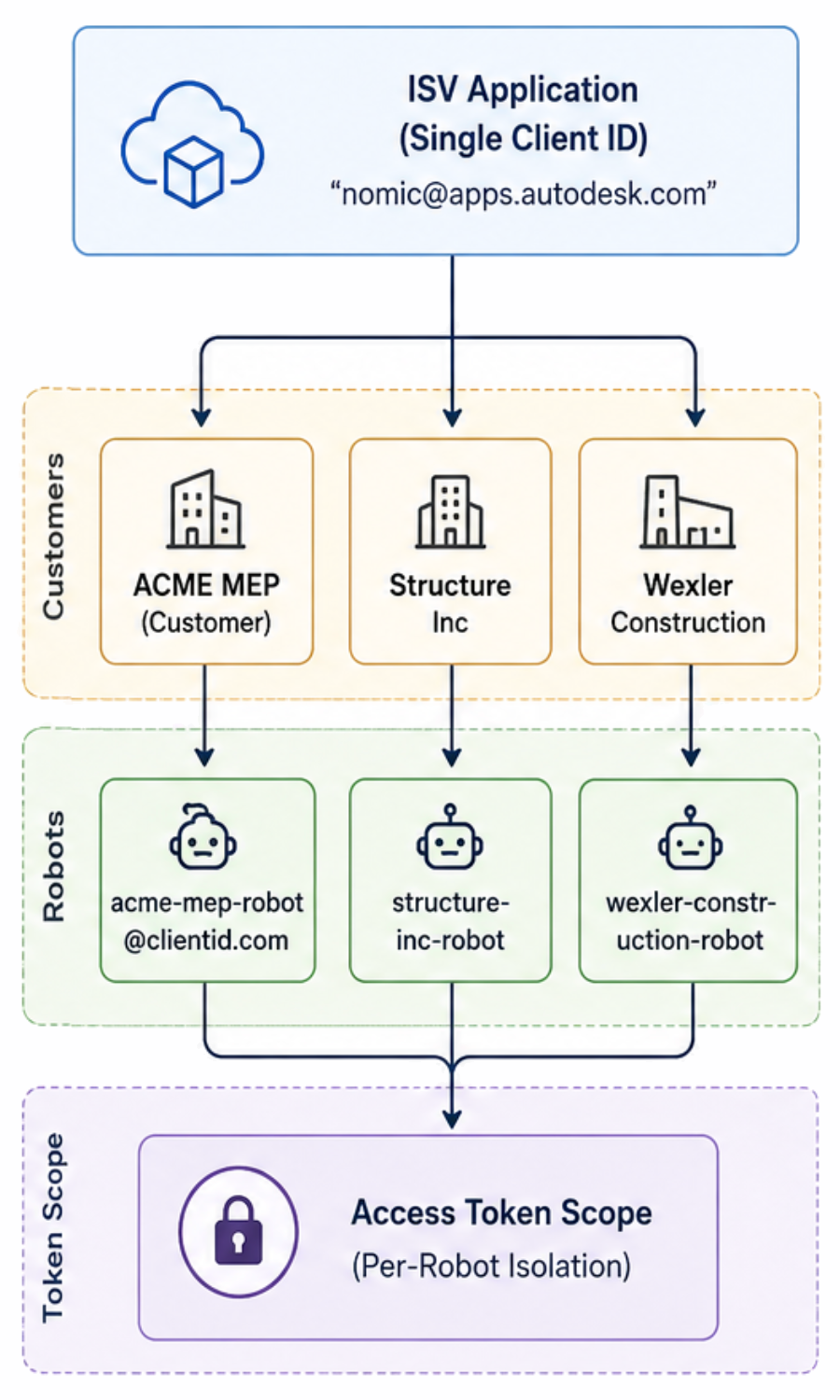
Independent Software Vendors (ISVs) who publish a single app on the Autodesk App Store face a particular challenge: every customer who installs the app shares the same Client ID, but their data must remain strictly isolated. The recommended pattern for this case is Robot-per-Tenant — provision a unique Secure Service Account (SSA) for each customer and use that robot’s three-legged access token for all API calls on their behalf.
In this page, robot is informal shorthand for an SSA — the non-human identity your app creates through the SSA API. Each robot has its own email address, appears as a member in Forma Hub and Project admin interfaces, and is used to obtain three-legged access tokens for API calls. See API Basics for the full lifecycle.
Naming Conventions
Include a customer identifier in every robot name so the address is self-documenting: at a glance, you (and the customer’s IT admin) can tell whose data the robot is authorised to touch.
For the full ruleset (allowed characters, length, format), see Naming Conventions. A recommended format for ISV integrations:
{customer-slug}-robot@{client-id-hash}.ssa.autodesk.com
Examples:
acme-mep-robot@nomic-7a3f9e.ssa.autodesk.comstructure-inc-robot@nomic-7a3f9e.ssa.autodesk.com
The challenge
When you submit an application to the Autodesk App Store, you provide a single Client ID. All customers use that Client ID when they install your integration. Without additional isolation, this raises an obvious concern:
How do you prevent data leakage between customers when multiple organisations install the same integration?
The Robot-per-Tenant pattern addresses this at the identity layer.
The Robot-per-Tenant pattern
Instead of relying on a single Service Account shared across all customers, provision a unique robot email address for each tenant. Each robot is:
- Created under your single Client ID.
- Assigned exclusively to one customer’s Hub.
- Granted permissions limited to that customer’s projects and data.
- Used to generate three-legged access tokens scoped to that tenant’s resources.
How it works
| Step | Action | Result |
|---|---|---|
| 1 | Customer installs your app from the App Store. | Your Client ID is added to their Hub. |
| 2 | Your app presents a provisioning UI. | Customer initiates onboarding. |
| 3 | Your backend creates a unique robot email for this customer. | For example, acme-mep-robot@nomic-7a3f9e.ssa.autodesk.com. |
| 4 | Robot is added as a Hub or Project member by the customer. | Robot inherits customer-specific permissions. |
| 5 | Your app uses the robot’s three-legged access token for API calls. | Data access is isolated to that customer’s scope. |
Architecture overview
Why this pattern?
The Robot-per-Tenant pattern is the recommended approach for ISVs because the obvious alternatives have significant drawbacks.
Why not create a new integration (Client ID) per customer?
Creating separate Client IDs per customer:
- Cannot be automated through the App Store.
- Violates the single-Client-ID App Store submission model.
- Makes version management and updates operationally complex.
- Prevents centralised usage analytics.
Why not have customers create their own integrations?
Requiring customers to create custom integrations:
- Creates significant onboarding friction.
- Requires technical expertise from every customer.
- Makes your App Store listing non-functional — customers would need to bypass it.
- Prevents you from maintaining a unified application identity.
For operational questions about this pattern — Service Account limits, admin visibility, automating project provisioning — see Frequently Asked Questions.
Data isolation guarantees
The Robot-per-Tenant pattern is enforced at two layers:
Token-scope isolation
Each robot generates three-legged access tokens that are:
- Scoped to the customer’s Hub or Project membership.
- Limited to the permissions granted to that specific robot user.
- Non-transferable between tenants — a token for
acme-mep-robotcannot readstructure-inc’s projects.
API-layer enforcement
The APS platform enforces access control at the API layer, not just in your application code:
API Request: GET /construction/admin/v1/projects
├─ Headers: Authorization: Bearer <robot_token>
└─ Response: Only projects where the robot is a member.
Practically, this means that even if your application logic has a bug and reaches for the wrong robot’s token, the API itself will not return another tenant’s data — the token simply does not carry the permissions.
Onboarding flow
The following TypeScript-flavoured pseudocode illustrates a one-time tenant provisioning step performed when a customer installs your integration:
async function provisionTenant(customerId: string, hubId: string) {
  const robotEmail = generateRobotEmail(customerId);

  const serviceAccount = await ssaApi.createServiceAccount({
    clientId: APP_CLIENT_ID,
    email: robotEmail,
    displayName: `${customerId} Integration Robot`,
  });

  await showCustomerSetupInstructions(robotEmail, hubId);

  await db.tenants.create({
    customerId,
    robotEmail,
    serviceAccountId: serviceAccount.id,
  });
}
Runtime token management
At request time, look up the correct robot for the calling tenant and mint a token scoped to that robot:
async function getProjectsForTenant(customerId: string) {
  const tenant = await db.tenants.findByCustomerId(customerId);

  const token = await ssaApi.get3LOToken({
    clientId: APP_CLIENT_ID,
    clientSecret: APP_CLIENT_SECRET,
    serviceAccountEmail: tenant.robotEmail,
  });

  return await formaApi.getProjects(token);
}
The token is automatically scoped to that customer’s data.
Security benefits
| Concern | Mitigation |
|---|---|
| Cross-tenant data leakage | Robot tokens are scoped to per-customer Hub or Project membership. |
| Privilege escalation | Each robot has only the permissions explicitly granted by the customer. |
| Audit trail | APS logs show which robot (and therefore which customer) made each API call. |
| Credential rotation | A compromised robot only affects the one tenant it serves. |