Asymmetric Signing
Asymmetric Signing is a process that uses a related pair of keys for encryption and decryption: a public key and a private key. A public key can be used by any person to encrypt a message so that it can only be decrypted by the intended recipient with their corresponding private key. A private key can be placed in a confidential location and known only to the issuer of the JWT tokens.
Refer to GET JWKS API reference endpoint to obtain a list of current public signing keys.
This document contains information on how the signing keys are rotated for effective usage. Also, it guides on validating an access token using the public key.
Key Rotation
Signing keys are periodically rotated for security. During key rotation, to allow your applications time to update to the new key, the new key is included in the /keys response for seven days before being used for token signatures. It is illustrated in the following diagram.
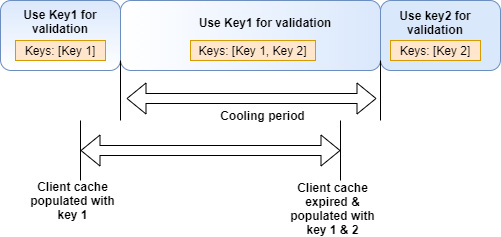
Keys can therefore be safely cached for seven days. For performance reasons, it is recommended to do so. The /keys response includes a cache-control header matching this duration that clients using this endpoint may follow.
As multiple keys are retrieved in the response, applications can identify the key to be used to validate a given token using the token’s kid (key ID) parameter. From the list of keys returned in the /keys response, choose the key corresponding to the key ID to validate the signature.
Validate Access Token
The asymmetric token enables products and services to validate JWTs using a public key without making network calls.
When validating an access token,
- Obtain and parse the access token, which is in JSON web token format
- Verify the signature used to sign in the access token
- Verify the claims added to the access token
You can use an online interactive JWT debugger to try out the validation steps. This helps to verify your JWT for the token expiration time, the time it was issued and other relevant details. Refer to ‘https://jwt.io/’ for an example.
We have listed a few code samples to perform these steps for you. It is helpful if you are using one of them. But, based on your requirement you can find libraries that are relevant and utilize them.
Suggested code samples:
Node.js
var jwksClient = require('jwks-rsa');
ar jwt = require('jsonwebtoken');


//Input Parameters
//Token to validate
token = 'Valid_Token';

//well_known_jwks_url: the url this should go to get the jwks.json
well_known_jwks_url = 'https://developer.api.autodesk.com/authentication/v2/keys'

var decoded = jwt.decode(token, { complete: true });
var header = decoded.header

var verifyOptions = {
   algorithms: ['RS256'],
   header: decoded.header
};

var client = jwksClient({

   jwksUri: well_known_jwks_url
});

function getKey(header, callback) {
   client.getSigningKey(header.kid, function (err, key) {
       var signingKey = key.publicKey || key.rsaPublicKey;
       callback(null, signingKey);
   });
}

jwt.verify(token, getKey, verifyOptions, function (err, decoded) {
   //This will display the decoded JWT token.
   if (typeof decoded !== 'undefined' && decoded) {
       console.log(decoded)
   }
   else {
       console.log("Invalid token")
   }
});
Python
- Note that the function of the below code snippet requires a package of (jwt==1.1.0) and (PyJWT==1.7.1)
import json
import jwt
import requests
from bs4 import BeautifulSoup
from jwt.algorithms import RSAAlgorithm
from oauthlib.oauth2.rfc6749 import errors, parameters
from requests import session

class Token:
   @staticmethod
   def validate_asymmetric_jwt_token(well_known_jwks_url: str, access_token: str) -> str:
       """
       :param well_known_jwks_url: the url this should go to get the jwks.json
       :param access_token: the token to validate
       :return: decoded access token
       :raises: Exception.
       """
       jwks_get_response = requests.get(well_known_jwks_url)
       if jwks_get_response.status_code != 200:
           raise Exception(
               "I couldn't connect to the wellknown url.")
       keys = jwks_get_response.json()
       if keys is None or keys == "":
           raise Exception(
               "jwks didn't return any keys.")
       used_key = jwt.get_unverified_header(access_token)
       public_key = None
       for key in keys['keys']:
           if key['kid'] == used_key['kid']:
               public_key = RSAAlgorithm.from_jwk(json.dumps(key))
               break
       if public_key is None:
           raise Exception(
               f"Could not find the key used to encrypt the token the response from jwks url was {keys}")
       aud = jwt.decode(access_token, verify=False)['aud']

       return jwt.decode(access_token, public_key, algorithms='RS256', audience=aud)
Java
public class Solution {

   /**
    * This method takes an access token and JWK
    *
    * @param accessToken
    * @param url
    * @return
    */
   private static boolean validateToken(String accessToken, String url) {
       boolean signatureVerified = false;
       try {
           String jsonWebKeySetJson = retrieveJWKS(url);
           System.out.println(jsonWebKeySetJson);
           if (jsonWebKeySetJson == null) {
               throw new Exception("Invalid public key.");
           }

           // Create a new JsonWebSignature object
           JsonWebSignature jws = new JsonWebSignature();

           // Set the algorithm
           jws.setAlgorithmConstraints(new AlgorithmConstraints(AlgorithmConstraints.ConstraintType.PERMIT,
                   AlgorithmIdentifiers.RSA_USING_SHA256));

           // Set the access token
           jws.setCompactSerialization(accessToken);

           // Create a new JsonWebKeySet object with the JWK
           JsonWebKeySet jsonWebKeySet = new JsonWebKeySet(jsonWebKeySetJson);

           VerificationJwkSelector jwkSelector = new VerificationJwkSelector();
           JsonWebKey jwk = jwkSelector.select(jws, jsonWebKeySet.getJsonWebKeys());
           if (jwk == null) {
               return signatureVerified;
           }
           // The verification key on the JWS is the public key from the JWK we pulled from the JWK Set.
           jws.setKey(jwk.getKey());

           // Check the signature
           signatureVerified = jws.verifySignature();

           // Get the payload, or signed content, from the JWS
           String payload = jws.getPayload();

       } catch (JoseException e) {
           e.printStackTrace();
       } catch (Exception e) {
           e.printStackTrace();
       }
       return signatureVerified;
   }

   /**
    * Retrieve Json Web Key from Json Web Key endpoint.
    *
    * @param jwkEndpoint:URL for JWK endpoint.
    * @return JWK will be returned.
    */
   private static String retrieveJWKS(String jwkEndpoint){
       String jwk = null;
       try {
           URL url = new URL(jwkEndpoint);
           HttpsURLConnection connection = (HttpsURLConnection) url.openConnection();
           if (connection != null) {
               BufferedReader bufferedReader = new BufferedReader(
                       new InputStreamReader(connection.getInputStream()));
               jwk = bufferedReader.lines().collect(Collectors.joining());
               bufferedReader.close();
           }
       } catch (MalformedURLException e) {
           e.printStackTrace();
       } catch (IOException e) {
           e.printStackTrace();
       }
       return jwk;
   }