Shared Part Number
In the Manufacturing Data Model, a shared part number signifies that multiple models can be linked to a single part number. This concept enables different representations of the same part to be grouped under one identifier, simplifying inventory and assembly management. For more detailed information, please refer to Shared part numbers in Autodesk Fusion documentation.
Characteristics of Shared Part Numbers:
- Multiple Models: A single part number can be associated with multiple models. This is useful when various representations or levels of detail are required for the same part.
- Grouping: Shared part numbers facilitate grouping different models under one logical identifier, ensuring consistency in inventory tracking and usage.
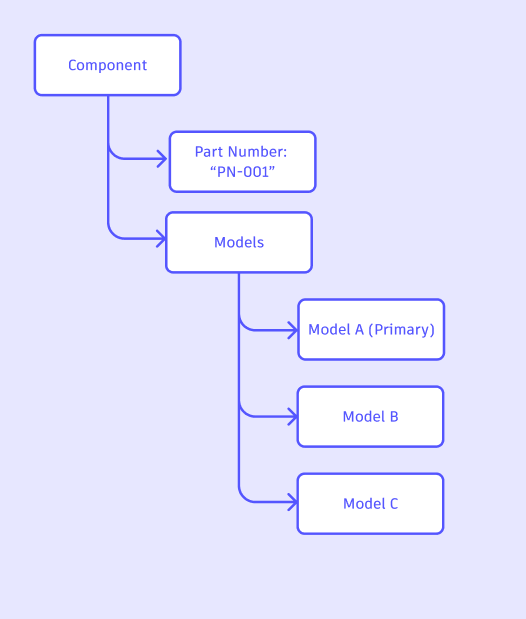
- Primary Model: Among the multiple models linked to a shared part number, one model is designated as the primary model, which is used for thumbnails, icons, and other representative features. The primary model may be
null for components that have no associated CAD models.
Example Usage of Shared Part Number
The following query retrieves the shared part number for a specific component identified by its ID:
query GetPartNumber($componentId: ID!) {
    component(componentId: $componentId) {
        partNumber {
            value
        }
        primaryModel {
            id
            name {
                value
            }
            assemblyRelations {
                results {
                    fromModel {
                        id
                    }
                    toModel {
                        id
                    }
                }
            }
        }
    }
}
Show More
In this example, the query retrieves the shared part number for a specific component identified by its ID. The response includes the component’s part number value, its primary model, and the assembly relationships associated with that primary model.
Look Up a Shared Part Number by Value
When you know a part number value and its hub, use the sharedPartNumber
query to retrieve aggregated information about that part number. The query
returns a SharedPartNumberInfo object containing the shared partNumber,
the assigned component (null when the caller lacks access), and the
isPresent and isModeled flags.
query GetSharedPartNumber($hubId: ID!, $partNumber: String!) {
    sharedPartNumber(hubId: $hubId, partNumber: $partNumber) {
        partNumber {
            value
        }
        isPresent
        isModeled
        component {
            id
            name {
                value
            }
        }
    }
}
Show More
Sample variables:
{
  "hubId": "<hub-id>",
  "partNumber": "ACME-12345"
}
Response fields:
partNumber — The shared part number.component — The component assigned to the part number. This is null when the caller does not have access to it.isPresent — Whether this part number is present in the system.isModeled — Whether this part number has models associated with it.
Note: The sharedPartNumber query replaces the removed
partNumberGroup query, and SharedPartNumberInfo replaces the removed
PartNumberGroup type. Update any existing integrations accordingly.
Managing Shared Part Numbers
You can assign a part number to a model, and the same part number can be reused across multiple models. A model that adopts an existing part number picks up the shared attributes (the canonical part number value and the designated primary model), ensuring all members of the shared part number stay consistent in representation and usage.
You can also promote any member of a shared part number to be the primary model using the setModelAsPrimary mutation.
Example for Assigning Part Numbers
The following example demonstrates how to assign a part number to a model:
mutation AssignPartNumber($input: AssignPartNumberInput!) {
    assignModelPartNumber(input: $input) {
        model {
            id
            name {
                value
            }
            component {
                id
                name {
                    value
                }
                partNumber {
                    value
                }
                description {
                    value
                }
            }
        }
    }
}
Show More
Sample variables:
{
  "input": {
    "modelId": "<model-id>",
    "partNumber": "ACME-12345",
    "isConfigurationRuleIgnored": false
  }
}
The mutation returns an AssignPartNumberPayload containing the updated model, from which the parent component and its part number can be inspected.
Input fields:
modelId (required) — The ID of the model receiving the part number.partNumber (required) — The part number to assign. If the value is already in use by other models, the model joins that shared part number; otherwise a new shared part number is established.isConfigurationRuleIgnored (optional, defaults to false ) — When true, sibling configuration part numbers are not updated. Set this to true when you want the assignment to apply only to the target model and leave its configuration siblings on their existing part numbers.
Below is an example diagram showing the relationship between a component and a shared part number across models:
Important Notes about Shared Part Numbers
The following are important considerations when working with shared part numbers:
- Required Part Number: Every model is associated with a part number. If one is not explicitly assigned, a part number is automatically generated for the model. As a result,
Component.partNumber is non-null in the schema.
- Primary Model Nullability: A component’s
primaryModel may be null when there is no CAD model associated with the shared part number. Always handle the null case in clients that depend on the primary model for thumbnails or icons.
- Detecting Shared vs. Standalone:
Component.isStandalone returns true only when the component has exactly one design. It returns false both when the component has several designs (Shared Part Number) and when it has no designs (non-CAD or orphan components), so a false value alone does not mean the part number is shared. The isStandalone field is deprecated and will be replaced in an upcoming release; see Known Issues for details.
- Changing the Primary Model: Use the setModelAsPrimary mutation to designate a different model within the shared part number as the new primary.
See also: