Query Complexity and Depth Limits
The GraphQL API provided by our service has query complexity and depth limits in place to ensure optimal performance and prevent abuse. The query complexity limits define how much data can be requested from the GraphQL API in one request by a client. Query depth limit determines the number of nesting levels of the field. Each field in the query contributes to the overall complexity score and each nested selection contributes to the overall depth score.
The complexity of a GraphQL query is determined based on several factors like the number of fields requested and custom directives or arguments that affect complexity.
Complexity limit
The complexity limit for Manufacturing Data Model GraphQL API is set to 75 fields. The complexity score of a query must not exceed this limit; otherwise, the server will reject the query and return an error message.
The following code block describes the query and error response when the complexity limit is surpassed.
Query
query componentVersion($componentVersionId: String!) {
    componentVersion(componentVersionId: $componentVersionId) {
    id
    name
    partNumber
    isMilestone
    materialName
    lastModifiedOn
    approvedBy {
    createdOn
    email
    }
    physicalProperties {
    status
    mass {
        displayValue
        value
        propertyDefinition {
        name
        specification
        units {
            id
            name
        }
        }
    }
    volume {
        displayValue
        value
        propertyDefinition {
        name
        specification
        units {
            id
            name
        }
        }
    }
    area {
        displayValue
        value
        propertyDefinition {
        name
        specification
        units {
            id
            name
        }
        }
    }
    density {
        displayValue
        value
        propertyDefinition {
        name
        specification
        units {
            id
            name
        }
        }
    }
    boundingBox {
        length {
        displayValue
        value
        propertyDefinition {
            name
            specification
            units {
            id
            name
            }
        }
        }
        width {
        displayValue
        value
        propertyDefinition {
            name
            specification
            units {
            id
            name
            }
        }
        }
        height {
        displayValue
        value
        propertyDefinition {
            name
            specification
            units {
            id
            name
            }
        }
        }
    }
    }
  }
}
Error Response
{
"errors": [
    {
    "message": "Current query complexity of 76 exceeds the limit of 75. Try reducing the number of fields in the query.",
    "extensions": {
        "classification": "ExecutionAborted"
    }
    }
 ]
}
Explanation
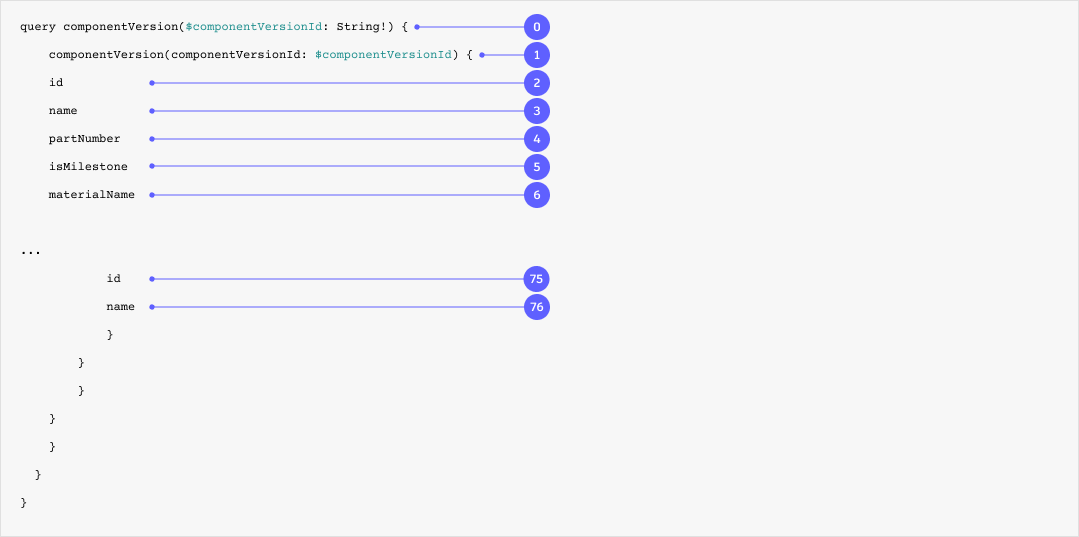
The illustration below shows how the complexity levels are calculated. Starting with 0, every field in the query counts as 1 to the score. Having a maximum complexity of 75 means the query should not exceed more than 75 fields.
Depth limit
The depth limit for Manufacturing Data Model GraphQL API is set to 20 nesting levels. The depth score of a query must not exceed this limit; otherwise, the server will reject the query and return an error message.
The following code block describes the query and error response when the depth limit is surpassed.
Query
query componentVersion ($componentVersionId: String!) {
    componentVersion (componentVersionId: $componentVersionId) {
        id
        name
        partNumber
        isMilestone
        materialName
        lastModifiedOn
        modelOccurrences {
            pagination {
                pageSize
                cursor
            }
            results {
                isDistributedDesign
                componentVersion {
                    id
                    name
                    modelOccurrences{
                        results{
                            componentVersion{
                                modelOccurrences{
                                    results{
                                        componentVersion{
                                            modelOccurrences{
                                                results{
                                                    componentVersion{
                                                        modelOccurrences{
                                                            results{
                                                                componentVersion{
                                                                    modelOccurrences{
                                                                        results{
                                                                            componentVersion{
                                                                                modelOccurrences{
                                                                                    results{
                                                                                        componentVersion{id}
                                                                                    }
                                                                                }
                                                                            }
                                                                        }
                                                                    }
                                                                }
                                                            }
                                                        }
                                                    }
                                                }
                                            }
                                        }
                                    }
                                }
                            }
                        }
                    }
                }
            }
        }
    }
}
Error Response
{
"errors": [
    {
    "message": "Current query depth of 23 exceeds the limit of 20. Try reducing the number of nesting levels in your query.",
    "extensions": {
        "classification": "ExecutionAborted"
    }
    }
 ]
}
Explanation
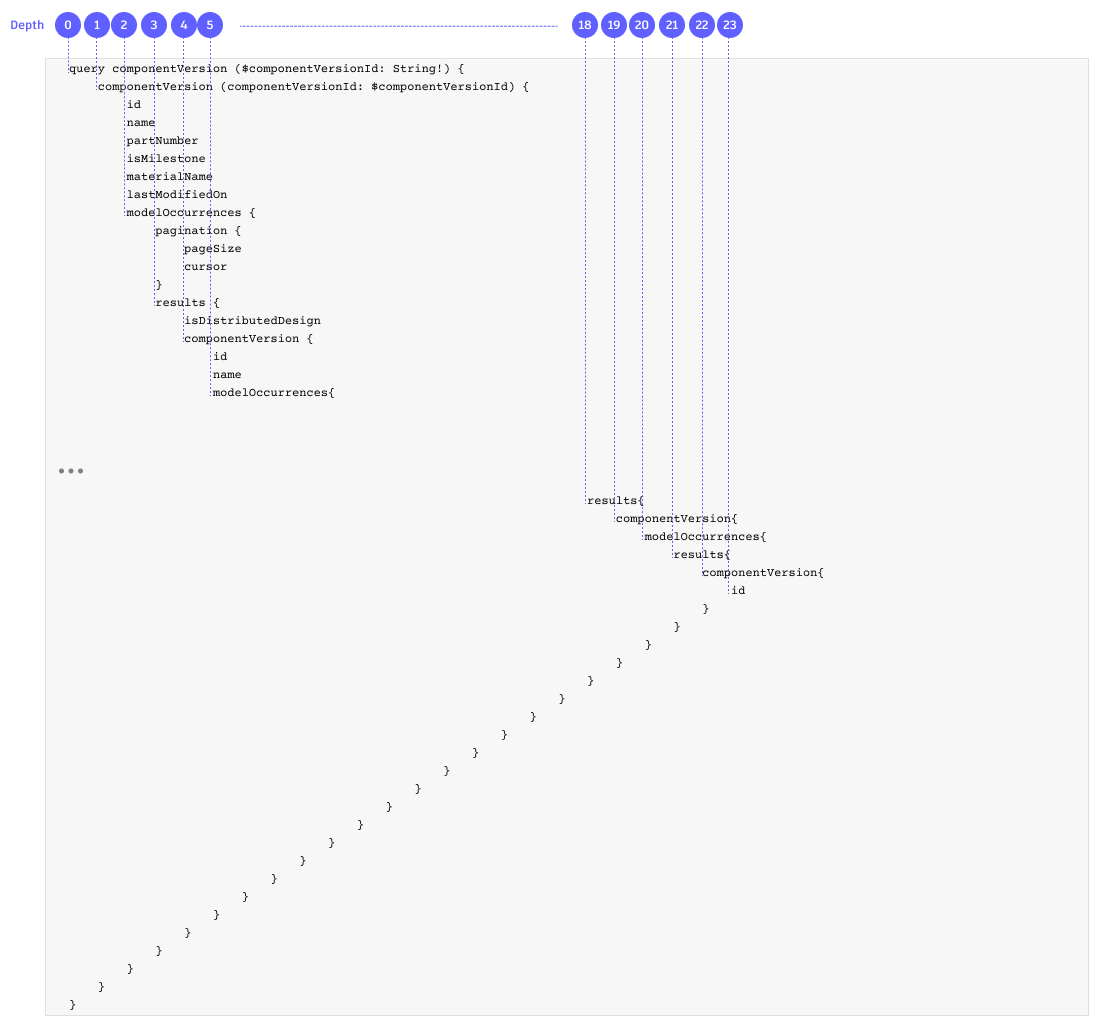
The illustration below shows how the depth levels are calculated. Starting with 0, every level of nested objects in the query counts as 1 to the score. Having a maximum depth of 20 means the query can’t have more than 20 nested levels.
Note: It is essential to optimize your queries to stay within the complexity and depth limits for optimal performance and better user experience.
Recommendations for optimization
To optimize your queries and keep them within the complexity limits, consider implementing the following best practices:
- Selective Field Selection: Request only those fields that you need to minimize unnecessary data retrieval.
- Pagination: Implement pagination techniques, such as limit-offset or cursor-based pagination, to retrieve smaller subsets of data instead of fetching all results in a single query.
- Query Splitting: Split larger complex queries into smaller chunks to receive a more responsive experience.
Testing and debugging
During development and testing, it is essential to verify the complexity and depth of your queries. You can use the data explorer tool to test your queries and identify and address any potential complexity or depth issues.