API Basics
The M&E Data Model GraphQL API can be used to retrieve data from the M&E Data Model, Flow’s native data store. It currently provides read-only access to:
- Collections
- Projects
- Assets
To use the M&E Data Model GraphQL API you need a valid authentication token (see the Authentication topic for details on how to obtain a token) and data in an existing Collection (see the docs for the Animate in Context for Maya feature, which writes data to a M&D Data Model Collection).
To access the M&E Data Model API, you need to have:
- A valid 3LO OAuth token authorized against the data model collection you want to access. See Authentication for details on how to obtain a token.
- Data in an existing Collection (see the “Animate in Context” topic in the Maya help, which writes data to a M&E Data Model Collection).
Concepts and Terminology
The M&E Data Model GraphQL API exposes data stored in the Media and Entertainment Data Model, a graph-based entity-component data store for managing production assets and the relationships between them. The M&E Data Model core constructs are:
- Collections
- Projects
- Components
- Component Schemas
- Assets
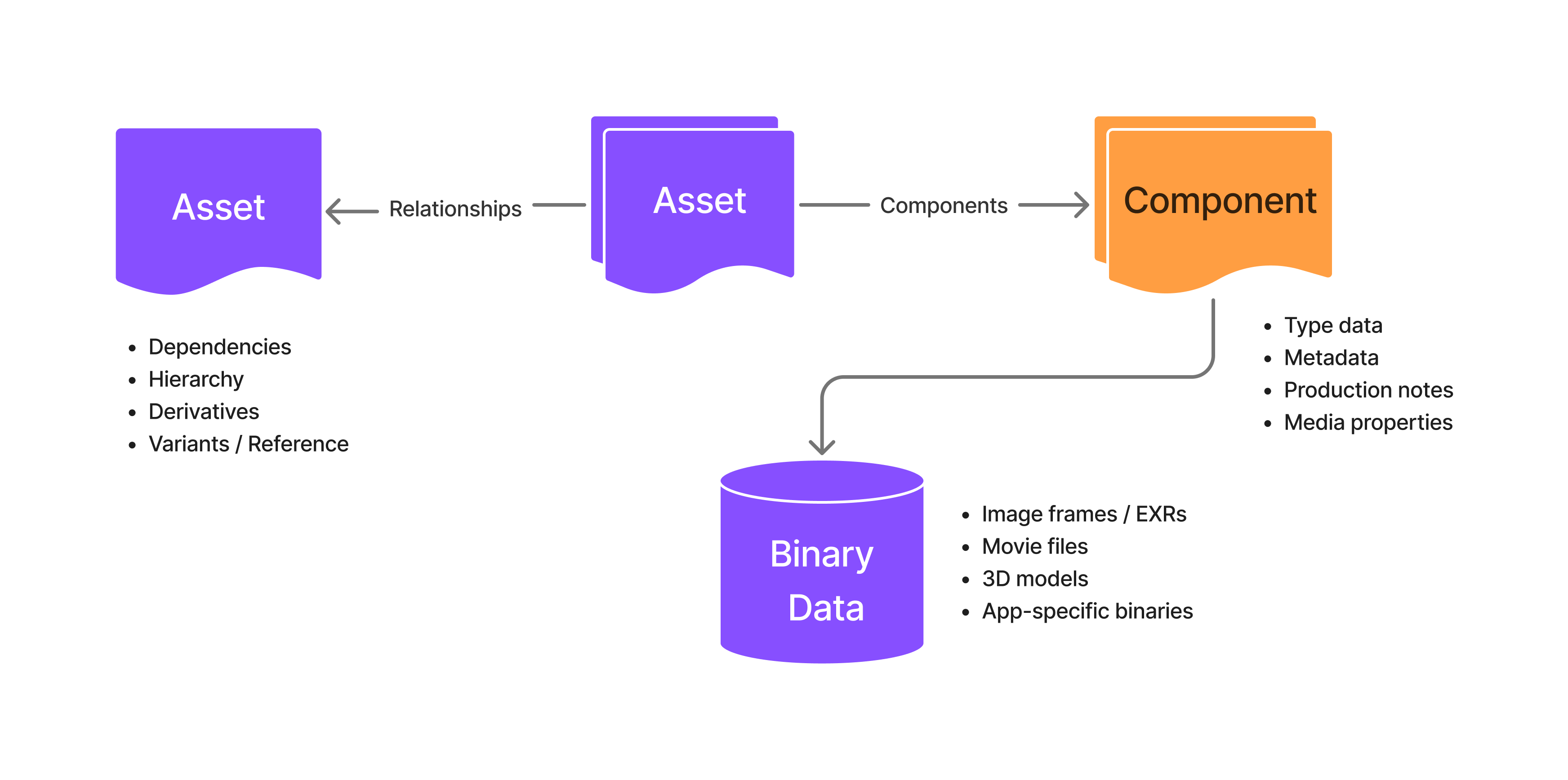
Collections
- A Collection is a logical grouping of projects. Collections are roughly equivalent to “Hubs” in the Autodesk Common Project Administration portal. A Collection is the top-level container for an organization, and it contains projects and manages users.
Projects
- A Project represents a scoped body of work. Assets must exist within a Project.
Component
- Components are objects of key/value pairs that give Assets their structure and semantics of an asset’s metadata. They are described by and validated against simple schemas.
Assets
Assets are a domain-specific entity used to represent production data.
Assets are:
- Addressable by a unique ID.
- Described by a set of “attached” components.
- Versioned by immutable Revisions.
- Able to store and retrieve files from the cloud.
- Able to encode the following relationships to other assets:
- Hierarchy
- Dependency
- Derivation
Asset Components
Type Component
The Type component allows for simple asset classification. Types are used to drive UI behavior, workflow logic, and eventually permissions.
Examples:
- Binary
- Folder
- Cut
- Shot
Binary Component
The Binary component references one or more files stored in Flow’s object storage. It supports:
- Upload and download via signed URLs (fetchBinaryComponentsUrls)
- File metadata (e.g., MIME type, size, checksum)