Get Exchange Details
In this tutorial, you will learn how to retrieve an exchange and exchange related informtation like the property definitions. You will also learn how to preview the exchange on the Data Exchange Explorer.
By the end of this tutorial, you will be able to:
- Retrieve an exchange and exchange related information like the exchange ID, name, and propertyDefinitions.
- Learn how to preview the exchange in the Data Exchange Explorer.
You will use the following queries in this tutorial:
| Type | Operation | Description |
|---|---|---|
| Query | exchange | Retrieves an exchange by exchangeId. |
Step 1 - Request the property definitions of an exchange.
The following steps demonstrate how you can run the exchange query to retrieve an Exchange and exchange related information, such as, its PropertyDefinition .
- Enter the following query in the Query Pane of the Data Exchange Explorer.
Query
query GetPropertyDefinitionOfExchange($exchangeId: ID!) {
    exchange(exchangeId: $exchangeId) {
        id
        name
        alternativeIdentifiers {
            fileUrn
            fileVersionUrn
        }
        propertyDefinitions {
            results {
                id
                name
                units {
                    name
                }
            }
        }
    }
}
Show More - In the Query Variables pane, enter the value of the
exchangeId. To know, how to obtain theexchangeId, see Navigate to Exchanges within a Folder.Query Variables
{ "exchangeId": "ZXhjfnlwdWFzY1NicWlIT0R1R0s4OUkwTHdfTDJDfjkwMGM5ODY1LWI2ZmMtMzI0Ny04NWUxLTgxMmZhOGY1ZTJkNA" } - Click Play. An exchange with a list of PropertyDefinition is returned in the response.
Response
{
    "data": {
        "exchange": {
            "id": "ZXhjfnlwdWFzY1NicWlIT0R1R0s4OUkwTHdfTDJDfjkwMGM5ODY1LWI2ZmMtMzI0Ny04NWUxLTgxMmZhOGY1ZTJkNA",
            "name": "SHARE -Multi-Fam Apt-Wing 2",
            "alternativeIdentifiers": {
                "fileUrn": "urn:adsk.wipprod:dm.lineage:wfjaO3PZSwC2gWg2A1AvbQ",
                "fileVersionUrn": "urn:adsk.wipprod:fs.file:vf.wfjaO3PZSwC2gWg2A1AvbQ?version=1"
            },
            "propertyDefinitions": {
                "results": [
                    {
                        "id": "autodesk.revit.parameter:curtaingridAngleVert-1.0.0",
                        "name": "Angle",
                        "units": {
                            "name": "Radians"
                        }
                    },
                    {
                        "id": "autodesk.revit.parameter:wallAttrWidthParam-1.0.0",
                        "name": "Width",
                        "units": {
                            "name": "Meters"
                        }
                    },
                    {
                        "id": "autodesk.revit.parameter:analyticalHeatTransferCoefficient-1.0.0",
                        "name": "Heat Transfer Coefficient (U)",
                        "units": {
                            "name": "British thermal units per hour square foot degree Fahrenheit"
                        }
                    },
                    {
                        "id": "autodesk.revit.parameter:hostVolumeComputed-1.0.0",
                        "name": "Volume",
                        "units": {
                            "name": "Cubic meters"
                        }
                    }
                ]
            }
        }
    }
}
Show More
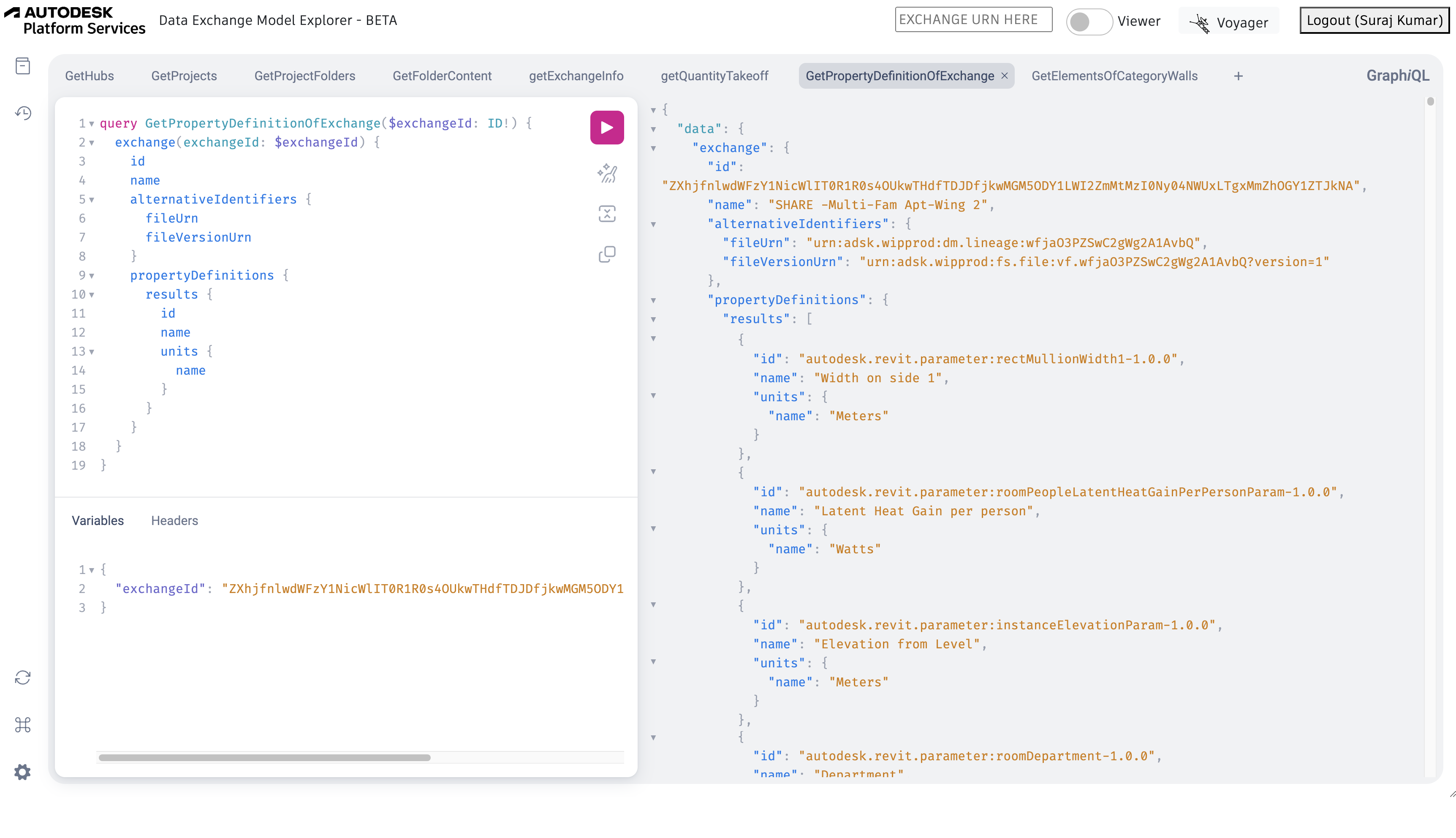
Once the query runs successfully, your explorer should resemble the following image.
Step 2 - Preview the Exchange.
The following steps will guide you to preview an exchange in the Data Exchange Explorer.
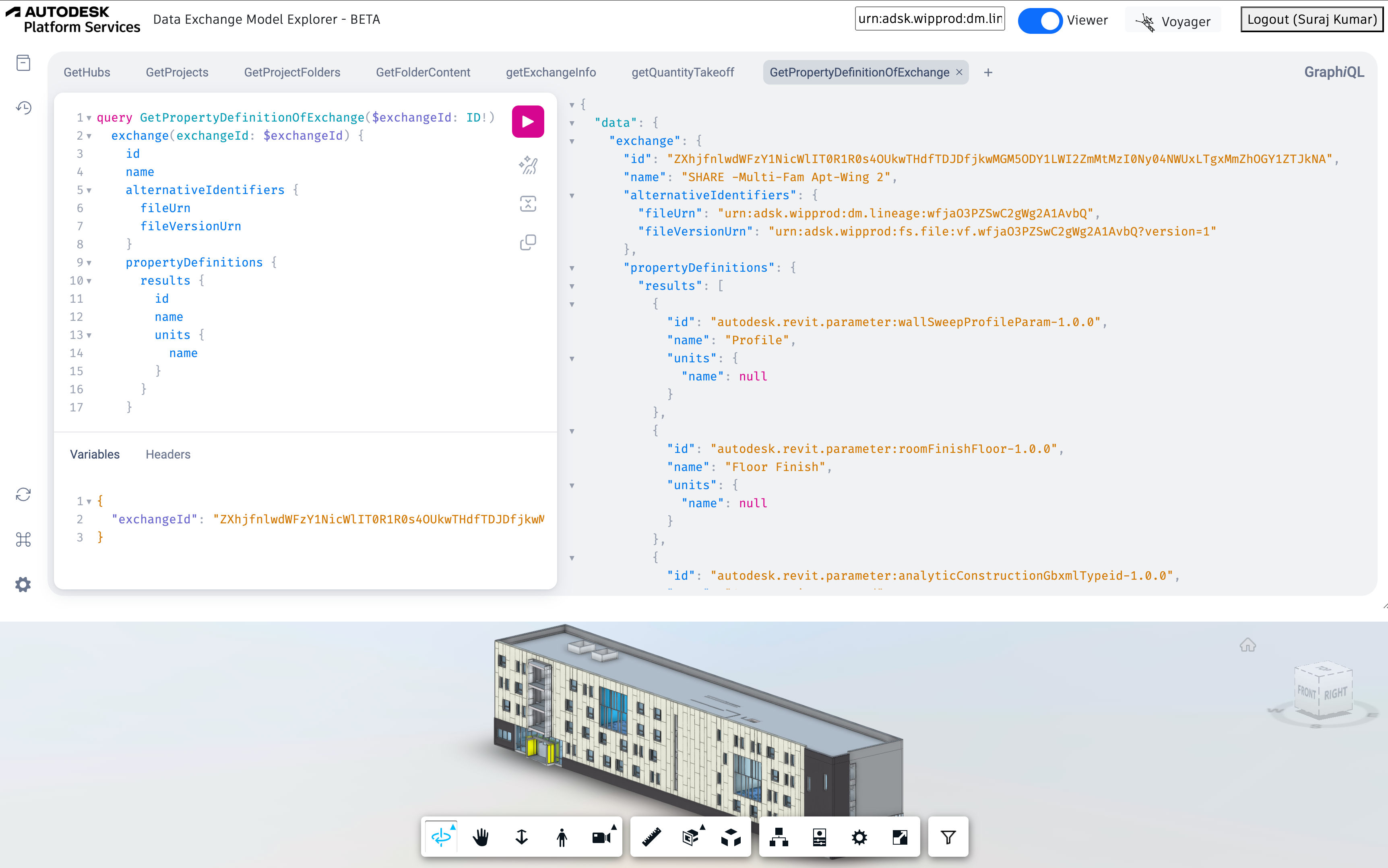
- To see the preview of an exchange, copy the value of “fileUrn (Exchange urn id)” obtained in the Step 1. Enter the value in the EXCHANGE URN HERE box present at the top right of the Data Exchange Explorer.
- Enable the Viewer, this will display the preview of the exchange at the bottom.
Once the query runs successfully, your explorer should resemble the following image.