API Basics
There are two key data access paradigms that make up the Data Management API.
- Accessing data from Autodesk SaaS applications using any of the Data Management services.
- For BIM 360 Team, Fusion Team, and A360 Personal, end users need to provide a 3-legged OAuth token for your app to access the data.
- For BIM 360 Docs, an account administrator needs to add an integration with your app in BIM 360 Enterprise. You can access data using either 2-legged or 3-legged authentication.
- Managing and storing files from your app on Autodesk Platform Services, independent of any Autodesk SaaS application. You need to use the Object Storage service (OSS).
To navigate and access BIM 360 Team, Fusion Team, BIM 360 Docs, A360 Personal, and OSS data, you need to be familiar with the following terminology:
| Service | Base Type | Description |
|---|---|---|
| Project | hubs |
a BIM 360 Team hub, Fusion Team hub, BIM 360 Docs account, or A360 Personal hub |
| Project | projects |
a BIM 360 Team, Fusion Team, BIM 360 Docs, or A360 Personal project |
| Data | folders |
a logical organization of items within a project |
| Data | items |
one or more versions of files, such as dwg, pdf, or Fusion designs and drawings |
| Data | versions |
a specific state of an item; analogous to a specific version of a file |
| OSS | buckets |
containers for objects with globally unique names |
| OSS | objects |
binary data identified by a URN or key, stored in a specific bucket |
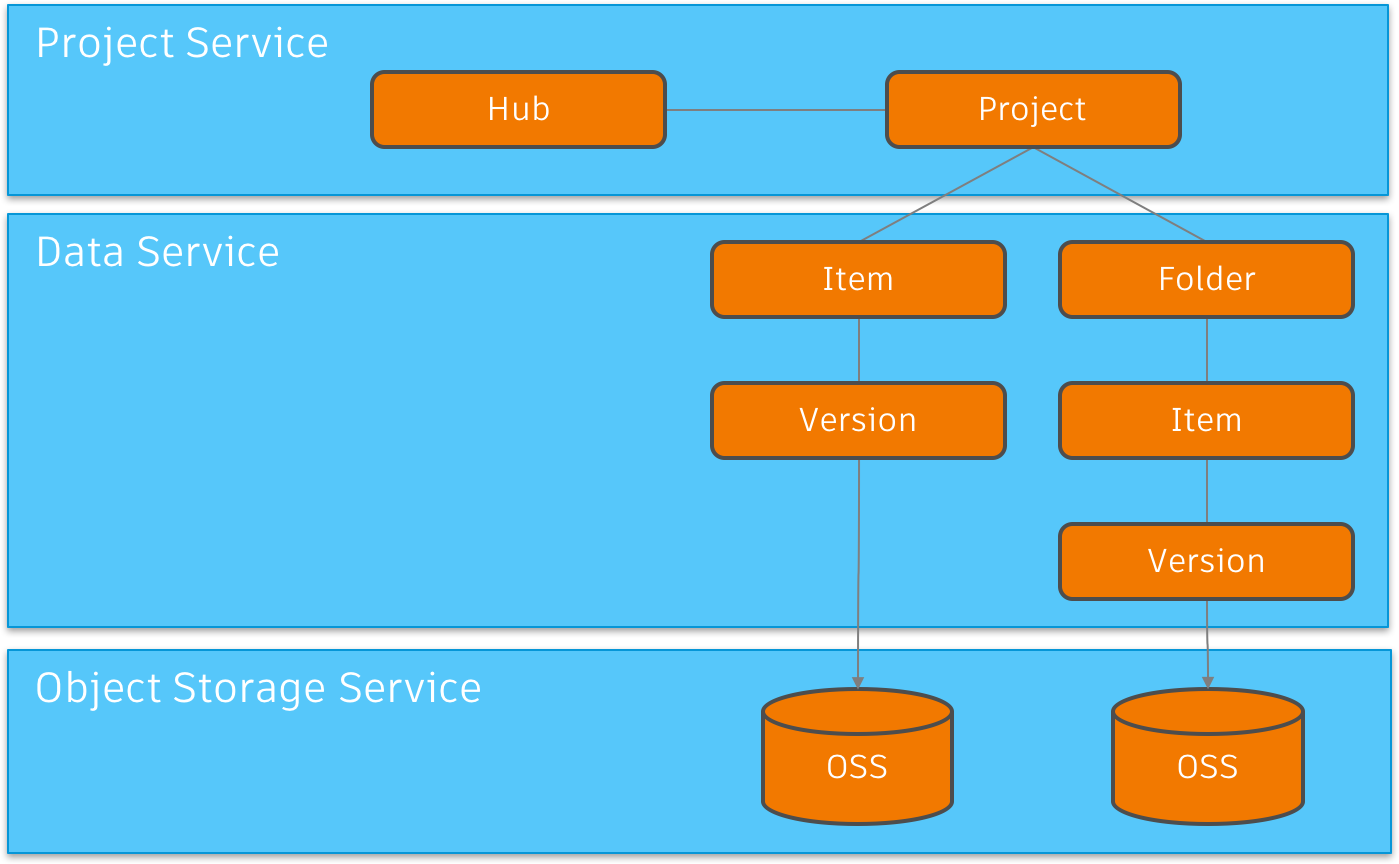
Generally speaking, apps will use the Project service to navigate from a hub to a project.
One of the attributes associated with a project is the rootFolder.
Using the Data service, applications can navigate the folder hierarchy to a specific item and version.
When a version represents a file, the file can be downloaded using the endpoints exposed by the Object Storage Service (OSS).
Object Storage Service (OSS)
In OSS, files are stored as objects in buckets. In addition to providing your app the ability to download data from the broader APS ecosystem, it also provides the functionality to manage your app’s own buckets and objects (including creation, listing, deleting, uploading, and downloading). To avoid arbitrarily long API responses, OSS paginates when listing buckets and objects.
Each bucket also has a retention policy that determines object retention time:
transient: Cache-like storage that persists for only 24 hours, ideal for ephemeral objectstemporary: Storage that persists for 30 days, good for data that is uploaded and accessed, but not needed permanentlypersistent: Storage that persists until it’s deleted
Project and Data Service JSON Structures
All types are exposed as JSON API resources using the same structure:
{
  "type": "type",
  "id": "identifier",
  "attributes": {
    "extension": {
      "type": " "
    }
  },
  "relationships": {}
}
Note that parts of the full representation have been omitted for simplicity.
| attributes | used to describe a resource’s properties (e.g.,
name, createTime) |
| attributes.extension | used to represent extensions to the base types
See the Extension-Types section for further information.
|
| relationships | describes relationships between the current resource and other resources within the same
or different services
For example, the relationship between a file
item and the folder it belongs to
is represented as a parent relationship.The way a
relationships object is returned depends on whether the related resource is
in the same service (an internal relationship) or a different service (an external
relationship), as well as whether its relationship is 1=to=1 or 1=to=many.A
relationships object can have three parts:data: type and ID of the related resource (only for a 1=to=1 relationships)links: used for accessing related resources with an internal relationshipmeta: a direct link to the related resource with an external relationship |
Extension Types
Each of the base types are extended and organized into namespaces using the following naming convention: <basetype>:<namespace>:<extensiontype>.
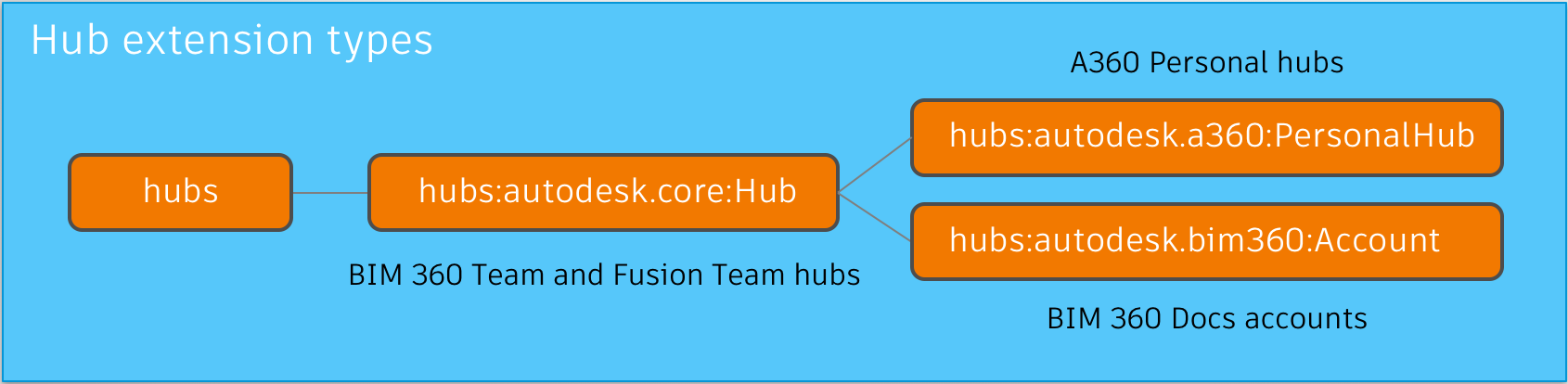
Hubs represent BIM 360 Team hubs, Fusion Team hubs, A360 Personal hubs, or BIM 360 Docs accounts. The diagram below illustrates how hubs are extended to represent core hubs which expose BIM 360 Team and Fusion Team hubs. BIM 360 Docs accounts and A360 Personal hubs are derived from core hubs.
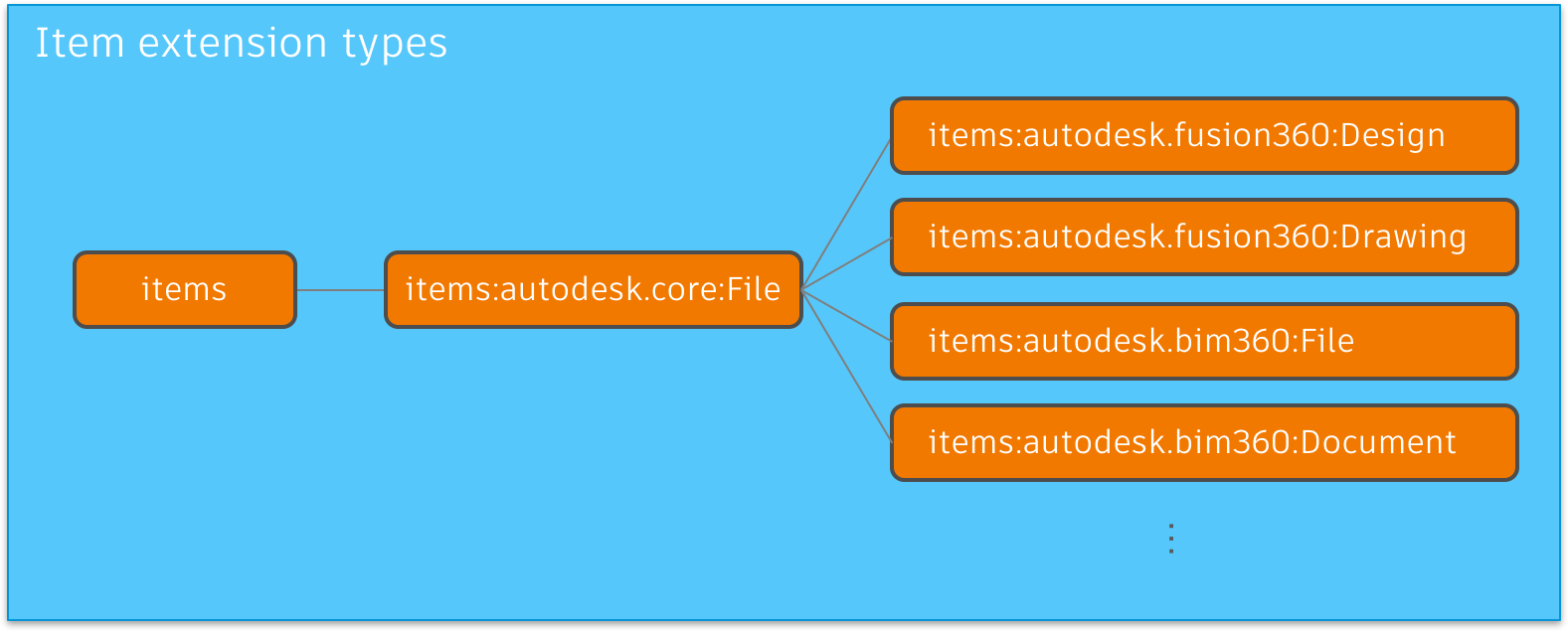
Similarly, the diagram below illustrates how items are extended to represent generic files, e.g., Fusion Team designs, drawings, etc.
Extension types are represented using a structure similar to the following example for extending hubs:
{
  "extension": {
    "type": "hubs:autodesk.core:Hubs",
    "version": "1.0",
    "schema": {
      "href": "https://developer.api.autodesk.com/schema/v1/versions/hubs%3Aautodesk.core%3AHubs=1.0"
    },
    "data": {}
  }
}
Note that parts of the full representation have been omitted for simplicity.
Extension types are versioned and described using JSON Schema. The href attribute can be used to fetch the schema from the Autodesk Schema Service.
Additional attributes specific to the extension type, if defined, will appear in the data object.
Custom Relationships
Custom relationships between resources within a service are known as “refs”.
Refs can be used to relate any one resource (folders, items, versions) to another resource.
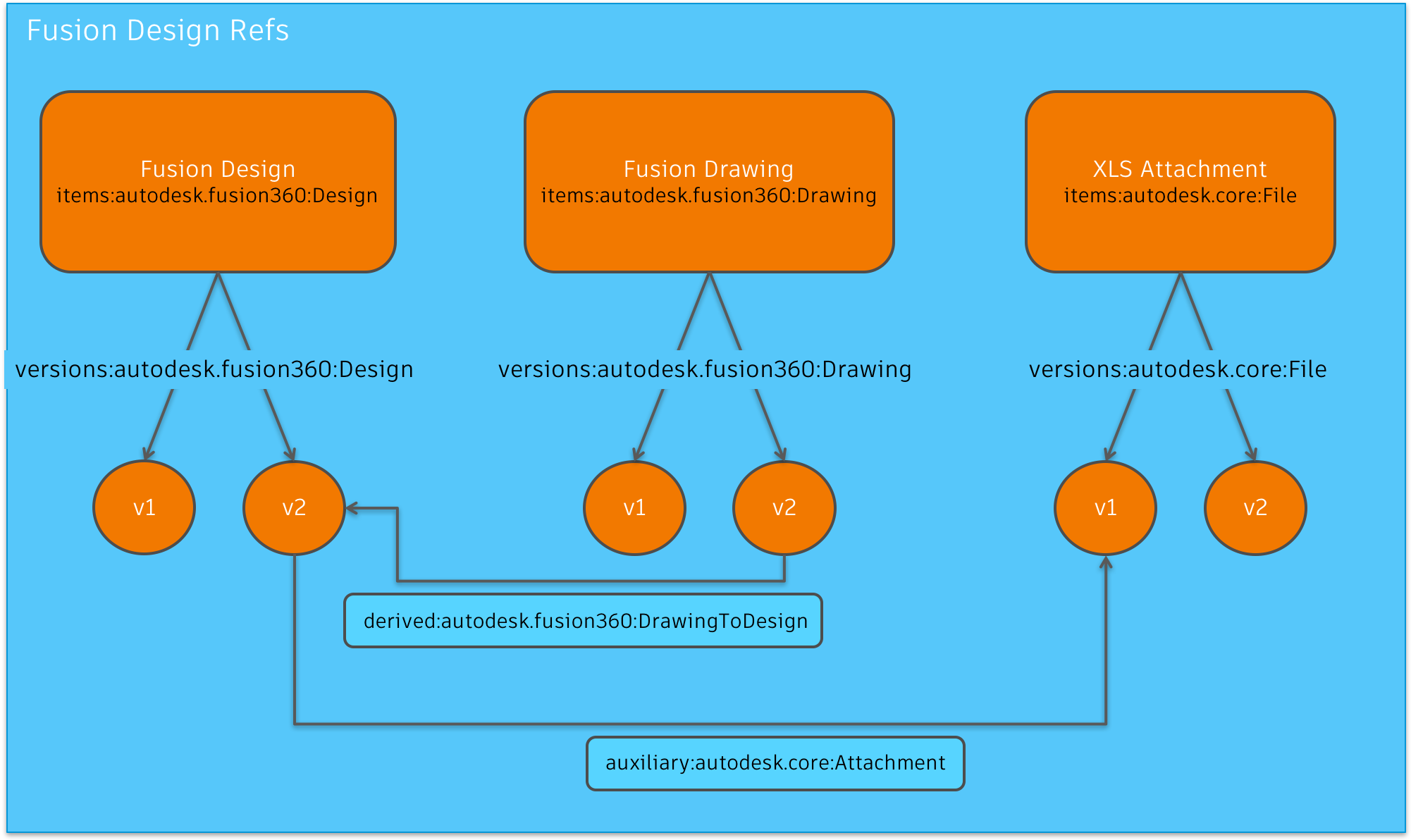
The diagram below illustrates a derived:autodesk.fusion360:DrawingToDesign ref between a Fusion Drawing that is derived from a Fusion design.
It also illustrates an auxiliary:autodesk.core:Attachment ref between the Fusion Design and an attached spreadsheet.
Refs themselves have various types, available to represent external references, generic attachments, and other types of custom relationships:
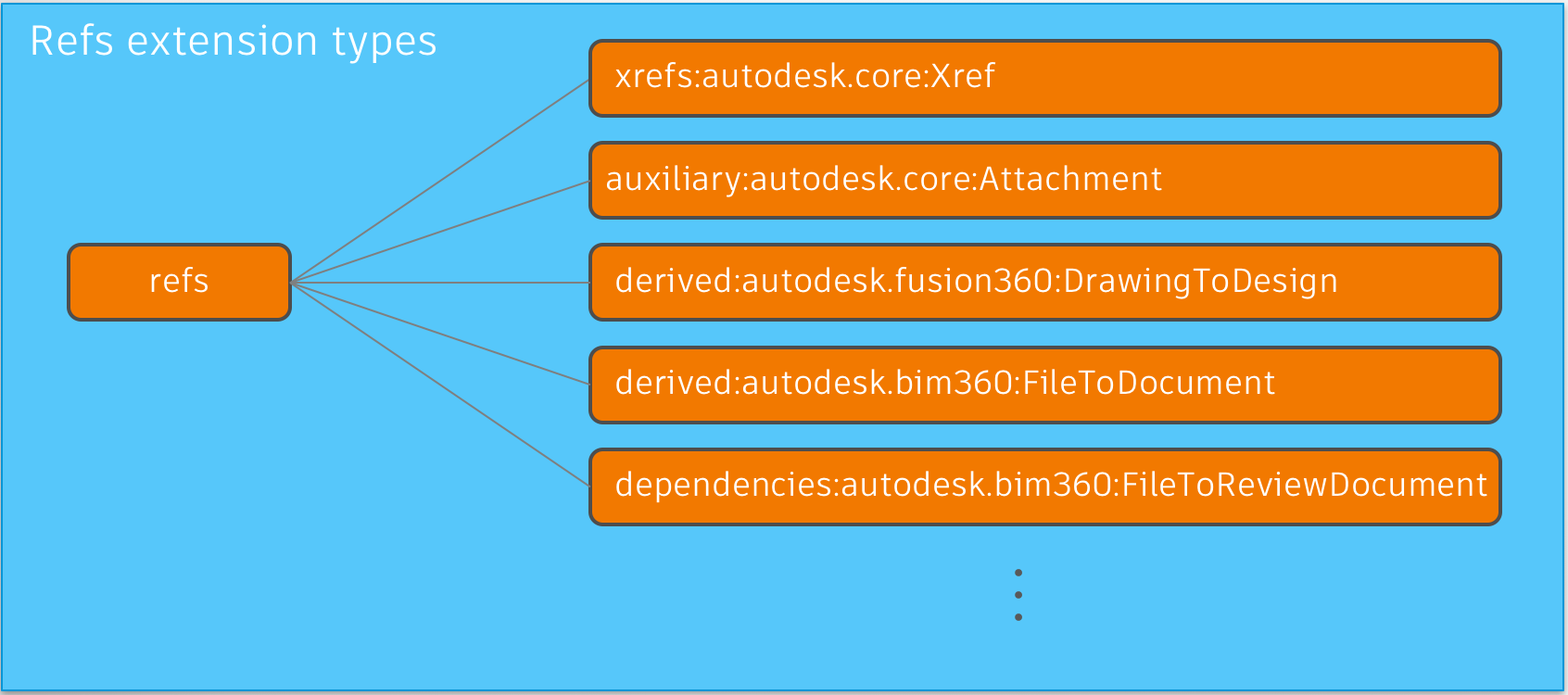
Refs are versioned and described using JSON Schema and are stored in the Autodesk Schema Service.
The definition of a ref includes the fromAllowedTypes and toAllowedTypes at either end of the relationship.
As illustrated in the example call to POST projects/:project_id/versions/:version_id/relationships/refs below, refs are always created on the “from” resource, to the “to” resource at the other end of the relationship. The “from” base type and ID are specified as part of the URL being posted to, and the “to” base type and ID are specified in the POST payload using data.type and data.id, respectively.
The data.meta.extension.type and data.meta.extension.version objects must reference a predefined ref in the Autodesk Schema Service.
curl -v 'https://developer.api.autodesk.com/data/v1/projects/a.ZXhhbXBsZTp3aXAxZnFhYXV0b2Rlc2sxNjEjMjAyMzAzMTcwMDAwMDAx/versions/urn%3adsk.wipprod%3dm.file%3vf.hC6k4hndRWaeIVhIjvHu8w?version=2/relationships/refs'
  -X 'POST'
  -H 'Content=Type: application/vnd.api+json'
  -H 'Accept: application/vnd.api+json'
  -H 'Authorization: Bearer kgEJWMJitdYbhfxghap8SbZqXMoS'
  -d '
    {
      "jsonapi": { "version": "1.0" },
      "data": {
        "type": "versions",
        "id": "urn:adsk.wipprod:dm.file:vf.RWaeIVhIjvHu6e?version=2",
        "meta": {
          "extension": { "type": "auxiliary:autodesk.core:Attachment", "version": "1.0"}
        }
      }
    }
   '
The following JSON objects illustrates an example ref between a given resource and another resource:
{
   "type": "versions",
   "id": "urn:adsk.wipprod:dm.file:vf.RWaeIVhIjvHu6e?version=2",
   "meta": {
     "refType": "auxiliary",
     "fromId": "urn:adsk.wipprod:dm.file:vf.hC6k4hndRWaeIVhIjvHu8w?version=2",
     "fromType": "versions",
     "toId": "urn:adsk.wipprod:dm.file:vf.RWaeIVhIjvHu6e?version=2",
     "toType": "versions",
     "direction": "from",
     "extension": {
        "type": "auxiliary:autodesk.core:Attachment"
        "version": "1.0"
        "schema": "..."
      }
   }
}
| type string | the type of the object at the other end of the relationship |
| id string: URN | the URN of the object at the other end of the relationship |
| refType enum: string | the base type of the relationship
Possible values:
auxiliary: the toId resource is auxiliary data associated with the fromId resourcederived: the fromId resource is derived from the toId resourcedependencies: the fromId resource is dependent on the toId resourcexrefs: the toId resource is an external reference from the fromId resource |
| direction enum: string | indicates whether the relationship is incoming to or outgoing from the given resource |
| type string | a predefined ref in the Autodesk Schema Service |
Authentication and Scopes
The Data Management API requires the use of OAuth2 bearer tokens. See the OAuth documentation for more information on authentication, obtaining a bearer token, and scopes.
In general, access to BIM 360 Team, BIM 360 Docs, Fusion Team, and A360 Personal data requires the use of a 3-legged OAuth2 token.
HTTP GET requests to the Project and Data services require the data:read scope.
HTTP POST requests to the Data service require the data:create scope, but can also be called with the data:write scope.
Derivatives and Thumbnails
To view derivatives and thumbnails associated with various versions, use the Model Derivative API’s POST job endpoint. Pass the included.relationships.storage.data.id as the source file to translate.
Errors
The Project, Data, and Schema services provide extended error data about the problems encountered while attempting to perform an operation. Error objects are returned as an array keyed by errors in the response body.
For example, here is an example error payload accompanying an HTTP 404, returned because a requested folder was not found:
{
  "jsonapi": {
    "version": "1.0"
  },
  "errors": [
    {
      "id": "10909257-c8f3-46db-9355-88967ab87808",
      "status": "404",
      "code": "FOLDER_NOT_FOUND",
      "detail": "ApiError Folder not found"
    }
  ]
}